
An MSP can usually recognize the moment an AI rollout starts to drift. A client owner buys Copilot licenses, gives a few administrators access, watches three people test the tool for a week, and then asks whether the subscription should renew. The MSP has no usage story, no agreed definition of success, and no clear answer about what employees are allowed to enter into an AI workspace.
Buying licenses isn't an AI adoption strategy. It's a technology purchase that still needs ownership, safeguards, enablement, and a reporting rhythm. A 2025 enterprise survey found that 80% of executives at organizations with a formal AI strategy considered implementation very successful, compared with 37% at organizations without one. The same survey reported that 95% of C-suite leaders believed their company needed to improve its AI adoption process, while 72% had already faced at least one generative AI adoption challenge. The survey findings point to the practical issue MSPs see in the field: access to a tool doesn't create disciplined use.
This roadmap gives an MSP a client-visible operating plan for the first 30, 60, and 90 days. It separates documented Prox.ia capabilities from illustrative service workflow design, while treating governance and enablement as one workstream. The result is a rollout that can be quoted, delivered, reviewed, and either expanded or corrected with the client's owner.
Table of Contents
- Why AI Tool Rollouts Stall Before They Start
- Discovery and Readiness Assessment for Each Client
- Choosing a Deployment Model That Fits the Client
- Days 0 to 30 Branded Workspaces and a Named Pilot
- Days 31 to 60 Enablement and Adoption Measures
- Days 61 to 90 Budgets Admin Controls and ROI
- From 90 Day Rollout to a Repeatable AI Service
Why AI Tool Rollouts Stall Before They Start
The first failure usually happens before the first employee signs in. The MSP chooses a tool, provisions access, and assumes useful behavior will emerge once people can ask questions. The client sees a new login, not a managed service.
That approach leaves four decisions unresolved:
Ownership: Nobody at the client is responsible for adoption, feedback, or escalation.
Data boundaries: Employees don't know which customer, financial, employee, or confidential information may enter a model.
Pilot scope: Users experiment with unrelated tasks, so the MSP can't distinguish a useful workflow from casual curiosity.
Leadership reporting: The client's leadership team receives no credible account of usage, outcomes, blocked requests, or policy issues.
The governance problem is larger than a missing policy document. A 2026 governance study found that 87% of organizations had formal AI governance principles or policies, but only 22% said those structures worked effectively in practice. The same study reported that only 22% were very confident they could produce sufficient evidence of governance decisions for regulators, auditors, or courts. The governance-gap findings support a blunt delivery rule: written policy without repeatable controls and evidence doesn't amount to operational governance.
Practical rule: A client shouldn't receive a workspace until the MSP knows who owns it, what the pilot will prove, and how the client will review the result.
An MSP also needs to keep three concerns separate. Technology choice determines which workspace and deployment approach fit the client. Governance defines permitted data, moderation, access, review, and change control. Enablement gives employees practical reasons and repeatable workflows for using the workspace. Each needs a named owner, a deliverable, and a review date.
The 30/60/90 plan below turns those concerns into a service sequence. It doesn't promise that every client will adopt AI at the same pace. It gives the MSP a consistent way to identify readiness, launch a controlled pilot, teach the right users, measure behavior, and make a documented decision at the end of the first operating cycle.
Discovery and Readiness Assessment for Each Client
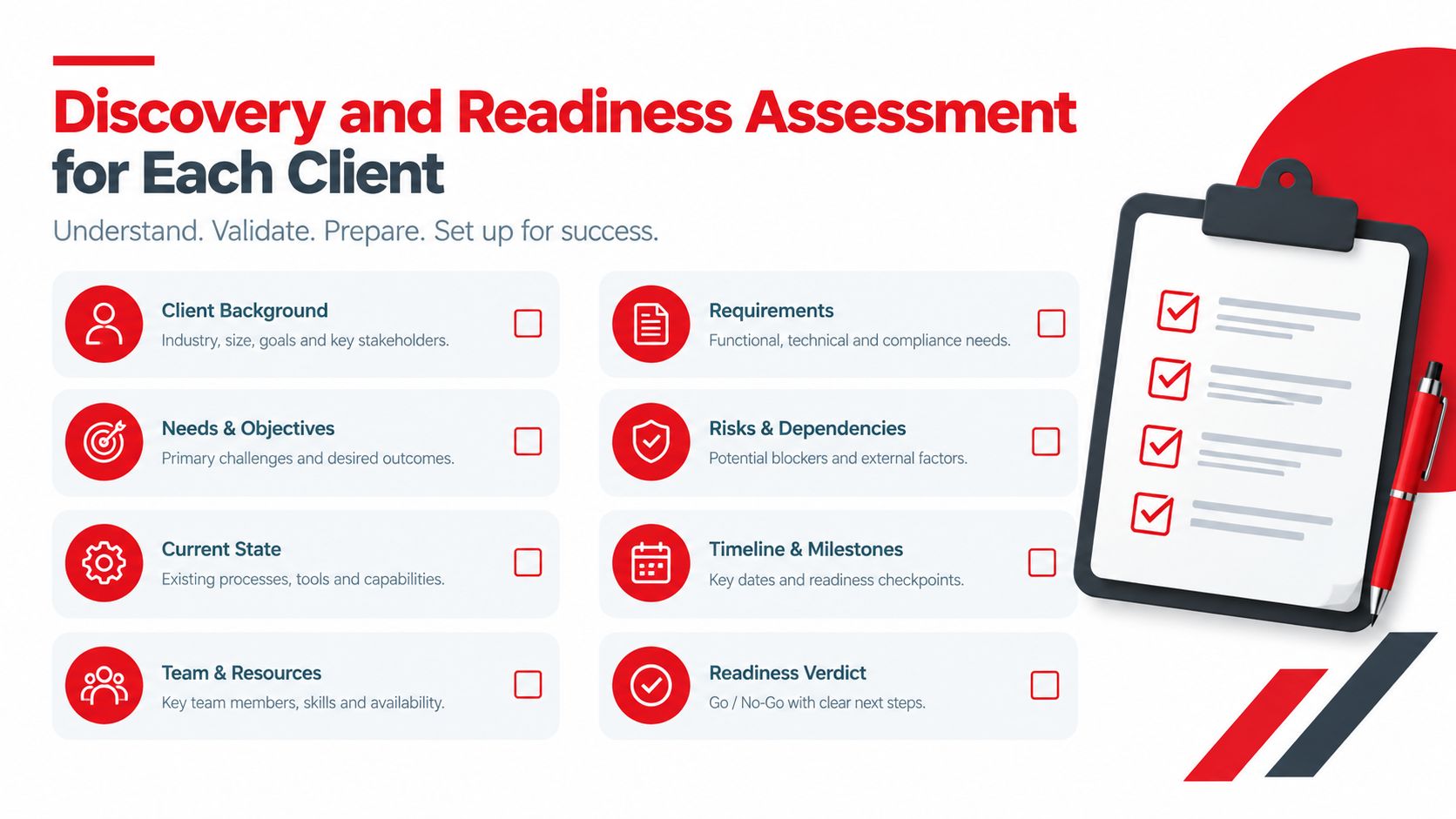
Discovery should be a standard intake, not an informal sales conversation. The MSP runs the same core process for every SMB client, then adjusts the depth to the client's size, data environment, and operating maturity. That consistency lets the MSP quote discovery separately and tells the client exactly what must be ready before workspace provisioning.
The client needs two named roles. An executive sponsor owns the business outcome and removes internal blockers. A power user or small group of power users supplies workflow detail, tests the pilot, and helps colleagues after launch. The MSP should name a service delivery owner who coordinates configuration, policy decisions, training, and reporting.
The intake artifacts
A short sequence of discovery calls and document reviews should produce these artifacts:
Readiness scorecard: Records the sponsor, pilot users, current productivity stack, data concerns, target go-live date, and open dependencies.
Data classification list: Separates information that employees may submit to the workspace from information that must remain outside it. The client, not the MSP, should approve the final classification.
Use case shortlist: Identifies practical workflows with a clear user, input, output, and review owner. One or two low-risk pilots are enough to start.
Policy draft: Documents data handling, moderation expectations, escalation, human review, and the process for changing an approved use case.
Pilot definition: Names the users, tasks, success criteria, review dates, and evidence the client expects to see at the end of the first month.
Go-live dependency list: Captures unresolved identity, source, access, training, or hosting questions.
The MSP should reject vague pilot language such as “improve productivity.” A usable pilot says who performs the task, what material they work from, what the workspace produces, and who checks the output. An illustrative example might involve a support manager summarizing a ticket for an internal handoff, or a sales manager drafting a proposal outline from approved material. Those examples describe workflow design, not guaranteed product outcomes.
Before quoting the build, the service delivery manager should confirm what Prox.ia deployment options and terms apply to the proposed client. The Prox.ia AI workspace offering provides the product context, but the MSP still needs to validate the proposed configuration, available deployment model, and commercial terms for the specific engagement.
Choosing a Deployment Model That Fits the Client
Deployment decisions belong in discovery because hosting changes the client conversation about data, responsibility, cost, and timeline. The MSP shouldn't present cloud, private, and on-premises options as interchangeable checkboxes. Each path creates a different operating commitment.
| Option | Data sensitivity fit | IT footprint required | Typical timeline | Trade-off to name with the client |
|---|---|---|---|---|
| Cloud | Suitable when the client accepts a third-party service boundary for approved prompts and content | Limited client-side infrastructure | Usually the fastest path, subject to confirmation | Faster and simpler, but prompts and workspace data involve a third-party service |
| Private cloud | Suitable when the client needs a more controlled hosting arrangement and a defined region | More coordination around hosting, access, and administration | Longer than standard cloud, depending on the proposed design | Greater control can add an ongoing service run rate and operating complexity |
| On-premises | Suitable for strict internal data rules and clients that require processing inside their network | Client infrastructure, maintenance, model updates, monitoring, and on-call responsibility | Dependent on hardware, network, security, and deployment readiness | Maximum internal control transfers more operational responsibility to the MSP and client |
The table is a decision framework, not a promise about available Prox.ia configurations. The product material describes cloud, private, and on-premises options, but the MSP should confirm the final model, hosting terms, model availability, and support responsibilities against the current Prox.ia product information before putting them into a proposal.
A cloud choice can fit an SMB that needs a quick start and has approved the relevant data boundary. A private deployment may fit a client whose leadership wants a named hosting context and more control, but the MSP must price and staff the additional operating work. An on-premises path may satisfy strict internal requirements, yet it can turn model updates, capacity planning, hardware failure, and after-hours response into MSP obligations.
The discovery call should end with a written decision, not a verbal preference. It should record the selected model, the data it may handle, who owns hosting and administration, what remains unconfirmed, and which decision would trigger a change request. If those terms aren't clear, the workspace isn't ready to quote as a fixed delivery.
Days 0 to 30 Branded Workspaces and a Named Pilot
The first month should produce a visible client outcome: a controlled, branded workspace used by named employees for a small set of approved tasks. The MSP isn't trying to maximize seats yet. It's proving that the workspace fits the client's data rules and that selected users can complete useful work with an accountable reviewer.
Build the controlled starting point
The MSP begins with the client experience. Where the proposed deployment supports it, the workspace should reflect the client's brand, approved access path, and intended landing experience. Employees should understand where the service comes from and where to request help. Prox.ia's documented offer includes branded AI workspace positioning, but the MSP must verify which branding and access elements apply to the selected deployment before promising them.
Account provisioning should follow the pilot definition. Named users are easier to train, support, and review than a broad anonymous rollout. The client sponsor approves the pilot group, while the MSP records each user's department, role, intended tasks, and escalation contact.
The MSP then configures the approved data and moderation policy. The working checklist should identify:
Permitted inputs: Approved internal sources, documents, and prompt categories.
Restricted inputs: Data that must remain outside the workspace or require additional review.
Moderation response: Whether disallowed content is blocked, flagged, or routed for review, subject to the capabilities of the proposed deployment.
Retention and hosting terms: The settings and responsibilities confirmed during deployment selection.
Change path: The person who approves a new source, model, workflow, or policy exception.
Moderation can reduce some risk, but it doesn't detect every sensitive item or guarantee compliance. The client still needs human judgment, documented boundaries, and an escalation route.
Make the pilot measurable
The pilot owner selects a small set of tasks, ideally three to five, with a clear output and review standard. Illustrative tasks include drafting a proposal outline, summarizing an approved support ticket, preparing an internal meeting brief, or converting a source document into a customer-facing draft for human review.
The Prox.ia multi-model AI workspace is relevant when the client needs a workspace for text, documents, images, or code according to the models and deployment available. The MSP shouldn't describe a model as suitable for a task until the proposed configuration has been verified.
Day 30 ends with a written readout. It should show which tasks users attempted, where outputs required correction, which policy questions surfaced, what training users requested, and whether the client sponsor approves the next wave. A stalled task is useful evidence if the report explains the blocker rather than hiding it.
Days 31 to 60 Enablement and Adoption Measures
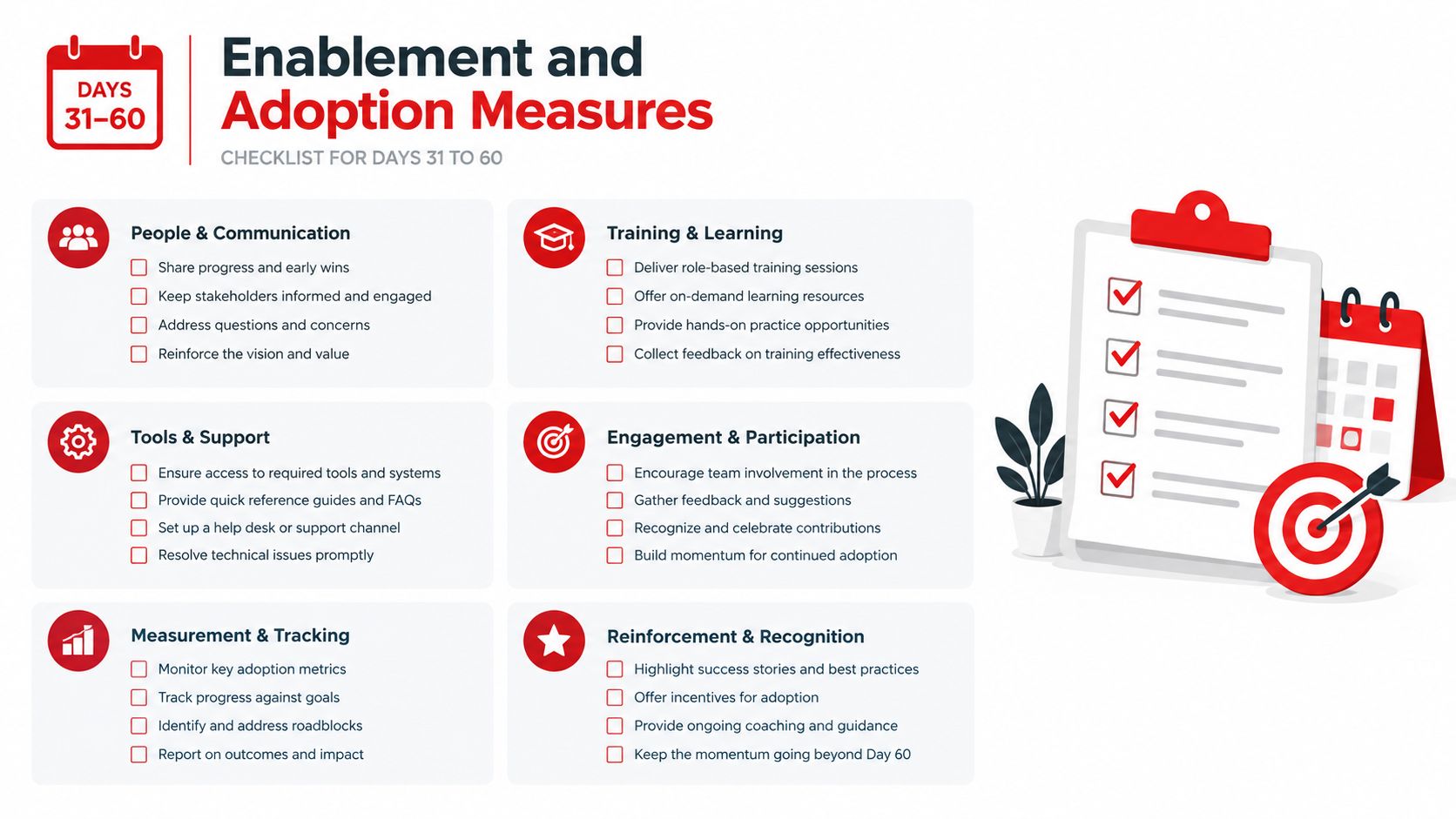
The second month is where a pilot becomes a usable service. The MSP should stop acting as the only person who knows how the workspace works. Client employees need workflow-specific training, simple reference material, and permission to provide feedback without bypassing the agreed policy.
Run two prompt workshops, but don't make them generic prompt-engineering classes. One should focus on client-facing work, such as proposals, customer communications, and account preparation. The other should focus on operations, such as internal summaries, document transformation, and repeatable administrative tasks. Each workshop should use the client's approved materials and capture a before-and-after example for later review.
Teach by role and workflow
A short recorded walkthrough for sales, support, finance, and operations can answer the specific question each team faces: “What can this workspace do for this role, and what must remain subject to human review?” The MSP should pair each recording with a one-page cheat sheet covering approved inputs, useful task patterns, review expectations, and the support path.
The rollout should expand in waves. Start with teams whose pilot tasks produced usable outputs and whose managers will reinforce the behavior. Don't add every employee just because seats are available. A new wave should have an owner, a training date, an approved task set, and a policy review point.
Enablement works when the employee can connect the workspace to a real task before the training session ends.
The MSP should capture examples that show both usefulness and friction. A successful example might demonstrate a clearer first draft or a faster internal summary, but the report should also record the review effort and any corrections. A failed example can expose poor source material, an unclear instruction, an unsuitable model, or a policy boundary that users didn't understand.
Measure behavior without pretending it proves value
Weekly adoption reporting should use measures the proposed Prox.ia deployment exposes. The service team can review active users, prompts per active user, completed pilot tasks, and moderation incidents when those measures are available and appropriate. These are operating signals, not automatic proof of financial return.
At Day 60, the MSP and client sponsor should review user participation, task quality, support questions, moderation events, and policy changes. The review should decide which templates to improve, which training topics to repeat, which users need coaching, and whether the next seat wave is ready. Prox.ia materials support onboarding, data policies, prompt workshops, adoption reviews, and ongoing support for MSP-led client adoption, while the specific workshop agenda and measurement pack remain illustrative MSP service design.
Days 61 to 90 Budgets Admin Controls and ROI
By the third month, the question changes from “Can employees use the workspace?” to “Can the client operate it predictably?” The MSP should establish cost boundaries, administrative responsibility, review evidence, and a decision process that doesn't depend on one enthusiastic pilot user.
Consumption budgets should be designed around the proposed workspace structure. Where supported by the deployment, the MSP can define limits by workspace, team, or user and configure alerts for unusual or approaching consumption. The exact budgeting model, available controls, and alert behavior need confirmation before they appear in a statement of work.
Administrative controls also need an owner. The service delivery manager should verify the proposed deployment's support for identity and access requirements, role separation, audit visibility, data residency settings, and a documented change request process. If a control isn't available in the selected configuration, the proposal should say how the client will manage the gap rather than implying that the platform solves it automatically.
Build a client-readable scorecard
An ROI scorecard should combine operational evidence with user feedback. It can track hours saved by role when the client has a defensible way to estimate them, tasks completed, output rework, and qualitative observations from user interviews. The MSP should label estimates as estimates and avoid presenting activity counts as guaranteed savings.
| Control or Measure | What the MSP Configures | What Gets Reported to the Client |
|---|---|---|
| Consumption budget | Approved limits, alert recipients, and escalation steps where supported | Consumption position, alerts, exceptions, and proposed adjustments |
| Workspace administration | Named administrators, access roles, review ownership, and change path | Current ownership, access changes, pending requests, and unresolved gaps |
| Data and moderation | Approved policy, moderation settings, review route, and policy version | Policy events, user questions, changes made, and items requiring client decision |
| Adoption | User groups, training waves, task definitions, and available usage measures | Participation, recurring workflows, workshop findings, and support demand |
| Outcome review | Agreed task and interview method | Hours or effort estimates, completed tasks, quality observations, and next action |
The quarterly business review should contain a one-page executive summary. It should answer four questions: who used the workspace, what work they attempted, what controls or incidents need attention, and what decision the client owner must make. A longer appendix can hold task examples, policy changes, training attendance, and configuration notes.
Volgap's automated monthly reporting belongs in a separate operational conversation, not as a substitute for Prox.ia adoption reporting. It can help an MSP standardize broader client reporting workflows, but the MSP must verify what data is available and how it relates to the AI service.
Day 90 ends with a signed decision: expand, adjust, or pause. Expansion requires a clear next use-case wave. Adjustment requires named remediation work. A pause should preserve the evidence and identify the condition for reconsideration. That decision protects the client from automatic renewal without a service rationale.
From 90 Day Rollout to a Repeatable AI Service
A 30/60/90 rollout becomes valuable to an MSP when the artifacts survive the first client. The next client shouldn't require a new delivery philosophy. The MSP should reuse the intake, pilot definition, workshop structure, review agenda, and scorecard, while adapting the content to each client's approved data and workflows.
The distinction between product capability and MSP workflow design needs to stay explicit.
| Workstream | Prox.ia Product Capability | MSP Illustrative Workflow | Volgap Operational Visibility |
|---|---|---|---|
| Workspace | Branded, multi-model AI workspace according to the available deployment | Brand approval, launch checklist, account handoff, and support routing | Separate operational reporting across client environments where applicable |
| Governance | Data policies, moderation support, consumption budgets, and administrator guidance according to the deployment | Data classification workshop, policy approval, exception log, and quarterly review | Reconciliation and reporting workflows for broader service operations |
| Enablement | Onboarding, prompt workshops, adoption reviews, and ongoing support positioning | Role-based training, recorded walkthroughs, prompt library, and champion plan | Client reporting preparation and operational visibility |
| Measurement | Usage and moderation reporting where available in the proposed configuration | ROI scorecard, user interviews, Day 30/60/90 readouts, and QBR deck | Usage, billing, and multi-tenant operational reconciliation where supported |
| Scale | Workspace access and service packaging for MSP-led client adoption | Wave planning, change requests, renewal decision, and service catalogue entry | Cross-client reporting and reconciliation for the MSP's operating layer |
The documented Prox.ia capabilities include workspace access, client onboarding, data and moderation policies, adoption support, consumption budgets, and administrative guidance, subject to the selected deployment and current product terms. The intake templates, prompt workshop agendas, QBR deck, ROI scorecard, and day-by-day escalation process are illustrative MSP workflow design. They are how the MSP packages delivery around the platform, not claims that the product automatically supplies those artifacts.
The MSP can establish a quarterly cadence: review policy and usage, select the next workflow, train the next user group, inspect moderation and support issues, and obtain the client owner's decision. Prox.ia remains the client-facing AI service. Volgap is a separate operational tool that Veevoo distributes and that may help reconcile usage, billing, and multi-tenant visibility across the MSP's broader service environment. The products shouldn't be presented as one combined platform or as replacements for the client's RMM, PSA, or security tools.
MSPs evaluating reseller delivery can review Prox.ia for MSP AI resellers and confirm current reseller terms, deployment options, supported controls, and commercial details before quoting. A repeatable service is built on verified capabilities, named responsibilities, and honest reporting, not on a promise that every client will adopt at the same speed.
Veevoo, Inc. distributes Prox.ia and Volgap and provides enablement context for MSPs building governed AI services and operational reporting workflows. Visit Veevoo, Inc. to review the available product information and contact the team about scoping a first 30/60/90-day client rollout.