
75% of knowledge workers were using AI at work in 2024, and nearly half of those users had started within the previous six months. An AI document assistant is a governed, multi-model workspace that lets client staff summarize, draft, and retrieve information from authorized documents, while an MSP resells the capability as a recurring service with onboarding, data policies, and usage reviews.
That distinction matters when an office manager uploads a vendor agreement, a finance lead searches an invoice packet, or a project manager needs a first draft before a client meeting. The software may produce an answer quickly, but the MSP still has to decide which documents belong in the workspace, who can access them, what requires human approval, and how the client will review usage over time.
Microsoft and LinkedIn's 2024 Work Trend Index found that generative-AI use at work had nearly doubled over the preceding six months. The same research identified time savings, creativity, and prioritization as leading employee-reported benefits, while also showing that 59% of leaders were concerned about measuring productivity gains and 60% said their organizations lacked a clear vision and implementation plan. For an MSP, that gap is the service opportunity. Access alone isn't an adoption strategy.
Table of Contents
- What an AI Document Assistant Means for MSP Clients
- Why Document-Assistant Adoption Stalls Without MSP Guidance
- How MSPs Package and Deliver the Service
- SMB Document Workflows That Benefit Most
- Prompt Moderation and Data Policy Essentials
- Model and Deployment Choices for MSP Offers
- Rollout Sequence and Recurring Service Reviews
- Next Steps for MSPs Adding an AI Document Assistant
What an AI Document Assistant Means for MSP Clients
A small business often has the same problem in several departments. A service coordinator searches a shared drive for a warranty clause, finance staff compare invoice details with a supplier agreement, and a manager asks for a summary of a long proposal shortly before a meeting. Each task appears minor, but repeated searching, copying, and checking creates friction across the workday.
An AI document assistant works against authorized files rather than treating every request as a general conversation. It can support document summarization, drafting, question answering, and information retrieval, depending on the models, file handling, and deployment available in the proposed workspace. The important operational question isn't whether the assistant sounds fluent. It's whether the answer is grounded in the right document and returned with enough context for a person to verify it.
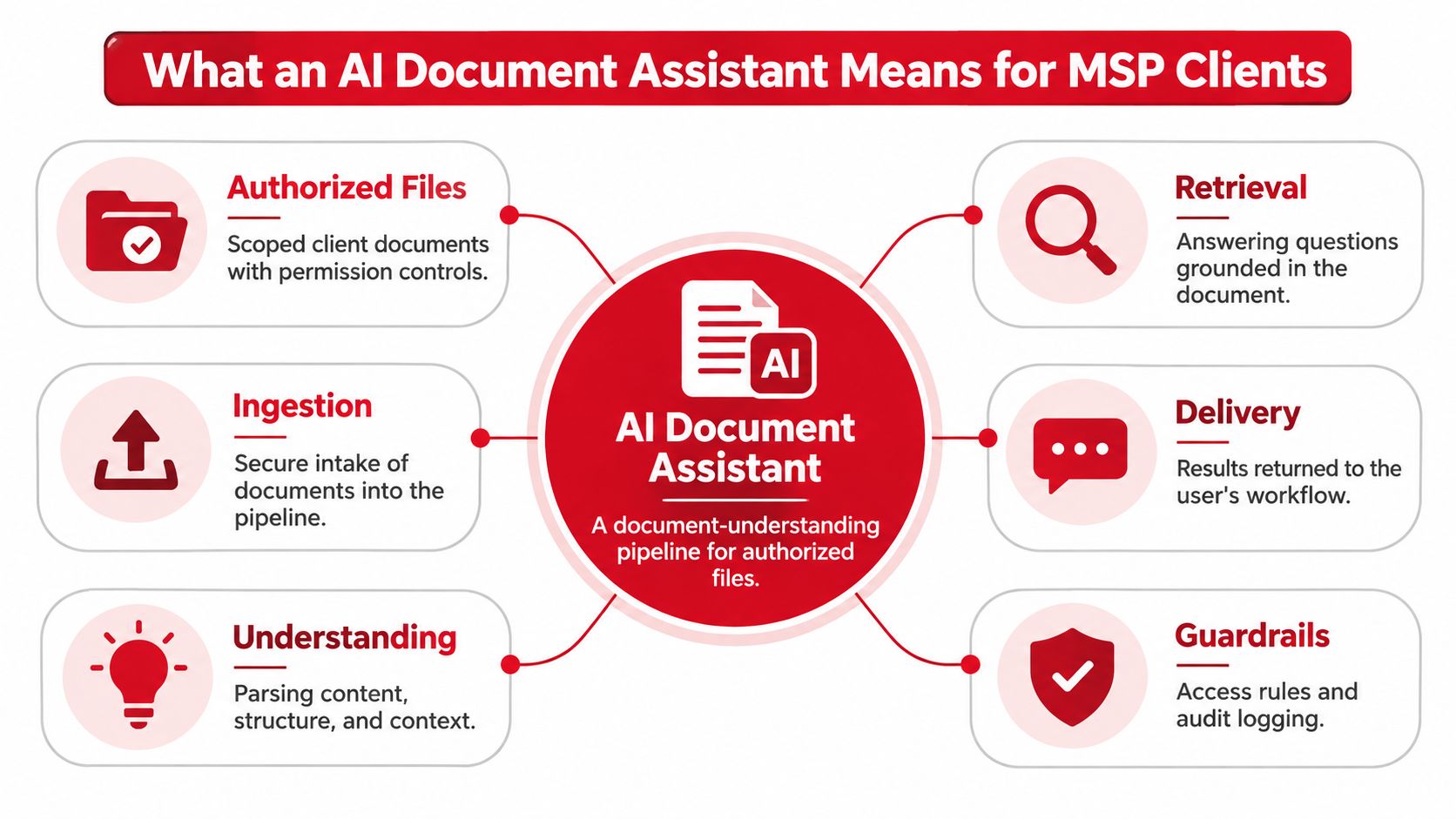
The pipeline matters more than the chat window
Microsoft Research describes document AI as a set of separate capabilities, including page-object detection, table detection and recognition, reading-order detection, multilingual form understanding, retrieval, and grounded answer generation. Its Document AI research includes TableBank, DocBank, ReadingBank, and XFUND, with XFUND covering forms in seven languages.
That decomposition explains why a chatbot-style test can be misleading. If the system reads a table incorrectly, it may change the meaning of a number. If it follows the wrong reading order, it may connect a condition to the wrong paragraph. If it maps a form value to the wrong label, a polished response can still be operationally wrong.
The MSP owns the operating context
The client doesn't need another generic AI account. The client needs a controlled workspace with defined document boundaries, user permissions, onboarding support, and a review process for uncertain answers. The MSP can package those controls around the underlying model without claiming that the model replaces legal, financial, HR, or technical judgment.
A practical service description should tell staff what the assistant can accelerate, what it can't decide, and where the source document remains authoritative. That framing turns document assistance into a managed workflow rather than an uncontrolled experiment.
Why Document-Assistant Adoption Stalls Without MSP Guidance
A pilot often starts with enthusiasm. A few employees upload documents, test summaries, and discover that the assistant can produce a useful first draft. Then usage becomes inconsistent because nobody has decided which files are appropriate, who approves prompts containing sensitive information, or how managers should interpret usage reports.
Model selection receives attention because it is visible. Workflow ownership receives less attention because it involves meetings, policies, role definitions, and follow-up. Yet McKinsey's 2025 global survey reports that workflow redesign had the strongest relationship among the tested organizational attributes with achieving EBIT impact from generative AI. The practical message for an MSP is direct: adoption stalls when the assistant is added to existing work without changing who does what, when, and under which controls.
Practical rule: A client shouldn't receive an AI workspace without receiving a documented operating model for it.
That model needs an owner on the client side and a service owner on the MSP side. It should define approved use cases, restricted document classes, escalation paths, and the signals that trigger a review. It should also account for the tension between convenience and control. If the approved workspace is difficult to use, employees may turn to consumer tools. If restrictions are excessive, legitimate experimentation may stop.
Resell an adoption system, not raw access
A recurring service can include workspace provisioning, administrator guidance, role-specific prompt workshops, data-handling rules, moderation reporting, consumption-budget reviews, and support for workflow changes. Those components do more than make the offer sound complete. They reduce the chance that employees treat a generated draft as a final decision or assume that a missing answer means a policy doesn't exist.
The service review should ask practical questions. Which teams are using the workspace? Which document tasks produce useful drafts or summaries? Where do users abandon the workflow? Which requests require escalation? Those questions give the MSP a basis for adjusting training and boundaries without inspecting every document's contents.
The assistant may be technically available after deployment, but the service isn't complete until people know when to use it and when to stop.
How MSPs Package and Deliver the Service
An MSP can structure a governed document-assistant offer as a set of connected service components. The exact product capabilities, supported files, model access, branding options, and deployment choices should be confirmed before a proposal is issued. Prox.ia is distributed by Veevoo, Inc., but the MSP remains responsible for defining the client service and validating the proposed configuration.
Start with a scoped workspace
The first activity is discovery. The MSP identifies the client's document workflows, user groups, sensitive document categories, approval points, and current storage practices. An illustrative example might include a finance team working with invoices and vendor terms, an operations team preparing internal summaries, and a leadership group reviewing drafts. Those are workflow examples, not a claim about a particular platform integration.
The deployment plan should record:
- User scope: Identify which employees need access and which roles require administrative visibility.
- Document scope: Separate approved sources from files that should remain outside the workspace until reviewed.
- Review scope: Mark tasks where a manager, finance professional, HR lead, or legal adviser must approve the result.
- Support scope: Define how users report incorrect answers, missing evidence, or suspected access issues.
Teach people how to ask and verify
Prompt workshops should use the client's own work patterns without exposing unnecessary confidential material. Staff can practice requesting a summary with defined headings, extracting action items, comparing two versions, or drafting an internal memo from an approved source. The workshop should also require users to check the supporting passage before acting on an answer.
The MSP should explain that moderation can reduce some exposure but does not detect every sensitive item or guarantee compliance. Data policies need written rules for confidential information, personal information, client records, retention expectations, and escalation. NIST's AI Risk Management Framework guidance supports identifying, measuring, documenting, and managing privacy risk throughout an AI system's lifecycle, including periodic monitoring of generated content.
Make reviews part of the offer
A recurring review can examine user adoption signals, moderation reporting, consumption budgets, support tickets, and workflow outcomes without turning the MSP into a content surveillance function. The service manager can then recommend training, access changes, or a narrower use case.

The strongest proposal separates what the workspace does from what the MSP delivers. The workspace may provide document interaction through available models. The MSP provides governance, onboarding, support, review discipline, and an escalation route when the output isn't sufficient.
SMB Document Workflows That Benefit Most
Not every document task deserves the same level of automation. Extraction, summarization, drafting, and policy interpretation carry different risks, even when users submit them through the same interface.
| Task Type | Retrieval Need | Citation Importance | Human-Review Level |
|---|---|---|---|
| Internal memo drafting from approved notes | Moderate | Useful for checking source context | Moderate |
| Vendor report summarization | High | Important for confirming conclusions | Moderate |
| Invoice table extraction | High | Essential when values affect payment or reconciliation | High |
| Policy guidance retrieval | High | Essential for confirming the current policy | High |
| Contract clause summarization | High | Essential before an operational decision | High |
| First draft of a client-facing explanation | Moderate to high | Important before sending | High |
Good starting points
Internal drafting often provides a manageable entry point because a person already knows the intended audience and can review tone, facts, and omissions. Summarizing a vendor report can also help a manager prepare for a discussion, provided the source remains available and the summary isn't treated as a substitute for reading material that carries significant risk.
Retrieval is especially valuable when employees need to find a specific obligation, date, or procedure across authorized files. The assistant should return the relevant document and location where possible, rather than forcing the user to trust an unsupported sentence.
Tasks that need stricter approval
Invoice extraction looks mechanical, but tables create specific failure modes. A missed decimal, shifted column, or incorrect label can affect a payment decision. The same applies to policy interpretation. An assistant can surface the text of a policy, but it shouldn't decide whether an exception applies to a person or situation without human judgment.
A faster answer isn't a safer answer when the source is incomplete, conflicting, or difficult to parse.
Service reviews should classify workflows by consequence, not by how impressive the demonstration looks. The MSP can help a client start with reversible, reviewable tasks and reserve higher-stakes decisions for workflows with explicit approval. For broader operational reporting, the client may separately evaluate automated monthly reporting, but that Volgap capability isn't a substitute for Prox.ia document governance and review.
Prompt Moderation and Data Policy Essentials
Grounded generation improves the connection between an answer and a document. It doesn't make every answer reliable by default. A system can retrieve a relevant passage and still omit a material qualification, combine evidence incorrectly, or produce a claim that the retrieved text doesn't support.
NIST's TREC Retrieval-Augmented Generation evaluation separates relevance, response completeness, attribution verification, and agreement analysis. Its metrics include Union Nuggets Coverage and Sentence-Support Rate. For an MSP, the operational lesson is to monitor retrieval coverage, unsupported-claim rate, and answer completeness separately instead of relying on a single conversational-quality score.
Moderation is one control among several
Prompt moderation can reduce exposure to certain requests or content categories, but it isn't a factual review engine. It won't confirm that a contract summary includes every exception, and it can't establish that a client's use satisfies a legal or regulatory obligation. Prox.ia prompt moderation should therefore be positioned as part of a broader control set, subject to confirmation against the proposed configuration.
A written policy should define:
- Allowed material: Documents and prompts that employees may use for approved workflows.
- Restricted material: Information requiring additional authorization or a different handling process.
- Human approval: Roles responsible for checking outputs before external distribution or consequential action.
- Escalation: The route for conflicting documents, missing evidence, suspected exposure, or questionable output.
- Review records: The signals the MSP and client will examine without collecting more content than necessary.
Preserve evidence in the workflow
The service should retain enough context for a user to verify an answer. That may include retrieved passages, page references, confidence information, source links, or region coordinates, depending on the product configuration. Logs should be designed around the client's privacy policy and access rules, not collected indiscriminately.
NIST's AI Risk Management Framework overview describes a lifecycle approach that can be adapted to organizations of different sizes. For SMBs, that can mean starting with a small set of documented use cases, assigning ownership, educating users, monitoring risks, and reassessing the service periodically.
Model and Deployment Choices for MSP Offers
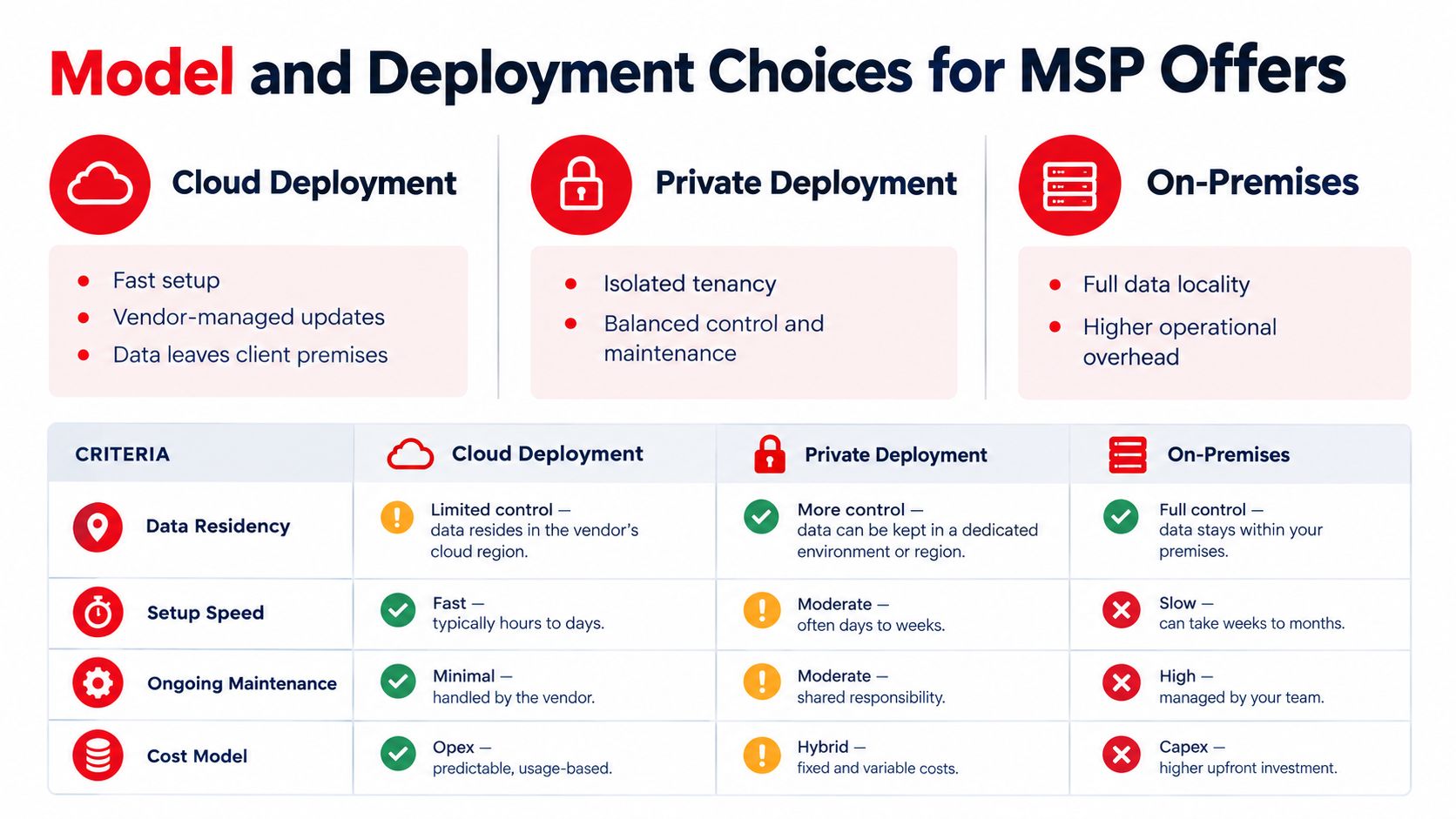
Deployment decisions affect data handling, maintenance, user experience, and commercial support. Cloud deployment may offer faster setup and vendor-managed updates, while private deployment may provide more isolation with additional administration. On-premises deployment can keep processing within client-controlled infrastructure, but the client or MSP takes on greater operational responsibility.
| Deployment model | Data residency consideration | Setup speed | Ongoing maintenance | Cost model consideration |
|---|---|---|---|---|
| Cloud | Data leaves client premises under the selected service arrangement | Often faster to provision | More responsibility sits with the vendor | Recurring service and usage terms require review |
| Private | Isolated tenancy may provide additional control | Requires configuration and validation | Shared responsibility between parties | Infrastructure and support scope need definition |
| On-premises | Data locality can be more direct | Usually requires more preparation | Client or MSP carries more operational work | Hardware, software, support, and maintenance must be assessed |
The table is a decision framework, not a product specification. Before selling an offer, the MSP should verify supported file types, model availability, identity controls, logging, retention, administrative features, branding, and deployment options. It should also confirm whether the proposed workspace fits the client's existing security and data policies.
Choose models by task
A model suitable for drafting may not be the right choice for table extraction or multilingual forms. Document understanding involves layout, reading order, retrieval, and answer generation, so testing should use representative client files rather than short, clean examples. Acceptance criteria should measure field extraction, table accuracy, page-level retrieval, and answer attribution separately.
A multi-model AI workspace can support a service strategy in which the MSP evaluates model fit instead of promising that one model handles every task. The relevant question is whether the available options, controls, and deployment match the client's requirements. Product claims still need confirmation during solution design.
RMM, PSA, and EDR platforms remain complementary operational tools. They shouldn't be presented as proof that a document workspace has a particular integration, security control, or deployment model unless that fit has been verified.
Rollout Sequence and Recurring Service Reviews
A repeatable rollout begins with a narrow service definition and expands only after the client can review results responsibly. The sequence below gives service leaders a practical operating cadence without treating adoption as a one-time installation.
- Classify documents and workflows. Mark approved, restricted, and review-required material. Record which teams own each category.
- Configure access and administration. Apply least-privilege roles, confirm administrator responsibilities, and document the access-review process.
- Run role-specific workshops. Use separate exercises for finance, operations, service delivery, and leadership. Each group should practice source verification.
- Launch controlled workflows. Start with drafting, summarization, or retrieval tasks that have an identified reviewer. Avoid broad claims about accuracy.
- Review moderation and consumption signals. Look for risky request patterns, abandoned workflows, unexpected usage, and support questions. Consumption budgets should be discussed with the client before they become a surprise.
- Hold recurring service meetings. Adjust policies, training, access, and approved use cases based on evidence from support and review activity.
The service manager should keep outcome measures practical. Documents edited, time spent handling email, and changes among heavier users can provide useful benchmarks because Microsoft Research observed that Copilot users created and edited 10% more documents overall, while heavier Word, Excel, and PowerPoint users increased document creation and editing by 13% in its workplace analysis. Some organizations recorded increases between 25% and 30%, but those findings apply to Microsoft 365 workplace users and don't establish that every assistant will produce the same result. The Microsoft Research workplace study also reported that Copilot users read 11% fewer individual emails and spent 4% less time interacting with email.
Those figures are benchmarks, not promises. The MSP should combine them with client-specific measures such as reviewer acceptance, source-verification behavior, workflow completion, and escalation frequency. A review cycle is valuable when it changes the service, not when it merely produces a dashboard.
Next Steps for MSPs Adding an AI Document Assistant
An AI document assistant becomes an MSP service when the provider manages the conditions around the output. Client onboarding, document classification, access rules, prompt education, moderation review, consumption planning, and recurring governance all matter as much as the workspace itself.
The safest starting point is a documented workflow with an identifiable reviewer and an authorized document set. The MSP can then validate the proposed Prox.ia configuration, confirm supported capabilities, define the client's data policy, and establish how issues will be escalated. Current product details should be checked on the Prox.ia product page before the offer is finalized.
Veevoo, Inc. distributes Prox.ia and helps MSPs evaluate governed AI workspace offers for client adoption, onboarding, and ongoing service management. Visit Veevoo, Inc. to review the available information and discuss whether a managed document-assistant service fits the MSP's client base.