

The most popular advice about an AI governance policy starts in the wrong place: write rules for employees, collect signatures, and call the program governed. For a US MSP serving SMB clients, the first document should instead settle who can approve a tool, accept a risk, grant access, and stop a workflow. Employee instructions come later.
A signed policy can prove that someone approved a document. It can't prove that the deployed controls work, that employees use the approved workspace, or that client data stays within the agreed boundary. An effective policy connects MSP responsibilities to client decisions, then requires operating evidence.
Table of Contents
- Policy Parts to Lock Before Client Use
- How to Design and Document the Policy
- Roles Data Handling and Retention
- Risk Review With Four NIST Functions
- Moderation Budgets and Deployment Choices
- Implementation Checklist Before Client Launch
- Operate the Policy and Take the Next Step
Policy Parts to Lock Before Client Use
An AI governance policy is the accountability agreement between the MSP and its client. It assigns ownership, names approved tools, sets access boundaries, and requires risk review before production. It isn't the employee usage note that staff acknowledge afterward.
AI governance policy components and evidence
| Policy part | Decision it locks | Accountable role | Operating evidence |
|---|---|---|---|
| Scope and approved tools | Which workspace and use cases are allowed | Policy owner | AI use-case register |
| Risk acceptance | Impact class and what may go live | Risk reviewer | Assessment filed before production |
| Access and roles | Who may use, administer, or approve exceptions | Service lead | Role matrix and acknowledgments |
| Data handling and retention | What data may be entered and how long records stay | Data owner | Data-class rules and retention schedule |
| Human review | Which outputs must be checked before use | Workflow owner | Named review checkpoints |
| Moderation and reporting | What is flagged and who reviews reports | MSP administrator | Notes from the moderation review |
| Budgets and quotas | Usage or spend limits and the exception path | Commercial owner | Budget-exception log |
| Incident and retirement | Severity, escalation, shutdown, and end of use | Incident owner | Incident record and closure |
Apply the decisions to an actual workflow
Illustrative scenario: A 40-person professional-services firm wants email drafts and document summaries. A partner already pastes client files into a public chatbot. Approving a new workspace won't, by itself, resolve that existing behavior.
The policy owner first records the permitted workspace and approved uses in the register. The risk reviewer then separates internal drafting from client-document processing and files the assessment before either enters production. Approval attaches to a defined workflow, not every activity employees can perform with the tool.
The service lead names ordinary users, administrators, and exception approvers. The data owner specifies permitted inputs and retention choices. A workflow owner identifies who checks summaries before they reach clients, including who covers that responsibility during an absence.
Make the commercial and incident decisions explicit
The MSP administrator brings moderation findings to the service review, but the client owner decides whether flagged behavior requires a workflow restriction. The commercial owner approves consumption limits and records exceptions, rather than allowing an administrator to increase spending informally.
The incident owner needs authority to suspend the affected workflow and criteria for retiring it. A workflow that no longer has a business owner shouldn't remain available because its accounts still exist.
Practical rule: Every policy decision needs a person who can make it and a record showing that the person did.
Copy these eight rows into a one-page skeleton before writing policy prose. Missing names or evidence are unresolved launch decisions, not drafting details.
How to Design and Document the Policy
The OECD's Steering AI's Future framework treats risk management as a continuous process of defining context, assessing risks, treating impacts, and governing accountability and review. For an MSP, that means a repeatable client conversation rather than a questionnaire completed once.
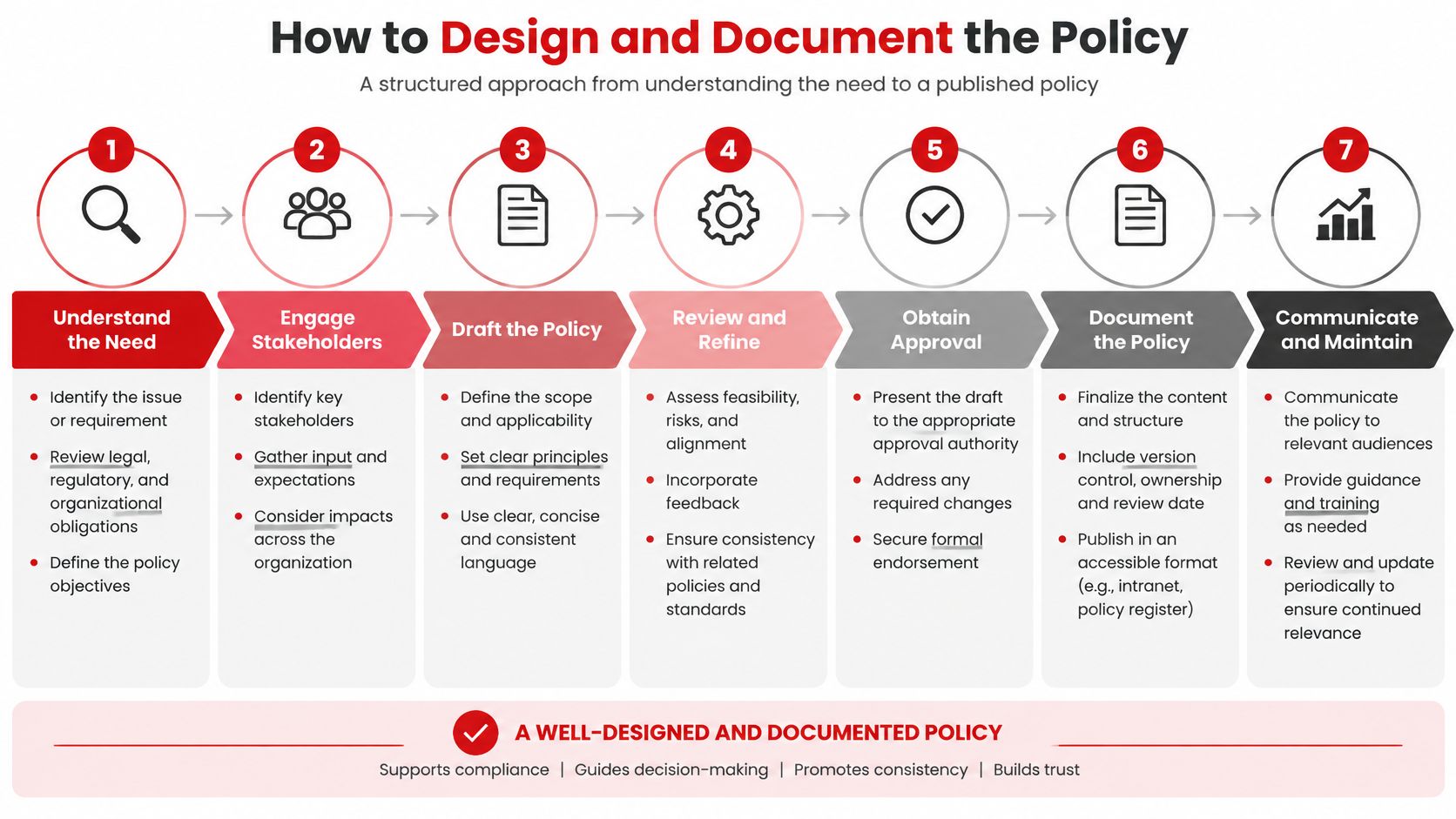
Turn client answers into operating records
Define scope and acceptance criteria. Ask which departments need AI, what information they handle, and whose interests could be affected. List permitted and banned tools, then describe unacceptable consequences. In the illustrative firm, internal-memo summaries might be permitted while client tax files remain outside the initial approval. Record that boundary before discussing features.
Build the AI use-case register around workflows, not model names. Capture the business purpose, owner, users, data sources, workspace, model dependencies, and consequences of failure. An email-drafting workflow and a financial recommendation shouldn't inherit the same approval merely because they use the same model.
Assess affected people and choose a response. Ask what could go wrong for an employee or client, for the business as a whole, and for people outside the firm. Consider incorrect conclusions, disclosure, unfair treatment, and inability to challenge an outcome. The response can be to stop the use, narrow its scope, or mitigate the risk through review and technical controls.
Write short clauses the client can acknowledge. Include the approved workspace, prohibited shadow tools, access roles, data rules, review responsibilities, incident contact, and next review date. Illustrative sample clauses, not legal language: “Staff may use only the named approved workspace for client work.” “Consequential output must be reviewed by the named workflow owner before it leaves the firm.” Replace generic role references with actual client assignments in the operating schedule.
Assign intervention and exception authority. Ask who can approve a deviation, who can pause processing, and who accepts the remaining business risk. For high-impact workflows, document oversight, user preparation, a route for challenging harmful outcomes, and a shutdown condition. An exception should have a reason, limits, an approver, and an expiry or review trigger.
Version the document and preserve the decision trail. Set the next review date, store acknowledgments with the register, and record changes to owners, data sources, models, or purpose. The service lead should be able to identify which policy version governed a workflow when an incident occurred.
Reject one-time approval
A practical OECD-style benchmark is process completeness: each production use case needs an owner, assessment, controls, monitoring indicators, an incident path, and a retirement condition. That's an operating benchmark, not a claim that this checklist is law.
The common failure is approving a workflow and never asking whether its inputs or consequences changed. Step four must therefore contain usable role and data rules, not a general promise to use AI responsibly.
Roles Data Handling and Retention
Separate the client policy owner, MSP service lead, client workflow owner, and data owner. These are distinct responsibilities even when an SMB assigns more than one to the same person. No administrator should become the entire governance program by default.
The client policy owner approves the document and material changes. The MSP service lead maintains the register, coordinates onboarding, and runs the service review. The workflow owner determines whether a particular output is fit to send, while the data owner, often an operations or privacy contact, sets permitted data classes.
Separate proposing a control from accepting risk
An illustrative RACI arrangement is straightforward: the MSP proposes and operates an agreed control, the client owner accepts the business risk, and the workflow owner checks the business result. Neither party may expand scope without notice. The MSP shouldn't authorize new client-data processing merely because an administrator can enable it.
The policy should express the input rules in recognizable business categories:
- Public: Material approved for public release, with ordinary accuracy and ownership checks.
- Internal: Nonpublic operational material permitted only within the approved processing boundary.
- Client-confidential: Client records and confidential work product, restricted to the approved workspace and specifically authorized workflows.
- Regulated: Information requiring additional legal, contractual, or sector review before processing is authorized.
Default client-confidential and regulated material to approved-workspace-only processing, not automatic permission to upload it. Some information may remain prohibited even inside that workspace.
Write retention as a decision, not an assumption
State separately whether prompts, outputs, and administrative logs are retained. For each record type, specify the retention period, deletion responsibility, permitted exporters, and approved storage destination. If the period hasn't been agreed, record set in the client schedule and resolve it before the affected workflow launches.
Illustrative professional-services example: A draft engagement email may contain internal commercial information, while an attached client file may contain confidential or regulated material. Classify the actual content, not the file extension or the employee's department.
AI output may be inaccurate and should be reviewed before use. Require a named reviewer before customer-facing, financial, legal, medical, or HR use, with authority to reject the output rather than merely acknowledge it.
A reviewer without time, context, or authority is a name on a form, not an effective checkpoint.
Staff must not paste secrets into unsanctioned tools. Such use should trigger incident reporting and exposure assessment, not coaching alone.
Keep the register entry, data class, retention choice, reviewer name, and acknowledgment date. These records support accountable operation; they don't automatically constitute a legal compliance file.
Risk Review With Four NIST Functions
NIST released AI RMF 1.0 on January 26, 2023 as a voluntary US reference for organizations that design, develop, deploy, or use AI. Its flexibility is useful for SMB clients, provided the MSP turns the framework into specific decisions.
The NIST AI RMF Playbook organizes that work through Govern, Map, Measure, and Manage. These functions provide a structure for onboarding reviews and recurring service decisions.
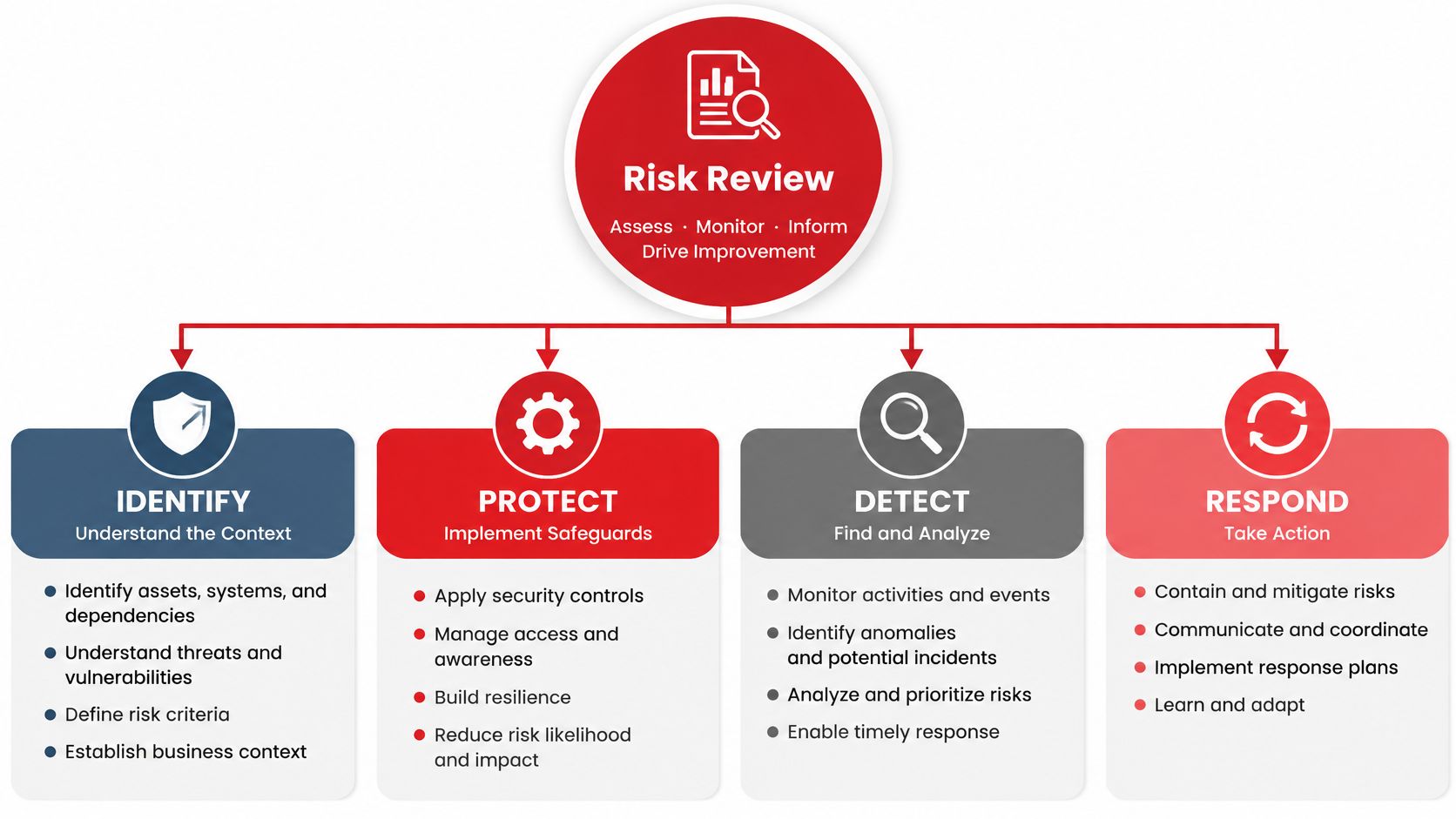
The visual uses general cybersecurity labels; the AI workflow review should use the NIST functions below.
Ask a different question under each function
Govern, who can authorize this use? Confirm the policy owner, acceptable-use boundary, and escalation route before issuing accounts. Record who approves exceptions and who can withdraw approval. These are administrative decisions, not model-quality tests.
Map, what happens if this output is wrong or exposed? Document intended use, affected people, data class, and potential harm. In an illustrative proposal-summary workflow, a summary could misstate a fee or expose a confidential commercial term. Describe those consequences directly instead of assigning risk based on the model's reputation.
Measure, what evidence supports release? Check that a reviewer exists, test representative sample inputs, and identify a signal that would reveal worsening quality. For the proposal example, compare amounts, qualifications, and exclusions against the source document. Set acceptance criteria with the client rather than inventing a universal pass score.
Manage, should the workflow go live, operate with limits, or stop? Name the person and service time allocated to monitoring. Set reassessment triggers, such as a new data class, model change, or expanded purpose. Record any unresolved limitation alongside the approval.
Keep controls and tests distinct
Access rules, ownership, and documentation establish administrative control. Testing, monitoring, and remediation establish whether the workflow behaves as expected. Neither category substitutes for the other.
For a multi-model AI workspace, record the actual model and workspace dependencies in the review. Availability of another model shouldn't extend an existing workflow approval.
File a one-page review per production use case under the four NIST headings. Include the decision, evidence location, unresolved issues, and reassessment trigger so another service lead can understand the approval.
NIST alignment isn't a compliance claim. The framework prescribes no particular product, deployment architecture, certification, or risk threshold, and adoption doesn't prove safety or satisfaction of contractual duties. Sector law and the client contract still require separate attention.
Moderation Budgets and Deployment Choices
The approved workspace belongs inside the policy, but it isn't the policy. Tool selection answers where employees work; the MSP-client agreement answers who approves that work, what evidence is reviewed, and what happens when limits are breached.
When packaging the approved service, the Prox.ia product page is the starting point for capability confirmation. Prox.ia lets MSPs offer a client AI workspace with data controls, spending visibility, moderation, multiple models, the MSP's own brand, and white-label features. Further capabilities require confirmation rather than assumptions about integrations, certifications, or detection rates.
Compare operational choices before signing
| Decision | Practical trade-off | Policy treatment |
|---|---|---|
| Moderation review | More review detail can improve investigations but expose sensitive content to administrators | Limit reviewer access and define escalation |
| Team consumption budget | Tight limits control spending but may interrupt approved work | Name an overrun approver and record exceptions |
| Deployment approach | Cloud, private, and on-premises proposals create different responsibility questions | Confirm availability and terms for the specific client |
| Model selection | More choice introduces additional dependencies to assess | List models approved for each workflow |
The AI prompt moderation overview belongs in the service-design discussion, not in a promise that every problematic input will be caught. Moderation has a defined scope and cannot guarantee detection of every sensitive item.
Use clauses that describe actual work
- Illustrative moderation clause: The MSP reviews moderation reporting during the monthly service meeting and routes flagged use to the client policy owner. The client decides the business response; the MSP records agreed actions. Moderation isn't a compliance guarantee.
- Illustrative budget clause: Each team operates within an approved consumption budget. The named commercial owner authorizes overruns, and the MSP logs the reason and approval before changing the limit.
- Illustrative deployment clause: The proposed hosting arrangement remains subject to confirmation. The policy names the approved arrangement only after responsibilities and deployment terms are documented.
Before naming the tool, the MSP needs written answers covering models in scope, data handling locations, administrative control, MSP support responsibilities, and the separate agreement. Veevoo, Inc. discusses deployment, licensing, and onboarding before commitment; availability, model access, support responsibilities, service levels, and reseller terms are confirmed separately.
Cloud, private, and on-premises are options to confirm for the proposed client, not a guaranteed menu. A preferred architecture written into an unsigned proposal isn't an approved deployment.
Employee usage rules sit beneath this framework. The governance policy approves the service and its accountability structure; the usage note tells staff how to behave within it.
Implementation Checklist Before Client Launch
Treat launch approval as an evidence check, not a calendar milestone. An unresolved owner, missing assessment, or unanswered deployment question should remain visible as a blocked decision.
Implementation checklist with owners and evidence
| Check | Owner | Evidence |
|---|---|---|
| Eight policy parts assigned | Policy owner | Signed policy with role matrix |
| Use case has owner and assessment | Named reviewer | Register entry and filed assessment |
| Data classes and retention written | Data owner | Data-class rules; retention set in client schedule |
| Human review named for consequential output | Workflow owner | Named review checkpoints |
| Moderation and budget owner named | MSP service lead | Monthly review notes and exception log |
| Acknowledgments stored with version | Client admin | Acknowledgment records |
| Vendor questions answered in writing | MSP service lead | Written vendor answers; deployment terms pending until confirmed in separate agreement |
Close the workflow-specific gaps
The reviewer should also confirm that each production register entry identifies controls, a monitoring indicator, an incident path, and a retirement condition. A filed assessment without those operating details doesn't close the launch gate.
The data owner checks that client-confidential and regulated inputs default to the approved workspace only, with any additional restrictions recorded. Retention must be stated or explicitly marked set in the client schedule, with the schedule completed before affected processing starts.
The workflow owner confirms review coverage for customer-facing, financial, legal, medical, and HR outputs. The service lead checks that moderation and budget responsibilities have a monthly review owner and that written vendor answers cover models, data location, administration, MSP support, and agreement terms.
Launch gate: An open deployment term stays open until the separate agreement confirms it.
A passed checklist shows that an operating process exists. It isn't a legal compliance determination or proof that every control will work under every condition.
Operate the Policy and Take the Next Step
Among companies with an AI strategy, 76% reported management-level oversight, yet only 41% made policies accessible to employees or required acknowledgment, according to the Thomson Reuters Institute's reporting on the AI governance gap. Management attention and employee-level execution are different achievements.
The practical response is a small operating loop, not more pages. Every activity needs a cadence, an owner, and a condition that closes the work.
Operating cadence after the policy is signed
| Activity | Cadence | Owner | Closed when |
|---|---|---|---|
| Use-case intake | Before first use | Service lead | Register entry and impact class filed |
| Risk review | Before production and on material change | Named reviewer | Assessment updated |
| User acknowledgment | Onboarding and each policy change | Client admin | Acknowledgment stored with the version |
| Moderation and budget review | Monthly service review | MSP service lead | Flags and exceptions discussed |
| Policy refresh | At least yearly or after a material incident | Policy owner | New version dated and sent |
Track behavior and corrective action
Keep the service dashboard focused on evidence that supports a decision:
- Acknowledgment complete: Staff have received and acknowledged the applicable version.
- Approved-workflow use: The client can compare sanctioned adoption with reported shadow-tool use.
- Budget exceptions: Overruns have an approver and a recorded reason.
- Data-handling incidents: Events and near misses reach the appropriate owner.
- Corrective-action closure: Days to close an action reveal unresolved work.
Define severity in the client's language, such as exposure of a client file or release of an incorrect financial statement. Require near-miss notes, and preserve prompts and outputs only as the retention rule allows. Training-slide counts don't show whether anyone follows the approved workflow.
Illustrative slip: The professional-services firm bans client files in public tools, but nobody asks about that behavior during the service review. The policy remains signed while the partner's practice continues unchecked. A direct question, a reporting route, and an assigned corrective action are more useful than another paragraph in the policy.
Smaller MSPs don't need to imitate an enterprise audit department. They need consistent operating evidence, kept separately for each client; that evidence still isn't a legal audit.
Veevoo, Inc. is the distributor and enablement partner, separate from the software vendor. Its MSP AI reseller discussion can help frame service ownership and adoption questions before the MSP commits to supporting a client workflow.
Veevoo, Inc. offers software distribution and enablement guidance to help MSPs assess AI service fit, controls, deployment needs, and adoption. Visit Veevoo, Inc. and request a fifteen-minute conversation with LeeJay Stewart to review one client use case, the data it touches, and the deployment questions that remain open.