

An illustrative 40-person SMB office receives AI workspace logins, but no approved tasks, training plan or named support contact. By week three, usage has stalled, and the client asks whether the MSP deployed anything beyond another subscription.
AI onboarding isn't complete when accounts work. It's complete when the client can assign approved work, employees can handle it within agreed boundaries, and the MSP can support the process. For a Prox.ia pilot, the first month should follow a service-delivery checklist with named owners and evidence at every handoff.
Table of Contents
- The 30-Day Onboarding Checklist at a Glance
- Name the Sponsor and Pilot Users Before Any Account Exists
- Write Acceptable Data Rules a Pilot Team Can Follow
- Configure Accounts, Roles and Budgets in Week Two
- Train Pilot Users on Real Tasks and Prompt Practice
- Track Support Signals and Hold the Week Four Review
- Make the Day-30 Go or No-Go Decision
The 30-Day Onboarding Checklist at a Glance
The following is a proposed delivery schedule, not a promise that every client will be ready to expand within a month. The MSP service delivery manager owns the checklist, while client managers remain accountable for business decisions and employee participation.
30-day AI onboarding checklist for MSP clients
| Timing | Checklist item | Owner | Exit check |
|---|---|---|---|
| Week 1 | Name executive sponsor and business owner | Client executive, MSP account lead | Written scope and one success measure signed |
| Week 1 | Choose 5 to 15 pilot users across two or three roles | Client department lead | Named list approved by each manager |
| Week 1 | Agree acceptable data classes and prohibited inputs | MSP service lead with client | One-page data rule signed by sponsor |
| Week 2 | Configure accounts, roles and consumption budgets | MSP administrator | Test login from each pilot role; budget caps confirmed |
| Week 2 | Apply client branding and publish quick-start guide | MSP service team | Sponsor review completed |
| Week 2 | Run role-based training with prompt practice | MSP trainer | Each pilot user completes scenario tasks |
| Week 3 | Launch two or three approved workflows | Pilot users, client manager | Task log active for each workflow |
| Week 3 | Hold office hours and triage issues | MSP support lead | Issue log with one owner per item |
| Week 4 | Review usage, output samples and policy exceptions | MSP service delivery, sponsor | Review notes recorded |
| Day 30 | Decide to expand, adjust or pause | Sponsor and MSP account lead | Signed decision memo |
Treat exit checks as evidence
A completed ticket isn't necessarily a completed onboarding step. The exit-check column identifies the artifact or demonstration the next owner needs before work proceeds.
For example, an administrator shouldn't infer acceptable data from a department's enthusiasm. The signed data rule must exist before anyone tests a workflow with client information.
Delivery rule: An unresolved prerequisite stays open, even when the scheduled week has ended.
The MSP should store scope approval, training results, configuration evidence and review notes together in the client service record. That gives the account manager something more useful than a launch announcement when the sponsor asks what happened.
The checklist describes service requirements, not confirmed Prox.ia capabilities. Branding, administration and budget controls must be checked against the Prox.ia product page for the proposed deployment before the MSP promises them; anything unconfirmed remains an open requirement.
Name the Sponsor and Pilot Users Before Any Account Exists
Selecting only enthusiastic AI users creates a weak pilot. They may work around confusing instructions or repair poor outputs without reporting the effort, leaving the service team with an incomplete picture of readiness.
A better starting point separates business authority, workflow knowledge and technical execution. A small client may assign several responsibilities to the same person, but the scope note should still distinguish them.
Separate approval from configuration
| Role | Decision or responsibility |
|---|---|
| Executive sponsor | Approves scope, the success measure and business exceptions |
| Business owner | Defines the current workflow, acceptable output and review requirements |
| Technical administrator | Implements approved access and configuration, and records limitations |
The sponsor should answer these questions before signing:
- Priority workflows: Which two or three tasks matter enough to justify employee time?
- Useful results: What observable result would make the pilot worth continuing?
- Exceptions: Who can authorize a departure from the data rules?
An illustrative success measure could compare the effort needed to produce an acceptable client follow-up draft against the current manual process. The business owner should define “acceptable” before testing, including factual accuracy, completeness and required editing.
Choose a representative pilot
For this proposed rollout, select 5 to 15 users across two or three roles. In the illustrative office, a sales coordinator, account manager and bookkeeper would bring different task requirements and data concerns.
Include a skeptic alongside the enthusiasts. That person's role isn't to obstruct the pilot, but to expose unclear instructions, awkward handoffs and outputs that don't meet everyday standards.
Each manager should approve the participant list and reserve time for training, task practice and feedback. Participation shouldn't depend on employees finding spare time after their normal workload.
Before signature, confirm the proposed deployment model against the product documentation. Cloud, private and on-premises availability must remain unconfirmed until validated, along with storage locations and administration responsibilities.
Record these decisions in a one-page scope note. NIST's AI Risk Management Framework, organized around Govern, Map, Measure and Manage, provides a useful structure for assigning responsibility without implying certification or guaranteed compliance.
Write Acceptable Data Rules a Pilot Team Can Follow
The client's AI behavior may predate the approved workspace. Discovery should include tools employees already use, personal accounts, copied documents and tasks they haven't discussed with IT.
In 2025, 59% of organizations surveyed globally by ISACA permitted generative AI, while 32% provided no employee AI training and only 22% trained all employees, according to ISACA's findings on AI skills and training. Permission alone isn't a usable operating instruction.

Classify information in everyday language
The following defaults are illustrative, not a compliance standard. Client legal, privacy and contractual obligations determine the final rules.
Illustrative data classes and default rules for a pilot
| Data class | Illustrative example | Illustrative default rule | Exception approver |
|---|---|---|---|
| Public marketing material | Published blog draft | Allowed | Not required |
| Internal non-sensitive work | Meeting agenda without personal names | Allowed, with human review of output | Pilot manager |
| Client confidential business information | Pricing sheet, contract draft | Restricted to approved workflows with human review | Sponsor |
| Personal data about employees or customers | Names with contact details, HR notes | Restricted; confirm against client privacy obligations | Sponsor and client compliance contact |
| Regulated or legally sensitive records | Health, payment card or litigation files | Prohibited unless client counsel approves a separate review | Client counsel |
| Credentials and secrets | Passwords, API keys, login tokens | Prohibited | Not permitted |
The MSP trainer should test these categories using ordinary workplace examples. If users can't consistently classify a document, the rule needs revision before the team receives permission to use it.
The service lead should review Prox.ia prompt moderation information when assessing the proposed controls. Moderation must not be treated as detecting every sensitive item or guaranteeing compliance.
A user's obligation to follow the data rule doesn't disappear because a prompt passes a technical check.
Put the incident path on the same page
The signed rule should contain the data classes, default permissions, exception approver and response to a breach. Keeping these together prevents employees from having to search a separate policy during an incident.
- First notification: The pilot user contacts the named MSP support lead and client business owner.
- Containment: The administrator follows the documented suspension or access-removal procedure for the affected environment.
- Client escalation: The compliance contact joins when personal, regulated or contractually protected information may be involved.
- Rule review: The service lead and sponsor assess the cause and authorize any restart conditions.
Record relevant incident evidence without copying sensitive content into general support tickets. NIST's Generative AI Profile identifies data protection, retention, monitoring, incident response and education as governance topics, making them appropriate items for the onboarding review.
Configure Accounts, Roles and Budgets in Week Two
Week two converts approved requirements into a tested environment. The administrator should first compare the scope note with the product documentation, including the Prox.ia multi-model AI workspace overview, and record which proposed controls are documented, confirmed for deployment or still unresolved.
Follow the setup sequence
- Create named accounts. Map each pilot user to the manager-approved role list. Avoid shared pilot credentials that obscure responsibility.
- Test role boundaries. Use an authorized test login for each role and verify the intended access. If workflow-level restrictions aren't supported or confirmed, record that limitation rather than describing them as configured.
- Confirm consumption controls. Where supported, set group budget caps based on expected task volume. Record the approved amount, calculation assumptions and whether the control stops spending or only alerts an administrator.
- Apply confirmed branding options. Use the client's name and logo consistently where the deployment supports them. Don't delay readiness testing for cosmetic changes.
- Publish the quick-start guide. Include approved workflows, the data rule, the support contact and the escalation procedure, then obtain sponsor review.
Configuration check: A spending forecast isn't an enforced budget cap. The service record must distinguish them.
Any mismatch between the checklist and available functionality needs a named owner and a decision: resolve it, adopt an explicitly approved alternative or narrow the pilot. Silent substitution leaves support technicians responsible for promises they can't fulfill.
Train Pilot Users on Real Tasks and Prompt Practice
Training should use the selected workflows, not an open-ended demonstration of AI features. The trainer should explain how each task currently works, what the proposed prompt changes and where an employee remains responsible.
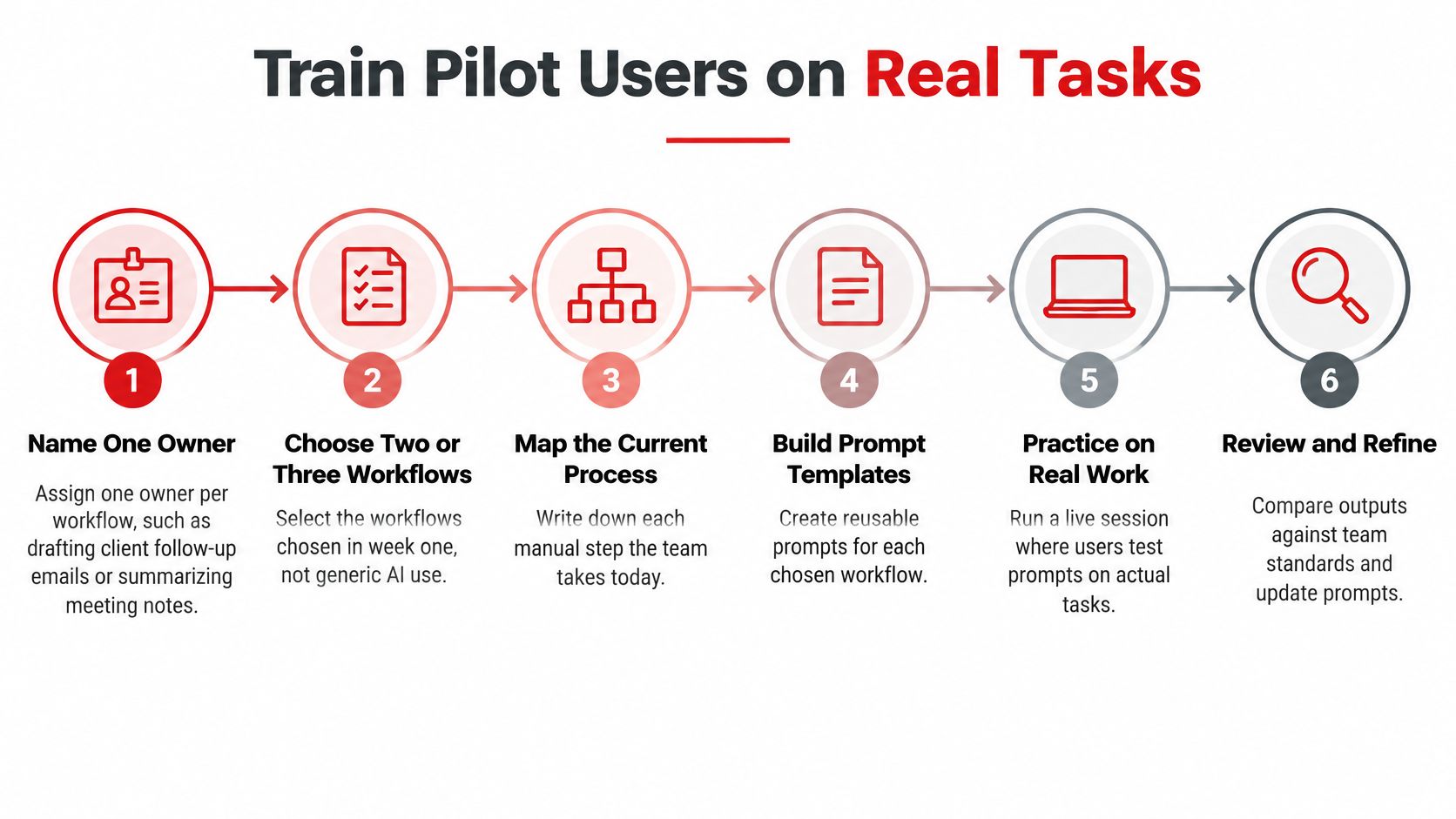
- Name a workflow owner. For an illustrative client follow-up task, the sales manager defines the source material and acceptable draft.
- Run role-based prompt practice. Users build reusable prompts for their own tasks using approved examples, rather than copying unrelated templates.
- Practice verification. Participants check names, figures and factual statements against the source material before sharing an output.
- Introduce problematic requests. Use synthetic examples involving fabricated citations or dummy credentials. Users must recognize the problem and stop or escalate, regardless of the system's response.
- Specify human review. The workflow owner documents which outputs require approval and who provides it.
- Demonstrate competency. Each participant completes scenario tasks and explains the relevant data boundary and escalation choice.
Sign off readiness, not attendance
A workshop attendance record doesn't establish that a user can perform the task safely. UK government AI adoption research identifies skills and ethical concerns as adoption barriers, supporting a training approach that addresses judgment alongside operation.
Keep sessions manageable alongside normal work. Anyone who fails a scenario check receives a targeted refresher before the week-three launch, rather than unrestricted access with a reminder to read the guide later.
Track Support Signals and Hold the Week Four Review
Logins alone prove only that someone reached the workspace. The service delivery manager needs evidence of task completion, output quality and support effort before recommending wider access.
During weeks two through four, schedule a proposed weekly office hour of 30 to 45 minutes. The support lead should record each issue's category, owner and resolution date, separating access problems, prompt quality, data-rule questions and workflow fit.
Pilot signals and what they can and cannot show
| Signal | What it may indicate | What it does not prove |
|---|---|---|
| Logins by pilot user | Users reached the workspace | Useful work is happening |
| Repeat use in an approved workflow | Task fits a daily routine | Output quality is acceptable |
| Sampled output review results | Prompt or training gaps where errors cluster | Overall model reliability |
| Policy exception requests | Real needs the data rules did not cover | That users are breaking rules |
| Moderation events | Sensitive prompts are visible for review | That no sensitive data was entered |
| Support issues by category | Where setup or training failed | Which vendor component is at fault |
| Consumption against forecast budget | Whether pilot scope matches actual use | Cost savings or productivity gains |
Interpret signals before assigning causes
A policy exception request can be evidence that employees understand the boundary and need an authorized answer. Rejecting every request without examining the task may push a useful workflow outside the approved process.
Moderation counts also require context. More events may reflect improved visibility; fewer may reflect safer use, lower activity or less reporting. The reviewer should examine the surrounding task and user explanation rather than treating a falling count as automatic improvement.
Similarly, support tickets shouldn't be assigned to a vendor component before triage. An apparent workspace problem could involve unclear instructions, unsuitable source material or a task that shouldn't have entered the pilot.
Review work, not just activity
At the week-four meeting, the sponsor, business owner and MSP service lead should examine sampled outputs alongside the issue log. Compare findings with the original success measure, including editing effort and unresolved limitations.
The service record should distinguish observed results from assumptions. If the team didn't record a manual baseline, it shouldn't claim measured time savings.
NIST describes its framework as practical and measurable across the AI life cycle, supporting recurring reviews rather than a one-time deployment assessment. It doesn't prescribe universal adoption targets, so the client's decision should reflect its workflow and risk tolerance.
Make the Day-30 Go or No-Go Decision
The sponsor and MSP account lead should choose an explicit outcome. Leaving the pilot open without a decision allows temporary access, unresolved questions and support obligations to become an undefined production service.
Choose an outcome with conditions
Expand when the required exit checks passed, sampled outputs met the agreed standard and the sponsor confirms the business case still holds. Expansion should identify the next users or workflows, not authorize unrestricted use across the client.
Adjust when participation is weak, review effort remains high or exception requests cluster around a data class. The business owner and service lead should identify whether the remedy is better training, revised rules or a narrower task before adding users.
Pause after a sensitive-data incident or repeated policy breach. The administrator removes affected access, the support lead follows the established incident path and the sponsor approves restart conditions.
Leave a signed operating decision
The decision memo should name the selected outcome, supporting evidence, next budget, next review date and owner for every open item. It should also distinguish ongoing support from additional implementation work so neither party assumes that expansion is included automatically.
For a Prox.ia service, the account lead should revisit the product-page checks established during setup and resolve any outstanding workspace, administration, budget or deployment questions. The Prox.ia MSP AI reseller information can support the commercial discussion, but it shouldn't substitute for deployment-specific confirmation.
The useful result is a supportable operating arrangement: the client knows what employees may do, the MSP knows what it owns, and both parties know what must change before wider adoption.
Veevoo, Inc. is a software distribution and enablement partner that distributes Prox.ia, rather than the software vendor. MSPs evaluating a client AI onboarding service can use the contact page to discuss pilot scope and confirm deployment-specific requirements before making client commitments.