

The first client workshop usually looks simple on paper. The MSP has a room full of people, a shared AI workspace, and a slide deck with a handful of prompt templates. Then the finance lead wants clean summaries, the operations manager wants safer outputs, and the technical lead wants to know what data can be pasted at all. That's the moment ai prompt training stops being a template handout and becomes a service design problem.
Good workshops don't teach employees to chase clever wording. They teach them how to define a request, add the right context, set constraints, choose an output format, and check whether the answer is usable. The history of prompting backs that up, from the shift toward pretrained models and fine-tuning to later methods like chain-of-thought and self-consistency, which helped make prompting a disciplined workflow rather than casual trial and error, as summarized in the prompting survey as summarized in the prompting survey. For MSPs, that distinction matters because the service has to hold up after the room clears.
Table of Contents
- Why Generic Prompt Training Falls Short for MSPs
- Role-Based Curriculum for Client Teams
- Hands-On Exercises That Build Real Skill
- Teaching Formatting Sensitivity and Stability
- Requirement Definition Beats Prompt Tricks
- Data Policy, Access Controls, and Shadow AI
- Measuring Adoption and Setting Consumption Budgets
Why Generic Prompt Training Falls Short for MSPs
The first time a client team sees a prompt template list, the reaction is usually polite optimism. Someone copies the “act as an expert” pattern, another person pastes a long instruction block, and the output looks fine in the demo because the example was curated to succeed. By the next week, the same team is back with mismatched responses, unclear formatting, and a quiet assumption that the AI tool is the problem.
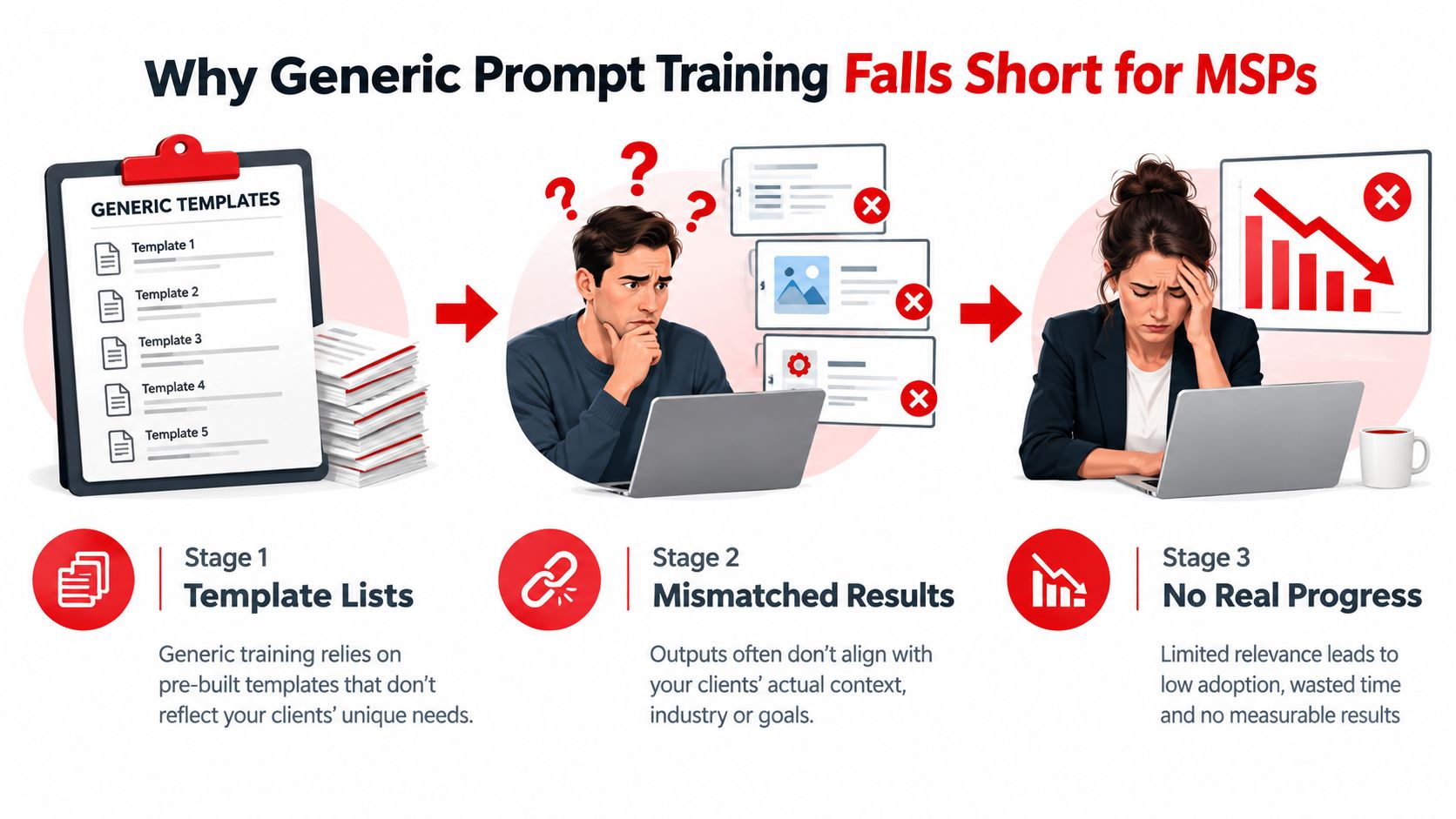
Template lists don't survive real work
The problem is not that templates are useless. The problem is that they're too shallow for the variety inside an SMB. An owner wants strategic summaries, an operations lead wants repeatable outputs, and front-line staff need something that works under time pressure. One generic prompt sheet can't cover that spread, especially when the same client also needs data-handling rules and approval points around what gets shared with the AI workspace.
Recent survey data shows why repetition matters. More than 55% of respondents revised their prompts either occasionally or very often, which is a strong signal that good prompting is iterative, not one-and-done survey on AI use and prompt revision. That is the workshop gap. Clients don't need a museum of clever examples, they need a workflow that helps them improve, compare, and reuse prompts safely.
Practical rule: if a prompt only works when the trainer explains it live, it isn't ready for a client team.
A useful discovery call starts before the slide deck. The MSP needs to know which roles are in scope, what tasks the AI workspace is supposed to support, what data must stay out of the system, which deployment options the client is willing to fund, and what success should look like after the workshop. That's where a short workshop brief earns its keep. It turns a vague request like “we want our people using AI” into a scoped engagement with realistic expectations.
Scope the work before anyone trains
That brief should spell out the business objective, the failure cost, and the boundaries. It should also say what the AI workspace will not do, because false expectations create support debt later. For example, if the client expects every output to be safe without review, the workshop needs to say otherwise in plain language.
A restrained internal planning link can sit in the sales conversation when the MSP is packaging the service, especially if the offer includes branded access and client onboarding in Prox.ia MSP reseller guidance. That keeps the service conversation grounded in what the MSP is selling, not in abstract AI hype.
A strong workshop brief usually answers four questions:
- Who is in scope? Owners, managers, admins, or front-line users.
- What work is in scope? Summaries, drafts, extraction, review, or support tasks.
- What data is off-limits? Customer records, internal-only notes, or sensitive files.
- What outcome counts as success? Faster drafts, cleaner structure, better review, or safer handling.
When that framing is missing, training turns into a demo. When it's present, the MSP can sell a repeatable service.
Role-Based Curriculum for Client Teams
A single agenda rarely fits everyone in a client org. The owner needs governance and adoption language, the operations lead needs reusable workflows, and technical staff usually need more depth on structure and verification. A tiered curriculum makes those differences explicit instead of pretending every attendee should learn the same thing at the same pace.
The simplest structure is three layers. Tier 1 covers AI literacy and safe-use rules. Tier 2 covers prompting for the roles that will use AI most heavily. Tier 3 is supervised practice with real client documents, where the output needs review before it touches a customer or an internal process.
| Workshop Modules by Client Role | Tier 1: AI literacy | Tier 2: Prompting skills | Tier 3: Supervised practice |
|---|---|---|---|
| Client owner | AI boundaries, risk, approval process | Request framing for strategic summaries | Review of a board-style or leadership summary |
| Operations lead | Safe data handling, reuse rules | Context, constraints, output format | Service report or policy summary draft |
| Front-line staff | Basic use rules, when not to paste data | Short task prompts, revision habits | Simple extraction or first-draft exercises |
| Finance lead | Data sensitivity, review requirements | Structured prompts for numbers and wording | Invoice or variance explanation review |
| Technical lead | Model limits, verification mindset | Debugging and comparison prompts | Documented workflow with test cases |
Match the exercise to the role
The table works because it keeps the training realistic. An owner doesn't need the same practice set as a service desk analyst, and a finance lead usually needs stronger review criteria than a marketer. The MSP can re-sequence the workshop day depending on who shows up, but the tiers stay the same.
The important part is what happens after the explanation. A prompt technique should be tied to a role and a deliverable, not presented as a universal trick. That's why role-based training tends to stick better than a general “AI for everyone” session. It creates a direct line between the workshop and the work the team does on Monday.
The best client workshops feel less like a software demo and more like a rehearsal for the client's actual documents.
This structure also gives the MSP a cleaner way to price and package the service. A basic session can cover Tier 1 for all staff, while a premium engagement adds supervised practice for higher-value teams. If the client's use case needs multiple model options or workflow separation, the MSP can anchor that discussion in Prox.ia's multi-model workspace context without promising capabilities that haven't been confirmed for the specific deployment.
Hands-On Exercises That Build Real Skill
The workshop lives or dies in the exercises. A room can nod through a presentation and still fail the first time someone has to turn a messy request into a usable prompt. The fix is to make the exercise set look like actual work, not like prompt theater.

Start with a real business task, then write it as a requirement. That means naming the objective, the audience, the source material, the constraints, and the output format. Once that's clear, build a small test set with normal cases, ambiguous cases, out-of-scope inputs, and one or two safety-sensitive examples.
Use a test set, not a demo
The defensible workflow is simple, and it's easy to teach in a half-day session. Define the task. Establish a baseline with a plain prompt. Create a small representative test set. Change one prompt element at a time. Measure the results, then freeze the prompt once it behaves consistently on the test set. That sequence aligns with systematic-review screening work that showed iterative prompt refinement can reduce update-screening workload by roughly 80%, while still requiring explicit attention to false negatives screening workflow study.
That number matters less as a marketing point than as a workshop design clue. The client team should see that prompt quality comes from comparison and retesting, not from a single “best prompt” posted in a shared folder.
The exercises should also separate first drafts from higher-value uses. Drafting a short summary is one thing. Reviewing a client policy, extracting action items from a document, or checking a service report for omissions is another. The second category needs clearer evaluation criteria and a stronger habit of revising the prompt after each round.
A useful exercise pattern looks like this:
- Write the task in requirement terms. The team names what success looks like.
- Create a baseline prompt. Keep it plain so the comparison is meaningful.
- Run three or four test cases. Include normal and edge cases.
- Change one element only. Adjust context, format, or examples, not everything at once.
- Record what failed. Separate bad requirements from bad outputs.
- Freeze the prompt. Retest it against new examples before reuse.
That habit trains judgment. It also stops teams from mistaking a good-looking first answer for a reliable workflow. If the prompt is later reused in a governed environment, the MSP can point to the exercise set as the reason the team trusts it.
Teaching Formatting Sensitivity and Stability
A prompt can be clear on paper and still fail in practice because the formatting nudges the model in the wrong direction. In client workshops, that shows up fast. One team changes headings, another changes spacing, and the output shifts even though the words look “the same.”
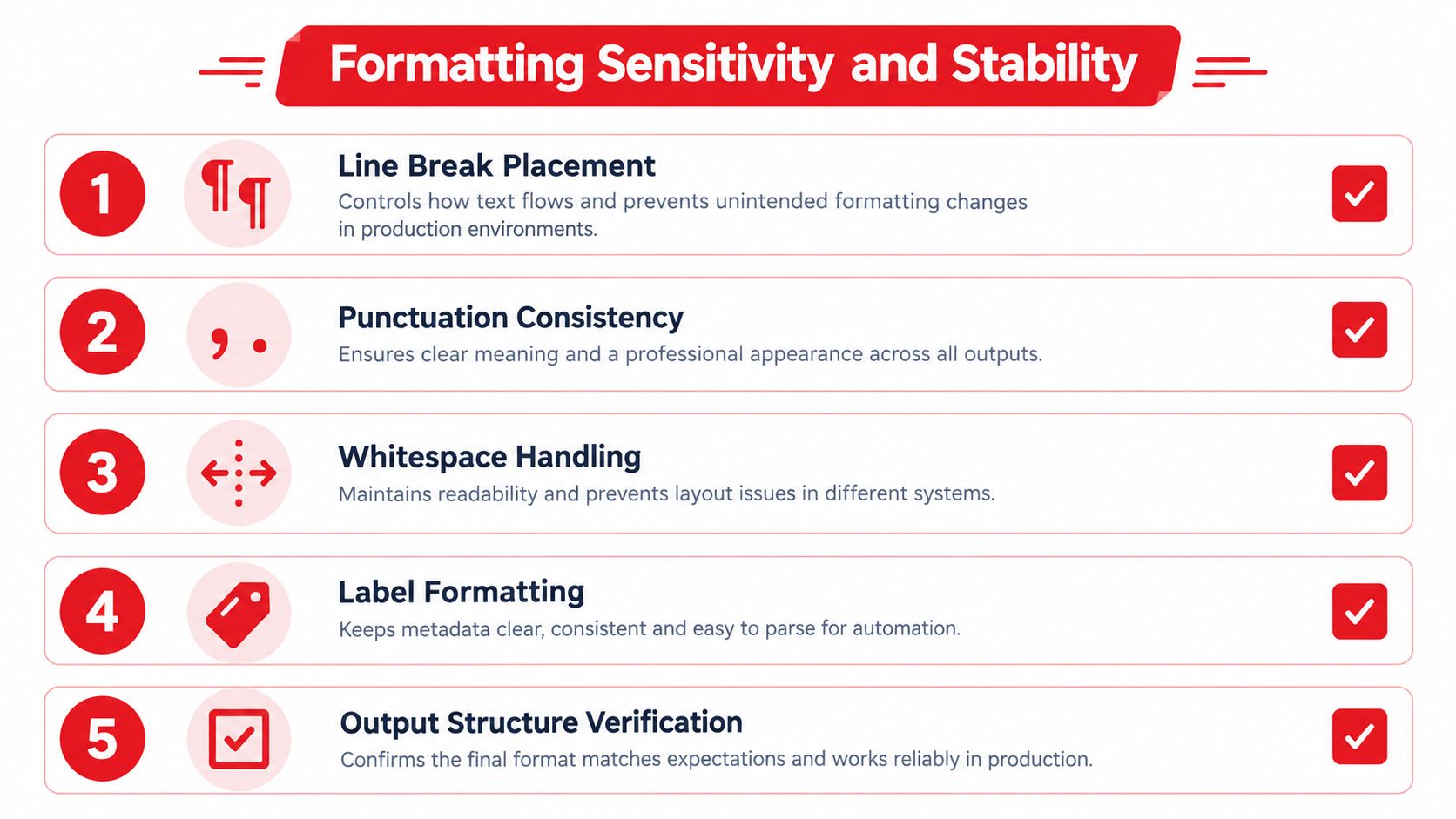
Stability starts with structure
Aim for prompts that are hard to misread, and keep them as short as the task allows. Clear delimiters separate instructions, context, and source data. Consistent headings show the model where the task ends and the example begins. A fixed output schema gives the client a fast way to spot drift before anyone reuses the result.
Research on open-source models found performance differences of up to 76 accuracy points for Llama-2-13B when prompt formatting changed, and that sensitivity persisted even with larger models and more few-shot examples formatting sensitivity study. For an MSP standardizing prompts across clients or teams, that is a direct warning. One good run does not prove the template is stable.
A useful workshop exercise is a small test matrix. Keep equivalent versions in play, with changes to headings, delimiters, example order, role descriptions, spelling, and spacing. Run each version against the same holdout set, then compare the average score and the worst-case score. A prompt with a decent average but a messy failure mode is not ready for production.
Operational rule: if the model, system prompt, examples, or document format changes, retest the prompt before it goes back into service.
That rule gives the client a clean change-control habit. It also gives the MSP something concrete to include in the service handoff. A prompt library should be treated like a managed workflow asset, not a static document sitting in a shared folder.
Use this checklist in the workshop and in the handoff:
- Separate inputs clearly with labels or delimiters.
- Specify the output schema so the client can compare runs.
- Test formatting variants before standardizing a template.
- Retest after changes to the model or document format.
- Review high-impact outputs before they reach a customer or decision-maker.
Add this checklist to the service handoff so the client knows retesting is part of the retainer, not an extra.
Requirement Definition Beats Prompt Tricks
A workshop falls apart fast when teams chase clever wording before they define the work. The client says, “Summarize this,” or “Draft a reply,” but the actual request usually includes the objective, audience, source material, constraints, and review standard. Without that structure, prompt edits turn into guesswork.
Carnegie Mellon researchers' 2025 Requirement-Oriented Prompt Engineering study reported a 20% performance gain for trainees taught to define requirements first, compared with a 1% gain for trainees who completed a conventional prompt-engineering tutorial ROPE study. For MSPs, the transferable skill is translating a business need into something the model can execute, not memorizing trick phrasing.
Diagnose the failure before rewriting the prompt
Poor output can come from several different problems. The requirement may be vague. The source data may be incomplete. The model may be a poor fit for the task. The answer may look fine and still need human review. Trainers should teach client teams to sort those causes before they start rewriting prompts.
That diagnosis becomes the basis for a reusable library. Good entries include the task definition, allowed data classes, review point, and escalation rule. In a governed client environment, that matters more than polished wording. It keeps teams from treating the prompt as a magic sentence and pushes them toward repeatable workflow design.
A simple workshop exercise is to ask five questions:
- What is the exact business outcome?
- What context does the model need?
- What can't be included?
- What format should the answer follow?
- Who checks it before use?
Those questions work across roles, which makes them more useful than a stack of one-off prompt patterns. They also make the training easier to sell internally, because the client can see the same logic applied to policy summaries, service reports, and document extraction.
One option for MSPs is to fold the curriculum into a broader governed AI offer through Veevoo, Inc. or a similar service wrapper. The point is the method, not the label on the service. The next step for the trainer is to turn those five questions into a standard intake form and a review checklist that every client team uses before a prompt goes into production.
Data Policy, Access Controls, and Shadow AI
A workshop on prompt training starts with the data rules around it. Teams can write strong prompts and still create exposure if no one has defined which data classes are allowed, who can enter them, and which tools sit outside the approved workflow.
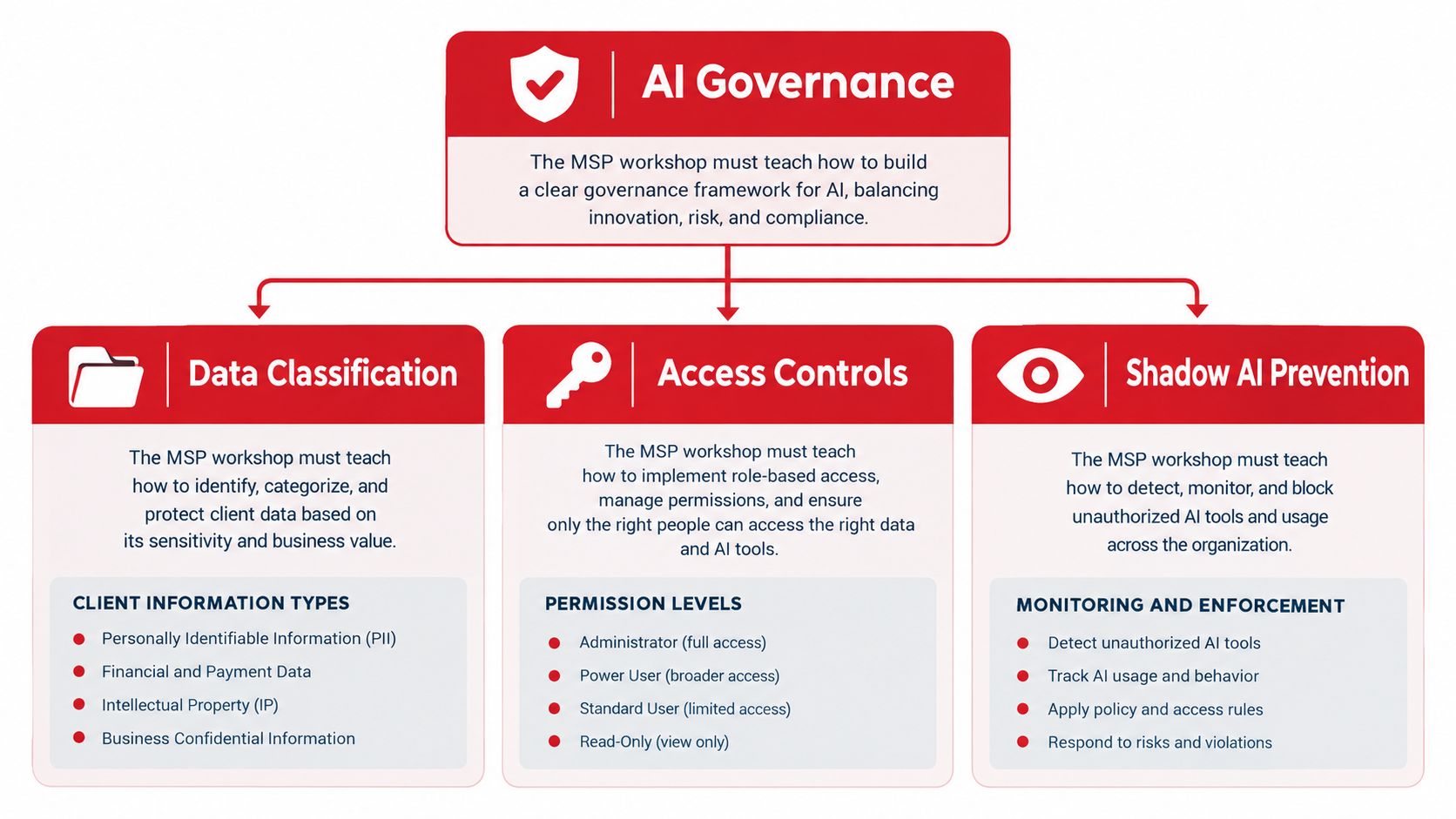
Governance is part of the curriculum
CISA states that data security is critical to the accuracy, integrity, and trustworthiness of AI outcomes across the AI lifecycle, and its guidance emphasizes data protection, proactive risk management, monitoring, threat detection, and network defense CISA AI data security guidance. NIST's AI Risk Management Framework also ties privacy and cybersecurity risk management to design, development, deployment, evaluation, and use, and its playbook calls for documented authorization, duration, and access-control protocols when personally sensitive information is involved NIST AI RMF, NIST playbook.
Governance belongs in the workshop agenda, alongside the prompting exercises. The client needs clear rules for what information may be submitted, who can use the workspace, how access is approved and reviewed, and what happens when someone wants to work with sensitive content. A clean split between administrators and end users helps because access, approval, and review should not be identical for every role.
Shadow AI needs the same treatment. CISA's AI security guidance supports maintaining an inventory of approved AI tools and reviewing use outside centrally managed services, because unapproved tools can bypass the organization's stated data-handling and access policies CISA AI guidance. Make the approved path visible enough that people choose it voluntarily.
For the workshop, a practical governance checklist includes:
- Data classification rules for what can and cannot be entered.
- Access approval steps for roles, duration, and review.
- Approved tool inventory so the client knows what is sanctioned.
- Escalation rules for sensitive or high-impact outputs.
- Moderation limits that are explained clearly, not oversold.
The moderation piece still needs a reality check. It reduces risk, but it does not catch every sensitive item or guarantee compliance. Policy language and human review still matter, and teams should understand where automated moderation stops. For MSPs building a governed AI service, Prox.ia AI prompt moderation guidance can support that conversation and keep the training tied to a managed offer.
Measuring Adoption and Setting Consumption Budgets
Training only matters if the client changes how it works. That means the MSP has to measure usage, review the quality of outputs, and see whether the workshop changed behavior. Without that follow-up, prompt training becomes a one-time event with no operational proof.
The simplest metrics are behavioral, not flashy. Which users are active. Which prompts are being reused. How often people revise their prompts. Where sensitive data appears. Whether the AI workspace is being used for the tasks defined in the workshop brief. Those are the signals that tell the MSP whether the curriculum is sticking or drifting.
Make adoption visible in service reviews
The business case is stronger when the MSP packages training as an ongoing service. ISACA's 2025 poll of more than 3,000 digital-trust professionals found that only 22% of organizations trained all employees on AI, while 89% expected they would need AI training within two years ISACA poll. That gap creates room for a recurring service that includes onboarding, governance review, adoption reporting, and refresh training when prompts or policies change.
Consumption budgets fit naturally here. The MSP can help the client define how much usage is reasonable for each team or role, then review that consumption during monthly service meetings. The review should surface not only volume, but also whether the usage matches the workshop scope. If a team is consuming budget without producing usable outputs, the curriculum or the guardrails probably need adjustment.
A practical monthly review can ask four things:
- Who used the workspace most often?
- What kinds of prompts were reused?
- Where did rework or verification increase?
- Did any sensitive data show up where it shouldn't have?
Those questions are simple, but they keep the service grounded in outcomes. They also help the MSP decide whether the next engagement should be a refresher class, a role-specific clinic, or a governance update. That's how AI training becomes a managed service instead of a favor.
For MSPs, the key win is repeatability. Clients get a cleaner workshop, safer usage, and a clearer support path. The MSP gets a service that can be reviewed, renewed, and improved instead of one more one-time session that disappears into the calendar.
Veevoo, Inc. helps MSPs package governed AI services with Prox.ia, including prompt workshops, client onboarding, moderation guidance, and usage review workflows. If this model fits the way a client team needs to learn, visit Veevoo, Inc. to see how the offer is positioned for MSPs building a practical AI service.