
A client partner wants an AI policy ready for next month. Staff already use chatbots to draft emails, summarize documents, and check spreadsheet formulas, but nobody has agreed which accounts or data are acceptable. The MSP can deliver a polished document and still leave those decisions unresolved.
An effective AI usage policy works when employees can find it, read it quickly, and identify who decides when something is unclear. For US MSPs and SMB clients, the useful deliverable is a short rulebook backed by approvals, training, and evidence that staff can apply it.
Table of Contents
- Required Sections for a Client AI Usage Policy
- Allowed Data Classes and Approved Tools
- Review and Escalation Rules Staff Will Follow
- Budget and Moderation Controls and Their Limits
- Sample Policy Language to Adapt for Each Client
- How to Roll Out the Policy to Client Staff
- Confirm Fit Before You Send the Policy to Clients
Required Sections for a Client AI Usage Policy
The policy needs eight sections, each making a decision rather than offering general advice. The following examples are illustrative, not claims about a customer or deployment.
Policy sections, decisions and illustrative examples
| Policy section | Decision it must make | Illustrative example |
|---|---|---|
| Purpose and scope | Who and what the policy covers | A 40-person accounting firm covers employees, contractors, and temps using company or personal devices for work. |
| Approved tools | Which AI tools staff may use for work | Prox.ia workspace only; personal chatbot accounts aren't approved. |
| Allowed data | Which data classes can enter a prompt | Public copy and nonsensitive internal drafts are allowed; client tax IDs require explicit exception approval. |
| Prohibited uses | Tasks AI must never be used for | Sending final tax positions to clients without review; entering passwords. |
| Human review | Which outputs need a second person | Client-facing figures and anything citing a regulation. |
| Escalation | Where a suspected exposure goes and how fast | Report to the office manager and MSP contact within one business day, with urgent exposures reported immediately. |
| Budgets and usage | Team limits and exception approval | A monthly team cap is agreed with the MSP; the partner approves exceptions. |
| Review and ownership | Named owner, version, and review date | The operations manager owns the policy, records its version, and reviews it each quarter. |
Make the decision enforceable
Scope should include AI features embedded in existing business applications, not just standalone chatbots. Otherwise, an employee might reasonably assume that a summarization feature inside an already-approved application needs no separate review.
The approved list should identify the account or workspace, permitted task, and approval conditions. A product name alone doesn't distinguish an approved business deployment from an employee's personal subscription.
The accounting example's tax-ID exception isn't a recommendation to permit those identifiers. The client must deliberately approve such a departure from the stricter default template below, after reviewing its obligations and deployment.
Practical rule: Every policy decision needs both a business owner and evidence that the decision was applied.
That evidence can be modest: an approval entry, a reviewer's sign-off, or a completed scenario check. The MSP handles technical administration within its agreement; the client retains business decisions about permitted data, consequential uses, and employee conduct. A missing owner becomes obvious the first time someone asks who can approve an exception.
Allowed Data Classes and Approved Tools
A banned-website list doesn't tell employees what information they can paste into an approved tool. Start with three outcomes: allowed, allowed with named approval, or not permitted.
Workspace restrictions add a condition; they don't turn sensitive data into approved content.
Data classes and default rules for AI prompts
| Data class | Default rule | Illustrative example |
|---|---|---|
| Public marketing and website copy | Allowed | Rewriting a public product page. |
| Internal drafts with no personal data | Allowed | A meeting agenda or nonsensitive process notes. |
| Client personal data, including names and contact details | Allowed with named approval | Drafting a reply that names a customer. |
| Financial account, card, or payroll data | Not permitted | Bank account numbers pasted into a spreadsheet prompt. |
| Passwords, keys, and access tokens | Not permitted | Pasting a script containing an API key. |
| Health, legal case, or HR records | Not permitted by default | Summarizing a disciplinary file; the client decides exceptions through formal review. |
| Source code and network configuration | Approved workspace only, subject to data review | Debugging a firewall rule after removing credentials and restricted configuration details. |
“Internal” isn't synonymous with harmless. Acquisition plans, unpublished pricing, and confidential contracts need classification even when they contain no personal information.
A useful pause test is whether the text could cause harm if a competitor or the public saw it. A yes means stop and ask the owner; a no doesn't override the table.
Approve the deployment, not the demo
If deployed and approved by the client, the Prox.ia workspace can be named as the authorized destination. The multi-model AI workspace overview is a starting point for evaluation, not evidence that a particular client has every model or connector shown.
Before issuing the list, the MSP must confirm the actual workspace, enabled models, connectors, and permitted data flows. Model access and supported connectors belong in the separate agreement, not assumptions carried over from a demonstration.
The cost of ignoring unofficial use can be material: IBM's 2025 breach report found that 20% of studied organizations experienced a breach involving shadow AI, and those incidents added an average of $200,321 to breach costs.
Move existing users onto an approved path
During an illustrative first-week discovery period, staff should identify tools, tasks, accounts, and data used. The transition statement should prohibit new restricted-data uploads immediately while providing a supported route for legitimate work.
Record each temporary exception in a shared log: requester, purpose, permitted data, approver, compensating controls, and expiry date. Approval without an expiry becomes an unofficial permanent entitlement.
Review and Escalation Rules Staff Will Follow
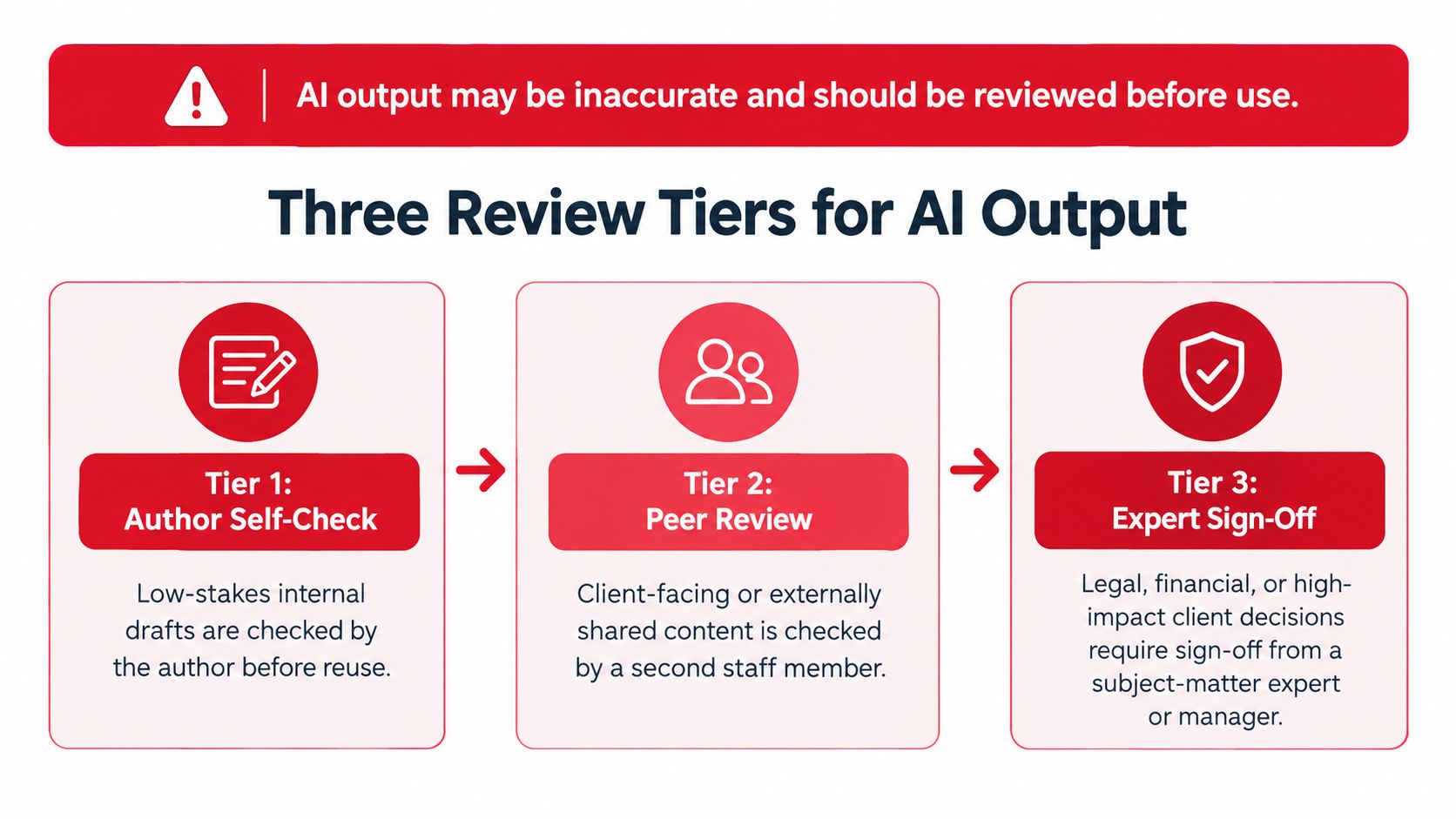
AI output may be inaccurate and should be reviewed before use. The review requirement should follow the consequence of an error, not how convincing the answer sounds. A single review standard for everything either slows routine drafts or leaves high-risk work unchecked, so the policy needs tiers and a named owner for each.
Low-stakes internal drafts receive an author self-check. Client-facing or financial content requires a second person to verify figures, names, dates, and supporting references. Legal, financial, or high-impact conclusions need a qualified subject-matter expert or manager; decisions about hiring, credit, or discipline must never rely solely on AI output.
The decision the policy owner must make is who counts as a qualified reviewer for each tier. The confirmation is a monthly sample of sent client work checked against the tier it was assigned.
Escalate suspected exposure without waiting for certainty
Staff stall at this step when the policy makes them judge whether an incident is serious enough to report. Word the trigger so suspicion alone is enough, then give them a sequence they can follow under pressure:
- Stop using the chat and preserve it without deleting it. Keeping the original record helps the response team establish what happened.
- Record the data involved, time, and person who entered it. A factual summary prevents repeated questioning and unnecessary copying of sensitive material.
- Notify the policy owner within the stated window. An illustrative same-business-day deadline makes reporting actionable, while suspected credential exposure needs immediate attention.
- Let the owner coordinate containment. The owner decides, with appropriate technical and legal support, whether to revoke access, rotate credentials, or notify the client.
- Have the MSP review the event with the client on an agreed timeline. The review separates technical findings from business and notification decisions.
- Update the relevant rule, training, or approved list. Closing the ticket without addressing the cause leaves the same failure available to another employee.
Escalation roles by step
| Role | Responsibility | Timing |
|---|---|---|
| Staff author | Self-checks internal drafts; stops using the chat and preserves it | Immediately on suspected exposure |
| Second reviewer | Checks figures, names, and dates in client-facing or financial content | Before sending |
| Named manager | Decides any use informing a decision about a person | Before the decision |
| Policy owner | Coordinates access revocation, credential rotation, or client notification | Illustratively, the same business day; urgent containment immediately |
| MSP contact | Reviews the event with the client and updates agreed controls or documentation | On the agreed client timeline |
Many organizations with a written AI policy never check whether anyone follows the escalation path. Schedule a quarterly escalation-log review to identify repeat causes and overdue actions, and treat a permanently empty log as a finding in itself: if staff use AI daily and nothing is ever flagged, the reporting route is broken, not the behavior.
Budget and Moderation Controls and Their Limits
Controls can reduce risk and make activity visible. None proves compliance, and each policy statement must match the client's confirmed deployment.
Budget and moderation controls, limits and policy wording
| Control | What it does | What it does not do | Policy wording to use |
|---|---|---|---|
| Team consumption budgets | Caps usage per team or group where supported | Judge whether a prompt is appropriate | Team caps apply; the policy owner approves exceptions. |
| Spending visibility | Shows usage and spend trends reported by the deployment | Approve or block a use case by itself | The service meeting includes a monthly spend review. |
| Moderation | Flags content within its defined scope | Detect every sensitive item | Staff must not enter regulated identifiers, even when nothing is flagged. |
| Moderation reporting | Summarizes flagged activity, if provided | Replace human review of outputs | The client reviews flags each quarter. |
| Client branding | Applies branding where confirmed | Change data-handling rules | The policy uses the workspace name employees actually see. |
Measure behavior beyond publication
Prox.ia moderation has a defined scope and cannot guarantee detection of every sensitive item. The AI prompt moderation overview can support the control discussion, but the MSP still needs confirmation of the proposed deployment's budget, reporting, moderation, and branding behavior.
The White & Case 2025 global compliance risk benchmarking survey found that 63% of respondents had a policy governing employee AI use; separately, a 2025 global study summarized there reported that fewer than one in four companies conducted regular AI audits. Adoption of a document and verification of employee behavior are different activities.
A practical service report should distinguish:
- Reach: Training completion and policy-awareness checks.
- Observed use: Approved-tool activity, reported incidents, and data-handling violations.
- Follow-through: Open exceptions, overdue actions, and remediation time.
Where lawful and agreed, sampled prompt and output checks can complement logging and moderation. Access to those samples should be restricted, with retention rules that avoid creating another store of sensitive information.
An empty incident log may mean safe use, poor reporting, or activity outside the approved workspace. It isn't proof by itself.
Illustrative budget example: A team reaches its cap in week three after repeatedly summarizing large documents. Raising the cap might restore access, but a document-size rule, selective excerpts, and approval for unusually large jobs address the underlying consumption pattern.
Sample Policy Language to Adapt for Each Client
These clauses provide employee-facing wording. Bracketed fields remain during drafting, but the client must resolve them before publication.
Approved tools
Staff may use [Prox.ia workspace name] for work tasks. No other AI tool may be used for company work unless the policy owner approves it in writing.
The workspace placeholder must match the name employees see at sign-in. The written-approval route should identify a reachable owner, not merely a department name.
Allowed data
Do not enter passwords, payment card or bank details, or government identifiers into any AI tool. Client personal data may be used only with approval from [role].
The role placeholder identifies who can authorize a specific use, not blanket permission for all customer information. Approval should record the purpose, permitted fields, destination, and duration.

Escalation
If you believe confidential or restricted data was entered into an AI tool, report it to [role] within [timeframe], even if you are unsure.
The role and timeframe placeholders make uncertainty reportable rather than leaving employees to investigate alone. The published policy should include a monitored contact route and a backup for an absent owner.
Advisor review
This template is a starting point, not legal advice or a compliance guarantee; the client should have its own advisor review it against its obligations.
That review should consider client contracts, professional duties, privacy obligations, employment practices, and any sector-specific restrictions. A technically available workflow isn't automatically an acceptable business use.
Resolve wording before approval
- Keep drafting fields visible: Owners and timeframes should remain bracketed until the client expressly accepts them.
- Remove unsupported promises: A clause claiming that every prohibited prompt is blocked must be removed if the deployment cannot support that statement.
- Separate duties: Employees need clear obligations; administrators need procedures for access, configuration, retention, and evidence.
- Maintain a version log: Record the change, approving owner, effective date, and whether staff need another briefing.
Removing an unenforceable technical promise doesn't mean removing the underlying business restriction. The client must either provide another way to enforce and check the restriction or decline that use case.
Key takeaway: A clause staff can't act on is decoration. Every actionable clause needs a named role and a time limit, including when approval must occur before use.
How to Roll Out the Policy to Client Staff
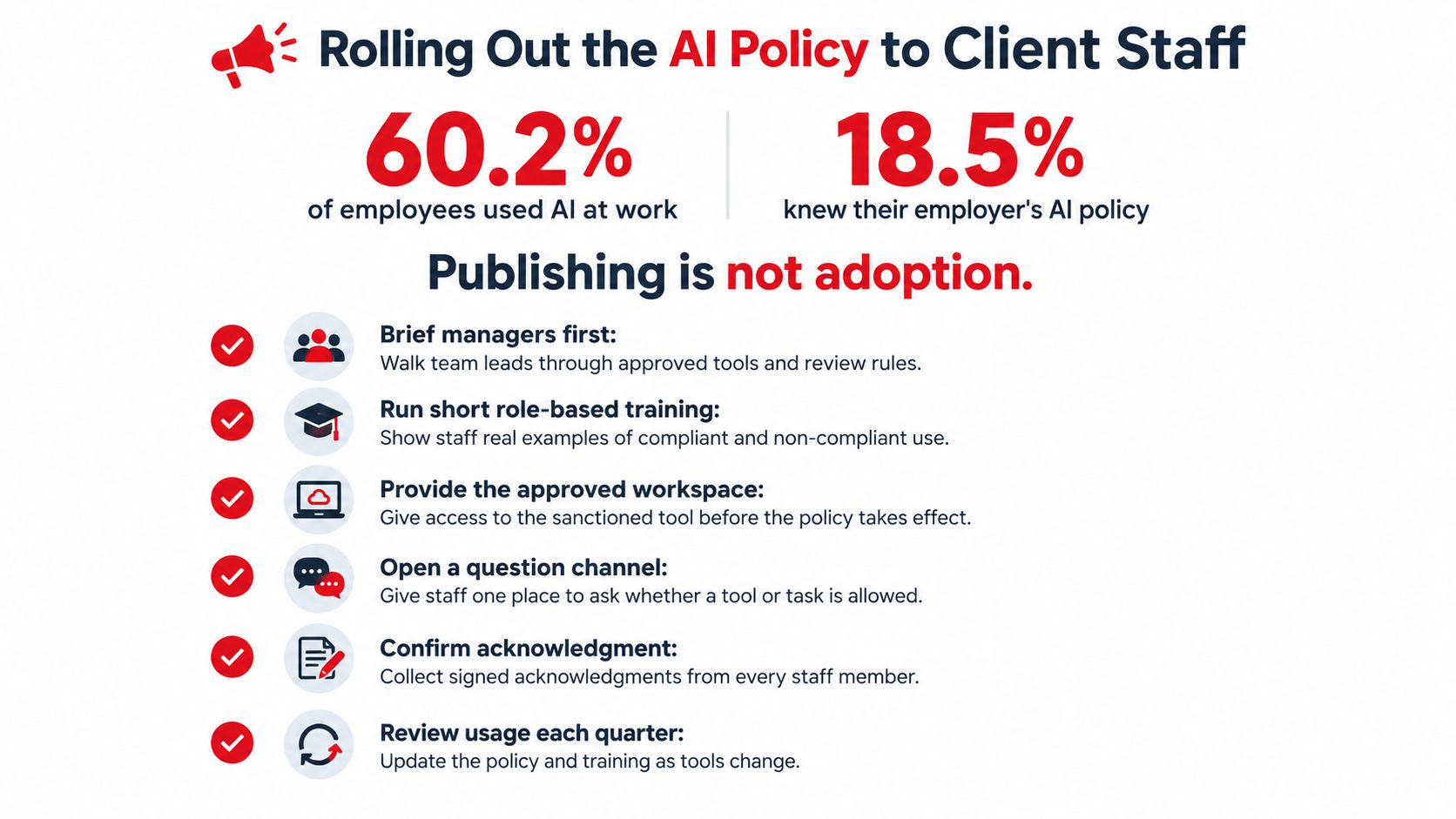
A KnowBe4 survey conducted in June 2025 across Germany, South Africa, the Netherlands, France, the United Kingdom, and the United States found that 60.2% of employees used AI at work, while only 18.5% knew their employer's AI policy. Publishing isn't adoption.
The rollout needs an accessible workspace, manager reinforcement, and a way to check decisions in practice.
Use a staged client checklist
The following is an illustrative rollout schedule, adaptable to client staffing and risk.
- Hold the intake call. Cover use cases, controls, and deployment needs. Veevoo discusses those subjects during the first Prox.ia conversation; the MSP should confirm each promised control against the client deployment.
- Inventory current users and tasks. Include embedded AI features and browser extensions, not just purchased chatbot subscriptions.
- Adapt for two or three roles. Accounting staff, marketing staff, and managers need different examples and approval boundaries.
- Pilot with one team for two weeks. Collect confusing questions and blocked legitimate tasks before broader publication.
- Train with client-work scenarios. Use synthetic examples of a client email or vendor-contract summary, including a short allowed-data check.
- Publish a one-page quick reference. Include the approved workspace access route in onboarding communications and brief managers before staff questions arrive.
- Check awareness each quarter. Ask employees to locate the policy and identify the owner, rather than merely confirm receipt.
- Review questions, exceptions, and incidents monthly. Assign actions from the escalation log and keep policy questions with the named owner, never an unapproved tool.
Distinguish evidence from acknowledgment
Awareness means an employee can find the rule. Understanding means the employee can apply it to a realistic scenario. Compliance requires observable behavior, with logs and lawful sampled reviews providing only part of the evidence.
The MSP AI reseller overview can help frame the service around onboarding and continuing support rather than document delivery alone. Signed acknowledgments can record receipt, but they don't replace scenario checks or operational review.
Confirm Fit Before You Send the Policy to Clients
Use the template only after the client's deployment details are confirmed in writing. The approved policy must describe the service the client will receive, not a possible configuration.
- Confirm the agreement: Availability, supported connectors, model access, deployment, pricing, service levels, support responsibilities, and reseller terms are confirmed separately.
- Confirm the controls: Check applicable administrator, budget, moderation, reporting, and branding functions. Remove statements that depend on unavailable controls.
- Confirm the data boundaries: Every listed data class needs a defensible handling decision and a practical way to support and check it.
The product overview describes the offering; deployment confirmation determines the final policy. For help checking fit, the MSP can contact the Veevoo team.
The contact conversation lasts fifteen minutes with LeeJay Stewart and covers IT visibility needs, AI service plans, or both; an AI-policy discussion can stay focused on AI service plans. An inquiry, demonstration request, or request to meet in Orlando doesn't create a purchase obligation or confirm an appointment.
Veevoo, Inc. distributes Prox.ia and provides guidance on fit, adoption, and the service MSPs build around it; it isn't the software vendor. MSPs preparing a client AI usage policy can visit Veevoo, Inc. to discuss deployment requirements, onboarding responsibilities, and the controls the final policy can accurately describe.