
An SMB client asks for AI on a Monday morning, and the problem is already bigger than software. Employees have started using personal tools, a manager wants “something approved by IT,” and the MSP has to decide whether to sell access, governance, or a service that bundles both.
That is the buying moment for ai workplace tools. The first move is not comparing logos, it is deciding how the client will use AI, who will control it, what data it can touch, and how the MSP will support it without turning every support ticket into a policy debate.
Table of Contents
- When an SMB Client Asks for AI Before You Have a Plan
- What AI Workplace Tools Actually Are
- Six Selection Criteria for Client AI Workspaces
- Deployment Choices and What They Mean for SMB Clients
- Model Choice, Usage Budgets and Pricing Logic
- Governance, Access Controls and the Branded Workspace
- An Illustrative Onboarding and Adoption Playbook
- Where Prox.ia Fits and Your Next Step
When an SMB Client Asks for AI Before You Have a Plan
The call usually starts with enthusiasm and ends with risk. One department wants draft emails, another wants document summaries, and somebody in finance has already been copying data into a personal account because it was faster than waiting for approval.

The MSP should treat that moment as a service design issue, not a procurement task. If the response is just “pick a tool,” shadow use keeps spreading while the client waits for a policy that never really reaches the desk.
The first question is not which model
The first question is what work the client wants AI to do. Drafting, summarization, translation, image generation, and code assistance are different workflows, and they create different support demands, review steps, and confidentiality questions.
Practical rule: if the client cannot describe the workflow, the MSP should not promise a workspace yet.
Enterprise-style buying assumes a bigger security team, deeper procurement, and a more formal rollout. SMB clients usually have tighter budgets, fewer internal controls, and employees who are already improvising, so the MSP has to move quickly with a governed offer or watch unofficial use become normal.
The right frame is simple. AI access is now part of the managed service stack, not an optional add-on to discuss later.
What AI Workplace Tools Actually Are
An AI workspace is a shared environment where employees use multiple underlying models under one login and one policy layer. That is different from letting every user buy a separate consumer account and hope the company can sort out access, billing, and behavior later.
For an MSP, consolidation matters because support follows the service, not the account. If one team uses a company workspace and another team uses personal tools, the provider ends up with split visibility, split onboarding, and split responsibility when something goes wrong.
Shared access beats scattered subscriptions
A workplace setup gives the MSP a controllable surface. That usually means centralized access, consistent policies, and some level of auditability, even though the exact controls depend on the platform and deployment.
Consumer tools are built for individual convenience. Workplace tools are built so an organization can decide who gets access, what they can do, and how the results fit into business processes.
That distinction matters in a reseller model. The MSP is not selling “AI” as a vague promise, it is packaging a repeatable operating service around onboarding, policy, and adoption.
It still sits alongside the rest of the stack
AI workplace tools do not replace RMM, PSA, or EDR. They sit next to those systems and solve a different problem, which is governed employee use of AI inside client workflows.
For MSPs evaluating a platform such as Prox.ia, the question is whether the workspace can be wrapped in the MSP's own support motion. That means the client gets one place for approved AI use, while the provider keeps control over rollout, policy, and recurring review.
Six Selection Criteria for Client AI Workspaces
A reseller-ready AI workspace should be judged against six plain questions, not a feature checklist full of marketing language. If a product fails any of these, the MSP will feel the pain later in support, billing, or client trust.
The six questions that matter
- Usable workflows: Can staff complete the work they actually do, such as drafting, summarizing, translating, or extracting action items, without training every user like a power admin?
- Model choice: Can the workspace support more than one underlying model or capability so the MSP can match tools to tasks rather than force one catch-all option?
- Onboarding: Can non-technical SMB users get started without a long internal rollout or endless hand-holding from the help desk?
- Administration: Can the MSP manage access, policy, and support remotely without relying on a local champion for every change?
- Budget visibility: Can consumption be watched by client, team, or user so monthly usage does not become a surprise?
- Confidentiality questions: Can the client owner understand where data goes, who can see it, and what guardrails exist before employees start pasting sensitive material?
These are business questions first. The product answer is secondary.
Buy on evidence, not on screenshots. If a distributor cannot confirm a capability in writing, the MSP should treat it as unverified and price the risk accordingly.
The same rubric works whether the workspace comes from Veevoo's Prox.ia offer or another platform. The MSP should force every candidate through the same six questions and reject anything that cannot be defended during a client meeting.
Deployment Choices and What They Mean for SMB Clients
Deployment is not a checkbox. It changes where data lives, how the MSP supports the environment, and which clients should be allowed to use the workspace for sensitive work.
A cloud setup is usually the easiest starting point for general SMB use because it keeps the service simple to launch and easier to maintain. Private cloud and on-premises options are heavier to run, but they may be worth it when the client's data handling expectations are stricter.
Compare the trade-offs before the client asks the wrong question
| Deployment | Data residency | MSP delivery cost | Best fit for SMB client |
|---|---|---|---|
| Cloud | Vendor-managed environment, subject to the platform's architecture | Lower operational overhead | General SMB clients that want a fast rollout |
| Private cloud | Dedicated or isolated environment, depending on the design | Higher than shared cloud | Clients with tighter confidentiality expectations |
| On-premises | Client-controlled environment on local infrastructure | Highest support burden | Clients that need the most direct control over data handling |
The key question is not “which deployment is best.” It is “which deployment matches the client's risk profile and the MSP's runbook.”
Prox.ia branding and deployment options need to be confirmed for the proposed setup, not assumed. A legal, healthcare, or finance client may justify the extra work of a more controlled deployment, but the MSP should sell that as an operational choice, not a magic compliance fix.
Model Choice, Usage Budgets and Pricing Logic
AI model selection cannot be locked once and forgotten. Different models fit different tasks, and the MSP needs to treat usage as an operating variable, not an invisible backend detail.
If the workspace supports multiple models, that flexibility should be wrapped in one policy layer and one billing logic. Otherwise, the service gets messy fast, especially when one department burns through usage while another barely touches the platform.
Budget control has to be part of the offer
The MSP should package consumption oversight as a recurring deliverable. That means reviewing usage, flagging drift, and deciding whether the client needs a different tier, a tighter policy, or a bigger allowance.
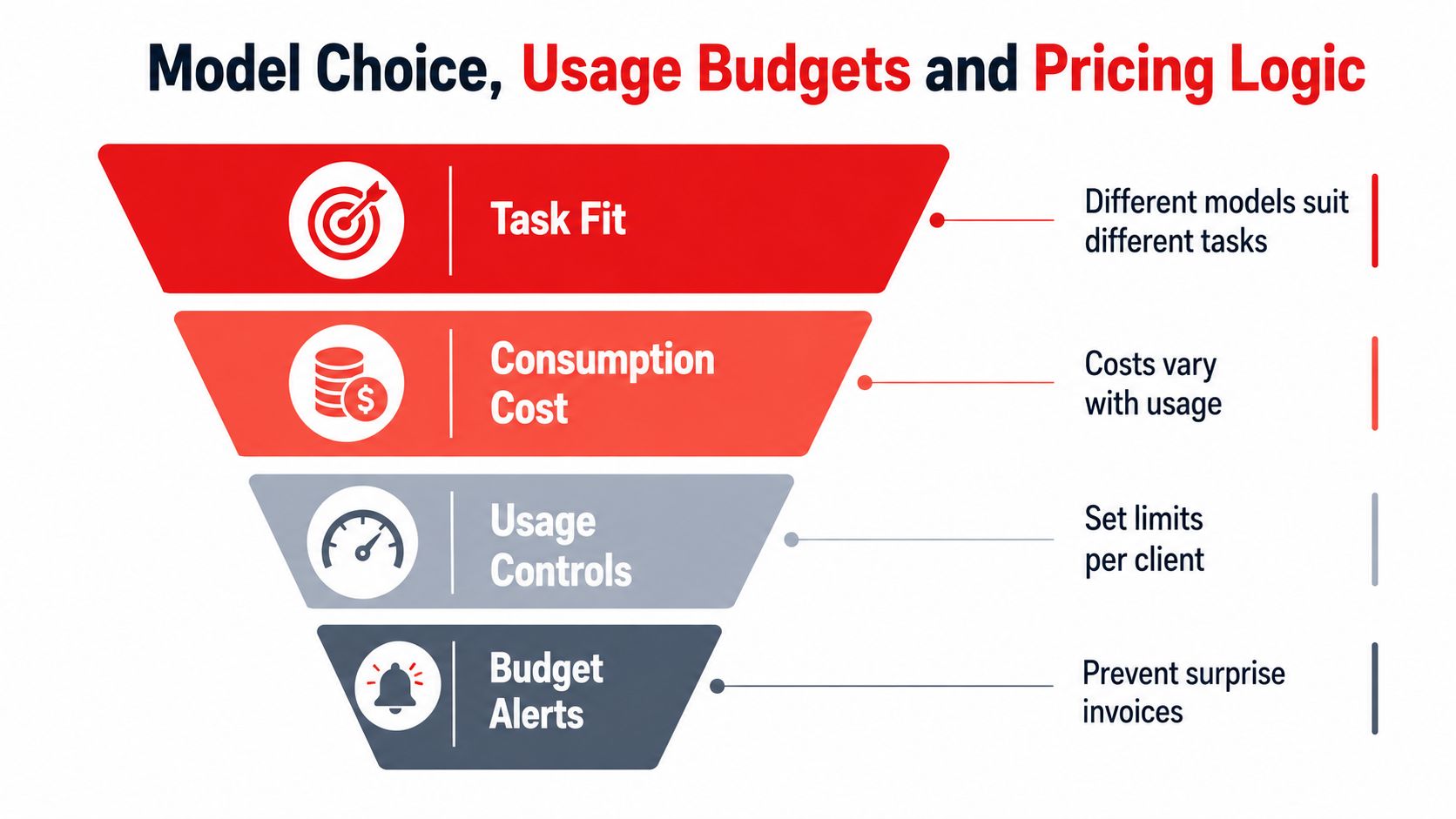
- Task fit: Start with the work itself, not the brand of model.
- Consumption cost: Assume usage will vary by team and by month.
- Usage controls: Set limits before the first pilot expands.
- Budget alerts: Build a process that prevents billing surprises.
The internal service design should point to a single workspace experience, even if the underlying models differ. Veevoo's multi-model AI workspace positioning is relevant here because the MSP needs one commercial wrapper, not a collection of disconnected tools.
Any pricing example in an MSP proposal should stay illustrative until Veevoo confirms the actual model list, reporting outputs, and consumption thresholds. The point is not to guess the economics, it is to build a service that can explain them clearly.
Governance, Access Controls and the Branded Workspace
Governance is the service. Without it, the MSP is just reselling access and hoping the client behaves well enough to avoid trouble.
NIST's Govern, Map, Measure, Manage structure is useful because it translates cleanly into MSP work: identify the AI systems, map the data and identities involved, measure behavior and control effectiveness, and manage exceptions or remediation. That is not abstract policy language, it is the operating model.
Turn shadow AI into a managed category
Employees will use outside tools unless the MSP gives them a better approved path. The practical response is to classify usage as approved, monitored, restricted, or blocked, then tie those classes to the client's service catalog.
That structure works only if the provider can see what is being used. Discovery can come from network and proxy logs, browser and endpoint inventories, identity-provider records, OAuth grants, SaaS audit logs, API-gateway traffic, and cloud logs, which is exactly why governance has to be operational, not just verbal.
Make the workspace feel owned, not borrowed
A branded workspace helps the client see the service as part of their operating environment rather than a random third-party account. Role-based access, moderation reporting, and audit trails then become the recurring controls the MSP can manage and review.
Moderation reduces risk, but it does not detect every sensitive item and it does not guarantee compliance.
For MSPs evaluating Prox.ia, the right conversation is about service packaging. A policy workshop, access review, and moderation review are all billable workstreams if the MSP designs them that way. The same applies to any managed AI workspace, including the option described by Veevoo through its prompt moderation page.
An Illustrative Onboarding and Adoption Playbook
An SMB rollout should start small and stay tied to real work. A pilot that feels exciting in week one but has no operating rhythm by week three usually dies as soon as the novelty wears off.
An illustrative 30 to 60 day rollout
Week 1 to 2, kickoff and policy alignment. The client owner, MSP service manager, and security lead agree on approved use cases, data boundaries, and who can request access. The MSP prepares the workspace, the access model, and the support path.
Week 3 to 4, pilot group launch. A narrow set of users, usually one or two teams, gets access first. The MSP watches what they do in practice, where prompts break, and which tasks need guardrails.
Week 5 to 6, prompt workshops and controlled expansion. Employees learn how to draft, summarize, and classify work inside the workspace instead of defaulting to personal accounts. Additional teams are added only after the MSP confirms the first group is using the approved flow.
Week 7 to 8, first service review. The MSP checks usage, adoption by role, and any moderation or policy issues, then adjusts access or budgets as needed.
A randomized experiment with 453 college-educated professionals found that ChatGPT access reduced average task completion time by 40% and increased output quality by 18%, with participants exposed to the tool being twice as likely to report using it in their real job two weeks later Science. That supports a controlled rollout, not an open-ended free-for-all.
The failure modes are predictable. Some users will bypass the workspace, some clients will push to switch models mid-rollout, and some pilots will stall when nobody owns the next step. The MSP has to keep the adoption motion tied to governance and budget review or the service turns into one more unused license.
Where Prox.ia Fits and Your Next Step
The buyer's decision is simple when stripped down to the essentials. The MSP needs a governed workspace that matches the client's workflows, supports the right deployment, gives visibility into consumption, and fits into a repeatable onboarding and review motion.
That is where Prox.ia belongs in the conversation for MSPs that want a reseller-ready option they can wrap with their own support, policy, and adoption services. The distributor is Veevoo, and the platform details, branding options, deployment choices, moderation limits, and pricing still need to be confirmed for each client engagement through the Prox.ia product page and the associated reseller discussion at the MSP AI reseller page.
The MSP should use the six criteria, the deployment decision, and the governance workstream as the proposal outline. If those pieces are clear, the client gets a service, not just access.
Veevoo, Inc. provides MSP-focused distribution and enablement for governed AI workspace services like Prox.ia, which makes it relevant when a client is asking for AI access but the MSP still needs control, policy, and recurring support. Visit Veevoo, Inc. to review the current Prox.ia offering and contact the team about fitting it into an MSP service package.