

The client's budget meeting is approaching, and the service delivery manager has pulled a report of devices older than five years. Then the reconciliation starts: some endpoints don't appear in monitoring, some billed devices have no matching inventory record, and several out-of-warranty workstations still show a healthy status. The report looks ready for a refresh conversation. The evidence behind it isn't.
Table of Contents
- Why the Refresh Calendar Is Often Wrong
- What Asset Lifecycle Planning Means for an MSP
- The Decision Dataset Behind Every Lifecycle Plan
- A Risk-Based Replacement Framework for SMB Clients
- Connecting Lifecycle Planning to RMM, PSA and EDR
- Turning the Lifecycle Plan into Client Reporting
- Common Pain Points and How to Defuse Them
Why the Refresh Calendar Is Often Wrong
Illustrative scenario: An MSP technical lead compares an SMB client's hardware-age export with the records used for service delivery. A workstation appears under an old hostname in the asset register, a different name in security tooling, and a former employee's assignment in the service record. Another device appears on the invoice but hasn't recently appeared in monitoring.
Neither discrepancy establishes that the hardware needs replacement. Both establish that the MSP needs an investigation before presenting a confident refresh recommendation.
A healthy status is also narrower than it looks. It may describe the checks a particular tool performed, not warranty coverage, operating-system support, business suitability, or the completeness of security coverage. Treating that status as a lifecycle decision collapses several separate questions into a misleading green indicator.
The Missing Evidence Behind the Calendar
The visibility problem isn't hypothetical. Only 16% of organizations reported consolidated visibility into every endpoint, while another 25% reported visibility of 75% or less, according to the endpoint visibility findings published through SHI. Those findings don't establish an individual client's inventory accuracy, but they give MSPs a reason to test completeness rather than assume it.
For the illustrative client, the manager should separate the initial findings:
- Identity mismatch: Establish whether conflicting records describe the same physical device.
- Coverage uncertainty: Investigate whether a missing agent reflects an offline endpoint, a broken installation, or an unmanaged asset.
- Commercial mismatch: Confirm whether a billed record represents an active service obligation or an unprocessed change.
- Lifecycle exposure: Check support deadlines and condition independently of operational health.
Practical rule: An age report is a candidate list for investigation, not an approved replacement plan.
For MSP owners, service delivery managers, and technical leads, asset lifecycle planning connects those investigations to client decisions. The deliverable isn't a cleaner spreadsheet. It's a defensible explanation of which assets should remain, which need corrective work, which require replacement, and when the client should allocate budget.
What Asset Lifecycle Planning Means for an MSP
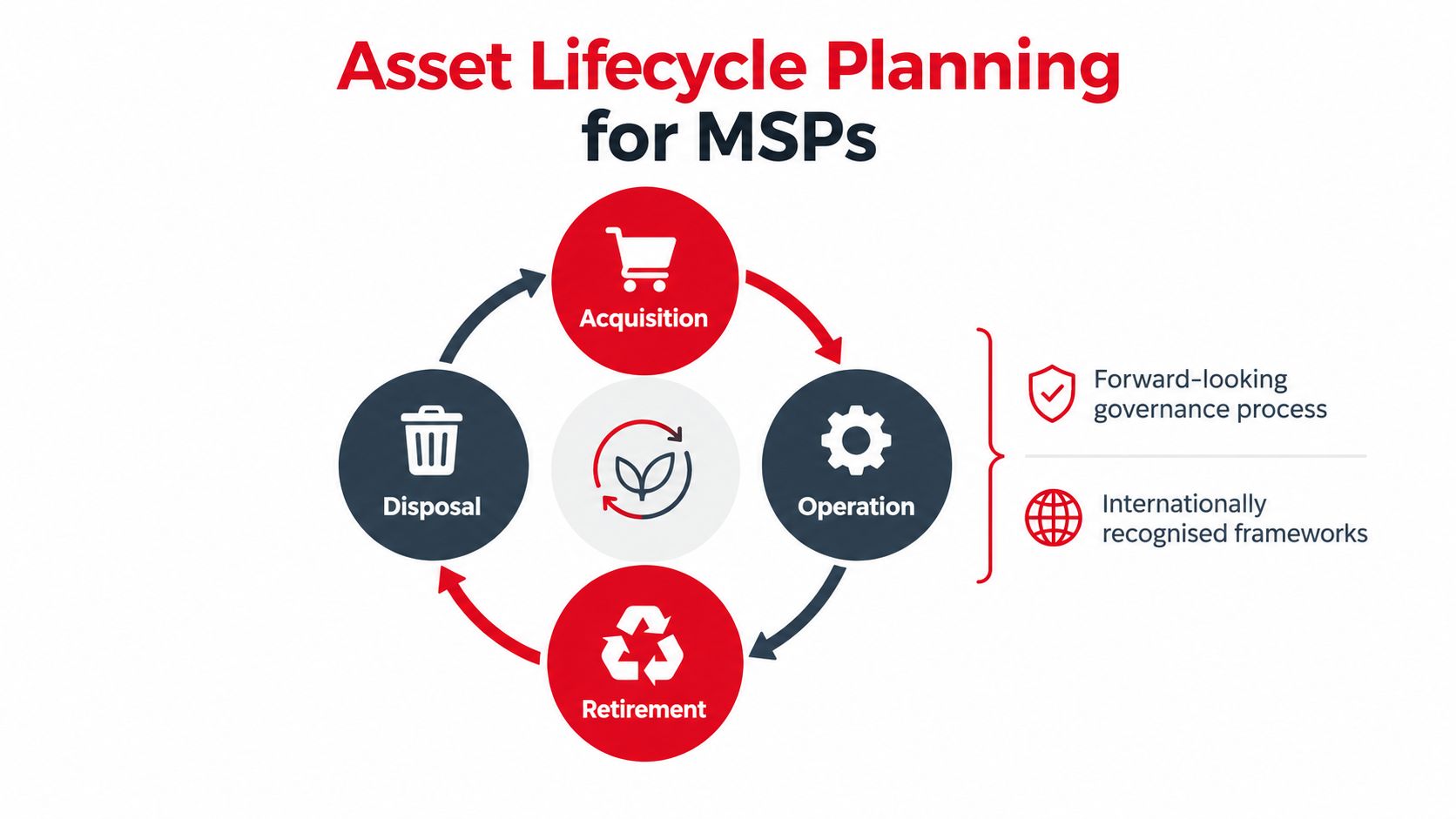
Asset lifecycle planning is forward-looking governance, covering acquisition, deployment, operation, renewal, retirement, and disposal. Operational asset management establishes the current state. Lifecycle planning determines the next decision, its timing, its business justification, and the person authorized to approve it.
The distinction matters during client reviews. A technician may correctly report that a workstation is functioning today. The service delivery manager must still determine whether it can support the client's intended workload through the next budget period.
A Governance Framework, Not a Vendor Checklist
The internationally recognized foundation is the ISO 55000 family, which developed from the British Standards Institution's PAS 55 framework, published in 2004, through international work beginning in 2010, and launched as ISO 55000, ISO 55001, and ISO 55002 on February 5, 2014, with contributions from experts in 31 countries, as documented by ISO's asset-management committee.
That development moved the emphasis beyond maintaining equipment toward managing value, risk, performance, and alignment with organizational objectives. For an MSP, the practical translation is straightforward: procurement, support continuity, renewal, reassignment, and retirement belong in the same decision process.
ISO also distinguishes asset life, from creation or ideation through end of life, from useful life, the period during which an asset can fulfill its intended purpose. Consequently, devices purchased together don't necessarily belong in the same refresh cohort.
| Operational asset management asks | Lifecycle planning asks |
|---|---|
| Is the device currently reporting? | Can the client reasonably retain it through the proposed service period? |
| What software is installed? | Which support dependencies affect its future suitability? |
| Who has the device? | Does reassignment offer more value than replacement? |
| Is the service issue resolved? | Does the maintenance history change the investment decision? |
A sensible lifecycle policy therefore specifies evidence requirements, decision authority, and review triggers rather than imposing an automatic replacement birthday. It should remain dated and reviewable, particularly when major technology, regulatory, or business changes affect the assumptions behind it.
For SMB clients, that approach keeps governance practical. The MSP doesn't need an elaborate committee for every laptop, but it does need a recorded reason for spending, deferring spending, or accepting an exception.
The Decision Dataset Behind Every Lifecycle Plan
Before assigning a refresh date, the MSP needs a record that explains both what is known and how it was established. A populated field without provenance can be less useful than an explicit unknown, especially when purchase dates have been inferred from deployment or warranty records.
ISO's lifecycle perspective supports dated milestones and condition indicators because value and exposure can change before equipment fails. Its revised guidance reinforces decision-making, information management, predictive actions, and continual improvement, as explained in ISO's discussion of asset value and lifecycle management.
Capture Decision Fields With Their Evidence
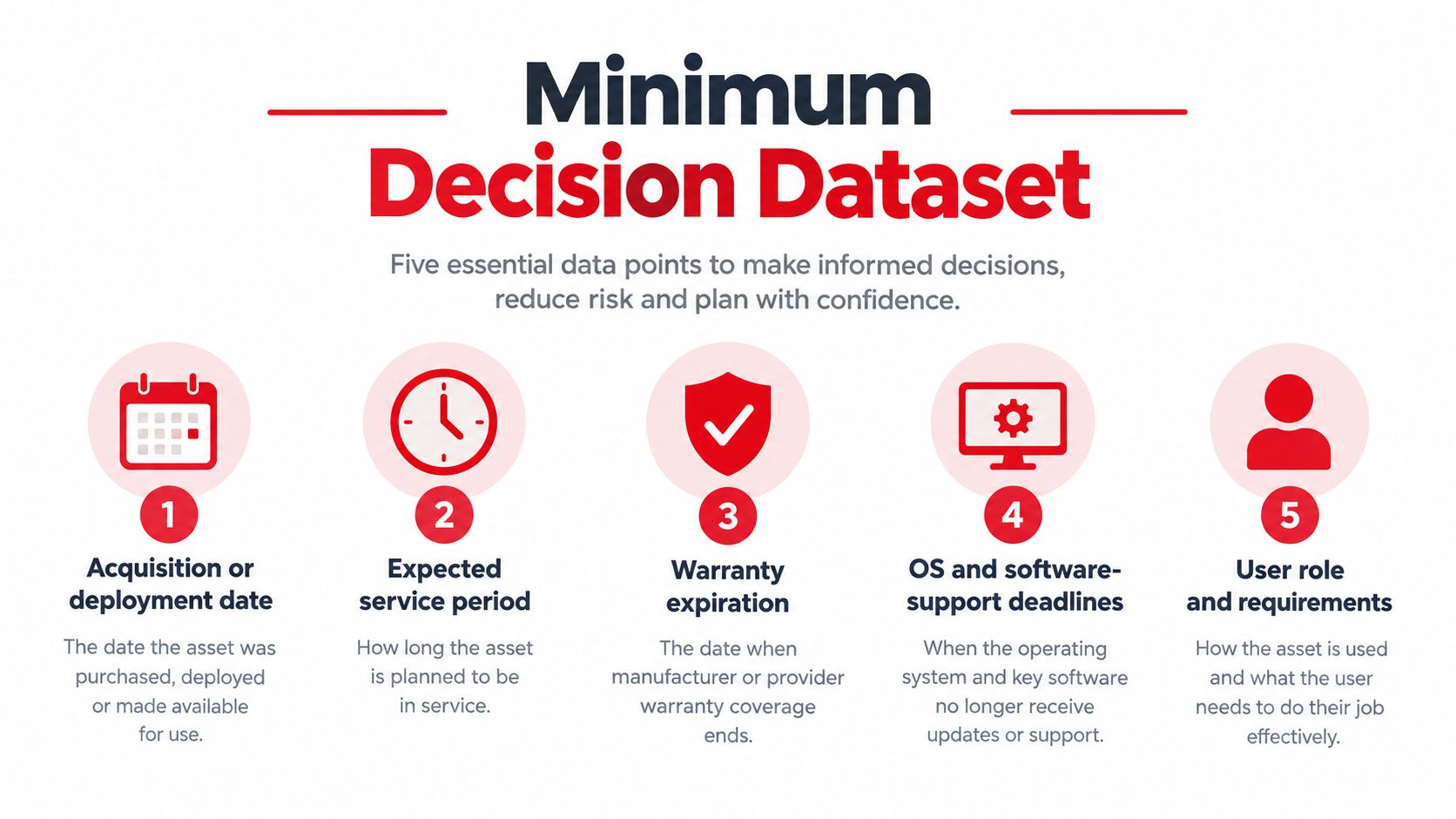
The minimum working record should include:
- Asset identity and provenance: Record the serial number or asset identifier, source system, and observation date. Preserve conflicting identifiers until someone resolves the match.
- Acquisition and deployment dates: Retain both when available. An invoice establishes a purchase event; it doesn't necessarily establish when the device entered service.
- Expected service period: Label this as a planning assumption, with the client policy or workload requirement behind it.
- Warranty expiration: Capture the documented end date and relevant coverage terms. An expired warranty and an unavailable repair option aren't interchangeable.
- OS and software-support deadlines: Record the installed version and applicable support milestone, including application dependencies that could block an upgrade.
- Ownership and assignment: Identify the client owner, assigned user, location, and business role.
- Management and protection status: Include source-specific observations and timestamps, not an undifferentiated protected checkbox.
- Proposed action: Use retain, repair, reassign, replace, or retire, with a rationale and decision owner.
Reconcile Before Publishing
Procurement records help establish acquisition. Warranty records establish coverage. RMM and EDR records contribute different operational observations, while identity and PSA records help explain assignment and commercial treatment. The MSP should retain those distinctions instead of allowing the latest imported value to overwrite every other source.
Illustrative example: A recently purchased laptop lacks confirmed security coverage, while an older workstation remains supported and suitable for its role. The immediate action for the newer laptop is coverage investigation and remediation, not automatic replacement; the older device may justify retention.
License assignment deserves the same discipline. A disabled identity with an assigned subscription is a review candidate, not proof that cancellation is appropriate without checking dependencies and retention needs. The related Microsoft 365 license-management workflow belongs alongside the device record, without assuming a license-to-user match establishes actual business use.
A Risk-Based Replacement Framework for SMB Clients
A workable refresh framework judges business exposure and condition, then uses age as context. It shouldn't force a supported device out of service merely because a calendar threshold has arrived, or allow a problematic device to remain because it is relatively new.
Uptime Institute's equipment lifecycle guidance recommends annual assessment of critical equipment across six dimensions: condition, functionality, obsolescence, regulatory impact, sustainability, and cost. It also recommends current inventory, capacity assessment, and total-cost-of-ownership budgeting.
Evaluate the Reasons to Retain or Replace
For SMB endpoints, those dimensions translate into specific questions:
- Condition: Does the repair history suggest a manageable issue or deteriorating reliability? A replaceable component may justify repair rather than a full refresh.
- Functionality: Can the endpoint perform the assigned role? A device suitable for administrative work may no longer meet a specialist user's requirements.
- Obsolescence: Are required software, service support, and replacement parts available? Performance alone doesn't settle this question.
- Regulatory impact: Do applicable obligations change the acceptable configuration or handling requirements? The MSP should identify the obligation rather than assign a generic compliance score.
- Sustainability: Is supported reuse or refurbishment feasible, and can data handling be verified?
- Cost: Compare repair, coverage, deployment, migration, and disposition costs with replacement. Purchase price alone is an incomplete comparison.
Classifying business criticality comes before assigning urgency. An unresolved support issue affecting an essential business workflow deserves different treatment from the same issue on an unused spare.
Build a Forecast With Visible Assumptions
Federal guidance describes a typical hardware lifespan of five to six years and maintenance or support contracts commonly lasting three years, but treats replacement timing as a planning consideration rather than a universal mandate, according to the federal technology lifecycle report. Those ranges can inform a client policy; they shouldn't substitute for device-level assessment.
A practical MSP recommendation is a rolling 12-to-24-month roadmap, explicitly presented as a planning method rather than an industry requirement. Each proposed expenditure should carry a target period, budget status, dependency, and confidence label.
High confidence means the relevant dates and device match are documented. Provisional means a specific assumption remains unresolved. Blocked means missing evidence prevents a responsible recommendation.
A refresh forecast should show what could change the recommendation, not just when the MSP proposes buying hardware.
The hardware, warranty, and OS lifecycle planning discussion provides a relevant product-evaluation context. Manufacturer coverage and available fields still need confirmation for the actual estate.
Risk-based refresh decision matrix for client endpoints
| Device example | Key risk signal | Refresh action | Planning horizon |
|---|---|---|---|
| Supported older workstation | Suitable condition and complete coverage evidence | Retain, with documented reassessment | Next scheduled review |
| Recently deployed laptop | Unconfirmed management or protection | Investigate and remediate before scoring | Immediate investigation |
| Business-critical workstation | Required workload exceeds practical capability | Replace or validate refurbishment | Next approved deployment window |
| Endpoint nearing support end | Confirmed deadline and unresolved upgrade dependency | Schedule migration and replacement if needed | Before the documented deadline |
| Unassigned spare | Unclear demand and recoverable value | Assess reassignment or retirement | After ownership and demand review |
Illustrative matrix. The client should approve risk categories and spending authority before applying it.
Connecting Lifecycle Planning to RMM, PSA and EDR
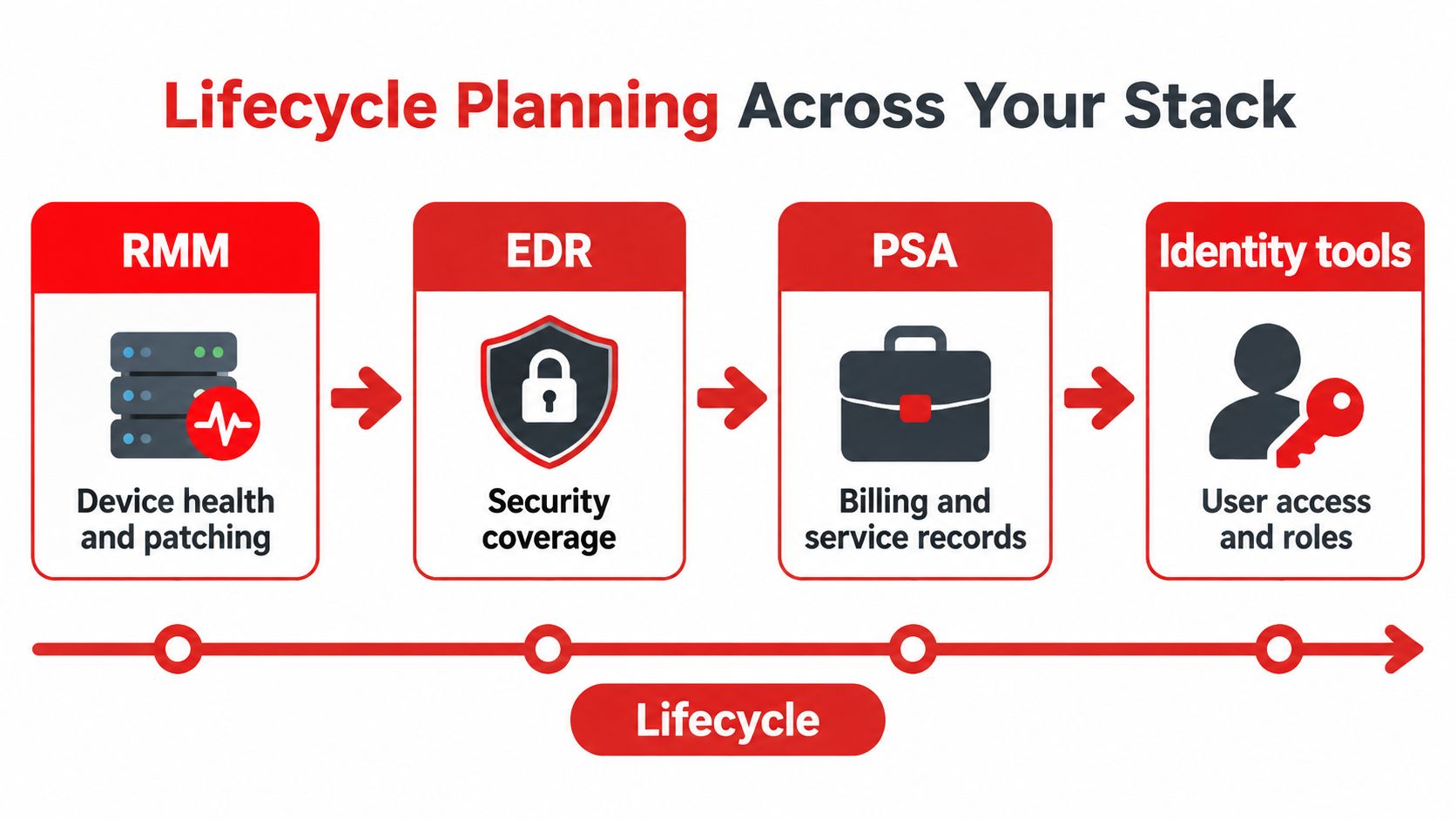
A single-system export is convenient because it avoids matching records. It also leaves the service manager dependent on that system's scope. A more defensible approach preserves each source's purpose and investigates disagreements rather than choosing whichever total looks most complete.
CISA recommends a regularly updated inventory of organizational assets with network addresses that helps distinguish known, unknown or shadow, and unmanaged assets, as described in its Cybersecurity Performance Goals. Discovery is therefore a starting point for investigation, not proof of management, protection, or compliance.
Different Sources Answer Different Questions
| Source | Lifecycle contribution | Limitation to preserve |
|---|---|---|
| RMM | Managed-device observations, health, and patching context | Absence doesn't explain whether the asset is offline, retired, or unmanaged |
| EDR | Security-agent and coverage observations | A matching record alone doesn't establish every required control |
| PSA | Service agreements, tickets, and billing context | A billable item doesn't prove current deployment |
| Identity tools | User status and assignment context | An enabled account doesn't prove a device or license is needed |
| Procurement and warranty records | Acquisition and support evidence | Coverage terms may require separate validation |
The reconciliation layer should complement these tools, not replace their operational responsibilities. The MSP still needs an owner to investigate exceptions and authorize changes.
Volgap is an option for cross-tool visibility across management, identity, security, license, and billing data. Its described scope includes inventory reconciliation, investigation of unmanaged or unprotected devices, comparison with PSA billing, and review of licenses assigned to disabled users.
That scope doesn't establish compatibility with every MSP stack. Any proposed end-to-end workflow remains illustrative until the relevant connectors, fields, matching behavior, and reporting outputs have been confirmed.
Test the Handoffs Before Promising Automation
A useful acceptance test follows an asset through the proposed workflow rather than stopping at a successful connection:
- Identifier matching: Can the workflow distinguish renamed devices, duplicate records, and separate assets?
- Source freshness: Are observation times visible, and how are stale or disconnected sources represented?
- Assignment handling: Can the MSP distinguish a current assignment from historical ownership?
- Commercial mapping: Does the comparison respect the client's actual billing model and exclusions?
- Lifecycle coverage: Which manufacturers, warranty terms, and OS-support fields are available?
- Exception closure: Can staff preserve the investigation outcome and prevent an unresolved mismatch from disappearing into a summary?
If a required field isn't available, the plan needs a documented manual input or another validated source. Silent assumptions aren't automation.
Turning the Lifecycle Plan into Client Reporting
The monthly report should present decisions and exceptions, not another inventory dump. The SMB owner needs to understand the recommended expenditure, the consequence of deferral, and the evidence still missing.
Nebraska's IT asset-management guidance.pdf) calls for a dynamic inventory, unique identifiers, and appropriate identification of end-of-life assets. Applied to reporting, that means planned, active, approaching-retirement, retired, and awaiting-disposal records shouldn't be mixed into an unexplained device total.

Make Every Count Defensible
Before publishing an exception count, the service manager should define its population, inclusion rule, reporting date, and exclusions. A count of approaching warranty expirations means little if the client can't tell whether it covers all owned hardware or only devices with successfully retrieved warranty data.
Overlapping categories also need explicit treatment. A workstation can be both outside warranty and approaching OS support end; adding those categories together would overstate the number of distinct devices.
The report should distinguish documented deadlines, proposed review dates, and unresolved evidence visually. That prevents a planning assumption from becoming an apparent manufacturer requirement when someone copies the summary into a QBR slide.
Reporting standard: Every headline count should be traceable to identifiable records, a defined rule, and a dated source.
Volgap's automated monthly reporting context is relevant when evaluating delivery options. The MSP should validate the available report fields and review workflow rather than promise a finished refresh plan without human approval.
Use the QBR to Obtain Decisions
The QBR should focus on changes since the previous review: approved replacements, deferred actions, resolved coverage gaps, proposed license reclamation, and completed dispositions. Budget discussions should separate quoted expenditure from preliminary estimates and include implementation work, not just hardware acquisition.
A compact client-facing template can keep that conversation grounded:
| Report category | Evidence required | Recommended decision |
|---|---|---|
| Old but covered | Condition review and confirmed support evidence | Approve retention and reassessment |
| New but unmanaged | Discovery record and missing management match | Assign investigation owner |
| Inactive but still billed | Dated operational observations and agreement mapping | Validate billing treatment |
| Approaching warranty end | Confirmed coverage date and terms | Compare renewal, retention, and replacement |
| Approaching OS support end | Installed version, deadline, and upgrade assessment | Approve migration dependency work |
| Retirement pending closure | Authorization and outstanding disposition evidence | Complete handoff and documentation |
The report becomes useful when each recommendation ends with an owner, approval status, and next review point. A polished chart without those fields doesn't move the client's plan forward.
Common Pain Points and How to Defuse Them
The hardest exceptions usually involve an unfinished handoff, not an old device. A technician removes equipment, finance retains the charge, and nobody records final disposition. The remedy is a closure process that reconciles operational, commercial, and data-handling outcomes.
Escalate Evidence Failures
- Missing monitoring records: Flag the discrepancy for investigation. Don't classify the device as retired solely because it stopped reporting.
- Disabled-user licenses: Confirm business dependencies and retention requirements before reclaiming the entitlement.
- Unsupported production systems: Record the affected workload, mitigation, accountable owner, and replacement dependency.
- Expired warranties: Verify available support options before recommending renewal or replacement.
- Undocumented disposition: Keep the record open until authorization, transfer, and final handling evidence are available.
Secure retirement must distinguish reuse, resale, recycling, and physical destruction. NIST-aligned hardware-management guidance published by Chesterfield County supports accountable inventory, controlled maintenance records, and media sanitization for reuse or disposal.
The handoff record should identify the asset, custodian, transfer authorization, destination, retirement date, sanitization method, and evidence of completion. Sanitization should match the storage medium and data sensitivity; functional hardware alone doesn't justify reuse.
Sustainability goals don't remove the need for verified data handling, and security concerns don't automatically justify destroying reusable hardware.
The same closure discipline applies beyond endpoints. CIS asset-management guidance covers hardware, software, and cloud platforms throughout their lifecycles, including investigation and appropriate disposal.
No refresh recommendation should reach the client without a documented source, an explicit planning assumption where needed, and a clear owner.
As a software distribution and enablement partner, Veevoo, Inc. offers Volgap to MSPs evaluating cross-tool visibility for lifecycle planning and client reporting. MSP teams can contact the distribution team with their RMM, PSA, EDR, identity, and warranty requirements to discuss connector fit and the evidence needed for a defensible refresh roadmap.