

A client's finance team wants AI access before the next reporting cycle. Marketing already uses personal AI accounts, HR wants help drafting sensitive communications, and the service desk has been asked whether the new workspace will stop confidential information from leaving the business. A statement that harmful content is prohibited won't answer any of those questions.
Content moderation guidelines need to tell employees what they can submit, administrators what happens when something is flagged, and reviewers how to correct a bad decision. For an MSP-run AI service, the appeal process belongs in the operating model from the start, not in a support article written after the first complaint.
Table of Contents
- Scope the Risks Before Writing a Single Rule
- Moderation Tiers and the Review Rules for Each
- How to Draft and Publish the Policy Template
- Connecting Moderation to Workspace Controls and Onboarding
- Reporting Moderation Results in Service Reviews
- Schedule a Moderation Workshop Before Your Next Client Launch
Scope the Risks Before Writing a Single Rule
Consider an illustrative scenario: a finance department wants contract summaries, while customer support wants suggested replies. Both teams use text generation, but their exposure differs. Finance may submit confidential commercial terms; support may produce customer-facing answers about sensitive situations.
Start with people and business tasks. Identify ordinary users, administrators, reviewers, and anyone authorized to approve exceptions. Then inventory enabled assistants, document uploads, image handling, code generation, and any customer-facing use before assigning risk.
Deployment setting comes before policy promises. A shared cloud workspace, private environment, and on-premises installation raise different questions about processing, retention, access, and operational responsibility. None should be assumed available for the proposed setup; the onboarding record should identify the confirmed deployment and applicable data policies.
Build a deployment-specific risk register
UNESCO's platform governance guidelines call for transparent policies, checks and balances, and attention to language, cultural particularities, and regional context. For an MSP, the practical implication is to scope the actual client environment rather than copy a universal prohibited-content list.
Scoping dimensions for a client AI deployment (illustrative example)
| Scoping dimension | Question to answer | Illustrative example |
|---|---|---|
| User group | Which client roles get access, and do any hold elevated permissions? | Finance staff pasting client contracts into prompts |
| Features and models | Which assistants or capabilities are enabled for each group? | Code generation enabled for a marketing team with no review step |
| Data sources | What client data could enter a prompt or document upload? | Patient names in a clinic's scheduling questions |
| Languages and regions | Which languages and jurisdictions does the workspace serve? | Spanish-language support queries needing separate review samples |
| Deployment setting | Is the workspace shared, private, or on-premises? | Data-handling questions differ by deployment type |
| Excluded uses | Which uses are out of scope and must be blocked or discouraged? | Generating legal advice for client customers |
Include AI tools employees already use outside the sanctioned workspace. Shadow AI belongs in the register because a workspace policy won't govern activity that never reaches that workspace. Ask department managers about browser assistants, personal subscriptions, and AI features embedded in existing applications.
Turn unknowns into onboarding decisions
Pilot the scope with a single department before broad rollout. Use synthetic or appropriately de-identified examples to examine what employees submit, what they expect back, and where someone must approve the result.
Record unanswered questions with an owner and a release decision. An unresolved retention question should remain an onboarding blocker where sensitive information is involved, not become an assumption buried in the policy.
Practical rule: An unknown control is an open item, not an implied safeguard.
Finish with a short scope statement. An illustrative version could cover finance and support employees, approved assistants, English and Spanish text workflows, and approved document sources, while excluding autonomous customer advice and legal determinations. The policy should reference that statement so administrators know exactly which deployment they're governing.
Moderation Tiers and the Review Rules for Each
Separate content handling from account sanctions. A prohibited request may justify blocking an output, but it doesn't automatically justify suspending an employee. Repeated misconduct and credential sharing require an access decision with its own evidence and authorization.
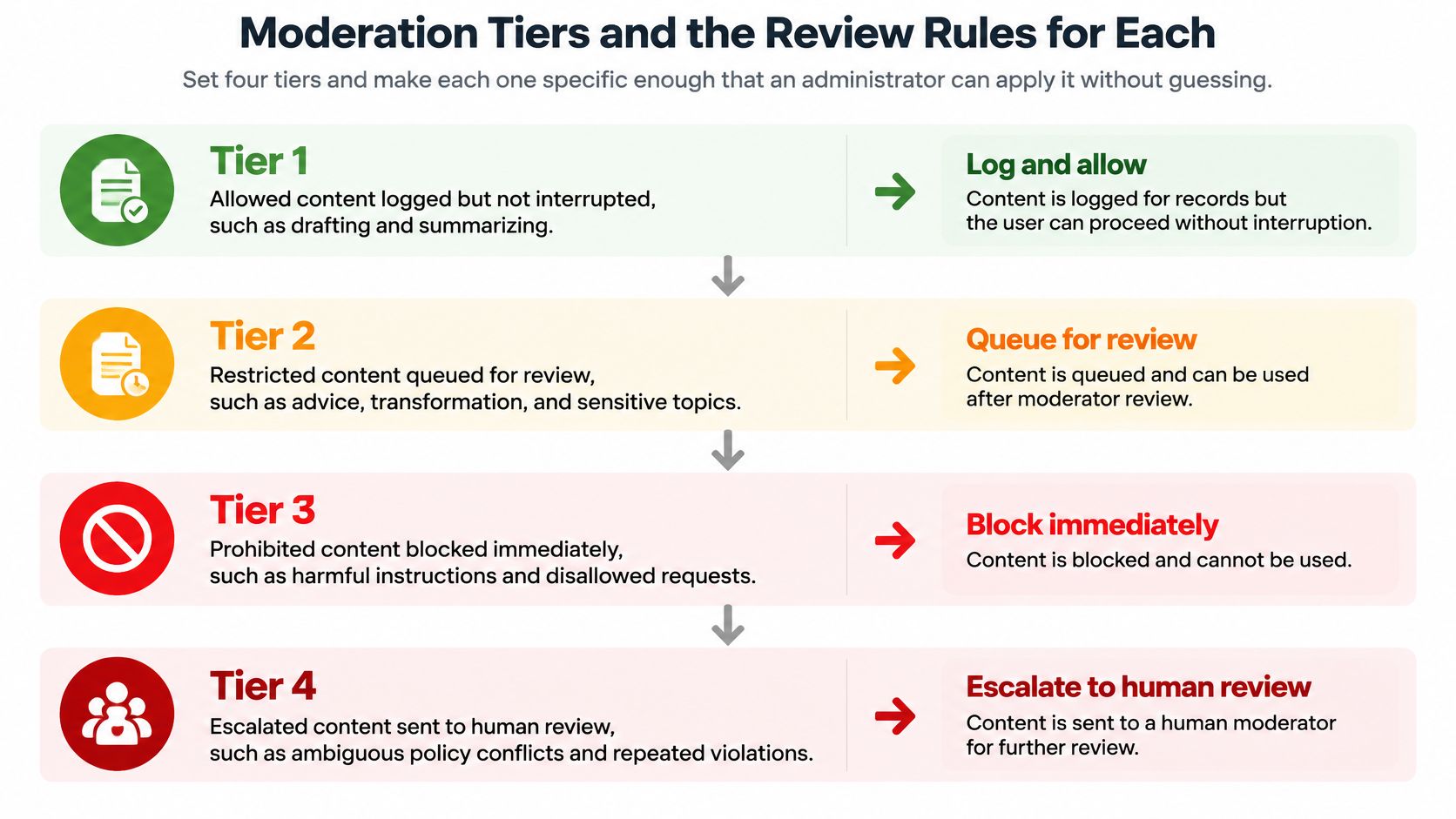
The hierarchy below summarizes increasing intervention. The operational table defines the proposed client policy, including when escalation becomes suspension.
Define the action at each tier
Tier 1 permits ordinary drafting, summaries, and internal FAQs without interrupting work. Logging should capture only the information needed for the agreed purpose, with access and retention defined separately.
Tier 2 handles restricted material. The user receives a warning, the item is held where supported, and a reviewer determines whether it can proceed, needs redaction, or falls outside the service.
Tier 3 blocks high-severity content and requires human review. A self-harm signal should trigger a protective response appropriate to the client's procedures, not be treated automatically as employee misconduct.
Tier 4 applies to access risk, such as repeated confirmed violations or credential sharing. Suspension is temporary containment pending review, not a substitute for deciding what happened.
Moderation tiers with illustrative content and review rules
| Tier | Illustrative content | Automated handling | Human review |
|---|---|---|---|
| Tier 1 - Allowed and logged | Drafting, summaries, internal FAQs | Pass through with usage logging | Quarterly random sample |
| Tier 2 - Flag and warn | Client personal data, pricing, HR records | Warn the user and hold for review | Reviewer decides within a client-approved service window |
| Tier 3 - Block and escalate | Harassment, illegal instructions, self-harm signals | Block the output and notify the administrator | Mandatory human review |
| Tier 4 - Suspend access | Repeated Tier 3 violations or credential sharing | Suspend access pending review | Mandatory review before reinstatement |
These are illustrative policy actions, not a statement of available workspace features. Replace the content examples with the client's categories and verify every proposed automated action before publishing.
Give reviewers authority, not just a queue
NIST's Generative AI Profile supports a layered approach involving content filters, monitoring, documented human moderation, and deployment-representative testing. Use deterministic rules for clear indicators, classifiers for contextual risk, and people for ambiguity rather than trusting a single safety score.
Assign confidence thresholds by category and validate them against labeled examples. A threshold suitable for routine commercial information may be unsuitable for severe harm. Random audits of passed content are essential because reviewing only flagged items won't reveal missed violations.
Name a client policy reviewer and a backup. Give them authority to release held content, overturn an automated decision, request specialist advice, and recommend reinstatement; reserve permanent account termination for an explicitly authorized decision-maker.
Mandatory human review should cover account termination, safety-critical claims, political or journalistic material, suspected self-harm, and cases involving children. The Cambridge analysis of human involvement in automated moderation treats meaningful oversight and remedy as governance issues, not merely workflow preferences.
How to Draft and Publish the Policy Template
The appeal path is part of the policy itself. A user who receives a block needs an understandable reason and a usable way to challenge it, not an unexplained instruction to contact support.
The European Commission's account of DSA implementation reports that users have appealed more than 165 million platform decisions through internal mechanisms since the DSA began applying, with almost 30% reversed. Those platform figures aren't a forecast for an MSP workspace, but they demonstrate why initial enforcement decisions shouldn't be treated as infallible.
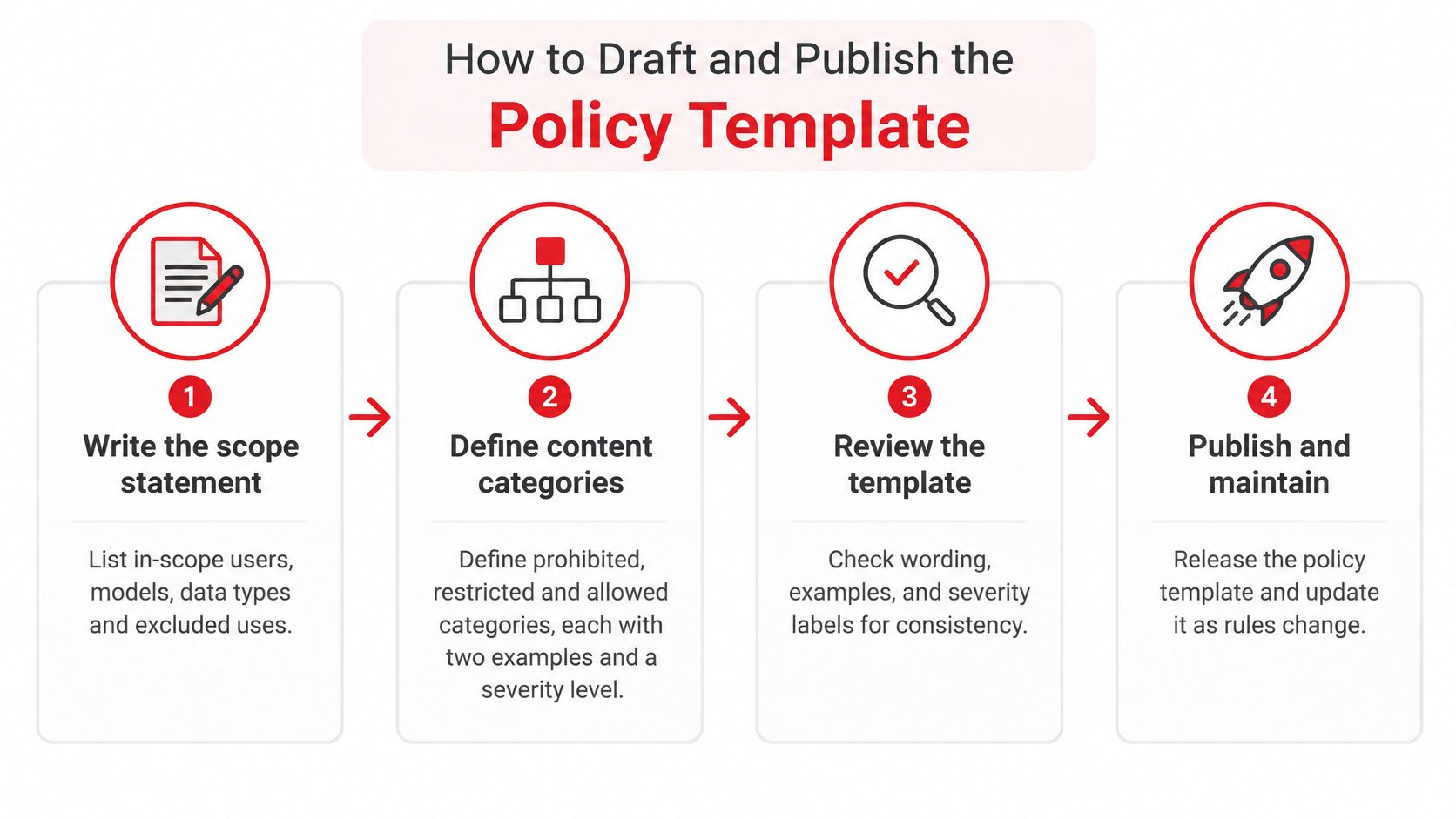
The drafting sequence should make categories understandable before the document is approved and maintained.
Write an operational policy
Write the scope statement. List in-scope users, approved models, data types, languages, features, and excluded uses. This prevents a department's approved drafting workflow from becoming assumed authorization for unrelated activities.
Define content categories. Give allowed, restricted, and prohibited categories a severity level and contrasting examples. Illustrative allowed examples could be public marketing copy and de-identified meeting summaries; restricted examples could be employee records and confidential pricing; prohibited examples could be targeted harassment and instructions for illegal acts.
Attach an action to every category. Specify the applicable tier, notification, review requirement, and fallback when automated enforcement isn't available. Review the wording, examples, and severity labels together so equivalent cases don't receive contradictory treatment.
Name reviewers and decision authority. Identify who handles initial flags, who can overturn automation, and who decides access sanctions. Appeals should go to someone independent of the original decision and, where staffing permits, the team that configured the workflow.
Make appeals usable. Allow affected users or their authorized client representative to appeal through a named service channel, submitting the case identifier, intended purpose, relevant context, and appropriately minimized supporting evidence. Publish an actual response deadline with business hours and backup coverage before launch, then require overturned decisions to produce a correction record and, where appropriate, a policy clarification or de-identified test example.
State the limits plainly. Prox.ia moderation has a defined scope and cannot guarantee detection of every sensitive item. The policy should explain that moderation reduces selected risks, doesn't replace professional judgment, and doesn't guarantee compliance.
Approve, publish, and maintain. Record the policy version, approval date, client sign-off, and next review trigger before go-live. Mark examples as illustrative and publish the signed document somewhere employees can reach without opening an administrator-only console.
A successful appeal should correct the user's case and help prevent the same mistake from recurring.
Test whether a manager can apply it
For an illustrative acceptance exercise, give a client manager five example prompts and ten minutes to classify them without coaching. Any disagreement about category, severity, or action means the wording needs revision before publication.
Connecting Moderation to Workspace Controls and Onboarding
A policy requirement needs an implementation owner. Some requirements belong in workspace configuration; others belong in administrator procedures, user training, or a manual review process. Treating all of them as software settings creates promises the deployment may not support.
The documented Prox.ia service model positions it as a client-facing, multi-model AI workspace an MSP can resell and support, with workspace access, onboarding, administrator guidance, data policies, and adoption support. Veevoo, Inc. is the distribution and enablement partner, not the software vendor.
Map the requirement before promising enforcement
Use the multi-model AI workspace overview during deployment planning, then record the specific capabilities included in the selected setup and current terms. Available models and features must be confirmed rather than inferred from a general product description.
Policy requirements mapped to Prox.ia workspace items (illustrative)
| Policy requirement | Prox.ia item to confirm |
|---|---|
| Who gets access | Workspace access; confirm provisioning and available permission boundaries |
| Administrator role and responsibilities | Administrator guidance; confirm administrative authority and support ownership |
| Data handling rules shown to users | Data policies; confirm where users receive them and what applies to the setup |
| Introduction of rules to new users | Client onboarding; confirm delivery and acknowledgment process |
| Ongoing reminders and limits of moderation | Adoption support; confirm responsibility for reinforcement |
| Moderation controls and reporting outputs | Product page for the chosen deployment; confirm actions, records, and available outputs |
For an illustrative legal-team workflow, the client might require stricter onboarding and specialist review of customer-facing material. That's a service design choice, not proof that the workspace can enforce a department-specific review queue.
If the required split isn't supported, record the fallback explicitly. It might be a manual approval step or a prohibition on that use until a suitable control exists. An onboarding instruction can communicate a restriction, but it mustn't be described as a technical block.
Control changes as part of service delivery
Present the policy under the client's identity and align it with the branded workspace where the chosen setup supports that presentation. Employees should understand that their employer owns acceptable-use decisions, while the MSP operates the agreed service.
Maintain a configuration responsibility record with the administrator, authorized approver, change reason, and validation evidence. Changes to enabled models, data handling, user groups, moderation behavior, or supported languages should trigger a policy-impact check.
Notify the client before material changes wherever the service arrangement permits. For externally imposed changes, record what changed, what remains uncertain, and whether any use should pause pending validation.
Reporting Moderation Results in Service Reviews
Flag volume is the easiest metric to misread. A rising count may indicate more misuse, a newly onboarded department, or an over-sensitive rule. A falling count may mean improvement, reduced usage, or missed violations.
The DSA Transparency Database makes structured explanations of moderation decisions available for scrutiny. The useful lesson for MSP reporting is to preserve the reason and outcome of a decision, not just count how often an automated system intervened.
Report volume, accuracy, and fairness separately
Open the service review with report volume and confirmed violations by category. Follow with time to decision by tier so the client can distinguish ordinary review delays from urgent cases awaiting attention.
Then show appeals and testing. Appeal overturn rate should mean reversed decisions divided by resolved appeals in the reporting period, with unresolved cases shown separately. Segment results by language, region, and violation type where collection is justified and privacy protections allow it.
Moderation metrics for a quarterly service review
| Metric | What it shows | Suggested cadence | Read with caution |
|---|---|---|---|
| Report volume | Flagged items by category | Monthly | A spike can reflect a new user group, not a policy failure |
| Confirmed violations | Flags reviewers upheld | Monthly | Counts exclude items the system never flagged |
| Time to decision | Speed of human review by tier | Monthly | Break down by tier, not one overall average |
| Appeal overturn rate | Share of decisions reversed on appeal | Quarterly | Segment by language, region, and violation type |
| False-positive and false-negative rates | Accuracy of automated flags | Quarterly on a labeled test set | Needs a sample the team has labeled |
| Reviewer workload | Cases per reviewer per week | Quarterly | Shows whether review keeps pace, not review quality |
A low reversal rate doesn't establish fairness if employees can't find the appeal channel or abandon the process. A high reversal rate calls for investigation into category wording, reviewer disagreement, or automation behavior, not pressure to reject more appeals.
Make the review produce decisions
Build the test set from appropriately authorized, minimized samples representative of real use. Include passed content, because false negatives can't be measured from the flagged queue alone, and rerun evaluations after model, policy, or language changes.
Show the sample boundaries alongside results. A small language-specific sample should be reported as limited evidence, not concealed inside a reassuring overall average.
Reporting discipline: An unavailable metric should appear as a measurement gap, not a zero.
The organizational discipline used for automated monthly client reporting can inform the review cadence, but that separate reporting workflow isn't evidence of AI moderation telemetry or integration. Only report outputs available from the AI deployment and agreed manual records.
Finish with a one-page summary designed for an illustrative five-minute review. End with three proposed decisions for the next quarter, such as clarifying a disputed category, adding reviewer coverage, and retesting a language with weak evidence, while stating that undetected sensitive content remains possible.
Schedule a Moderation Workshop Before Your Next Client Launch
A pre-launch workshop should test the service under realistic pressure. Invite the client administrator, a small group of daily users from different departments, and the people responsible for flags and appeals. Include the client policy owner so unresolved questions receive an authorized answer.
For an illustrative launch plan starting this week, the service lead can reserve the workshop immediately, circulate synthetic scenarios before the session, and make completion a go-live condition. Calendar dates, owners, and outstanding decisions should appear in the launch checklist rather than remain in email threads.
Rehearse the decisions employees will face
Use this illustrative workshop agenda, adjusting the schedule to the client's scope:
- Scope and examples, 30 minutes. Walk through allowed and blocked prompts using realistic department tasks. Ask participants to explain the rule in their own words rather than acknowledge a slide.
- Flagged cases and an appeal, 30 minutes. Role-play three cases, including a decision that deserves reversal. Require the reviewer to explain the outcome and identify what evidence changed the decision.
- Warning and review experience, 15 minutes. Demonstrate the actual deployed warning and review route where available. Where the process is manual, show that process instead of a mock interface presented as a product capability.
- Reporting ownership, 15 minutes. Confirm the reporting cadence, monthly-summary recipients, and responsibility for unresolved cases. Establish who acts when the primary reviewer is unavailable.
Hand participants the signed policy and a one-page reference card. The card should identify the review channel, information needed for an appeal, prohibited data submissions, and the person authorized to approve exceptions.
Verify the offer before launch
The MSP AI reseller model should be packaged around an operating service, not access alone. Prox.ia lets MSPs offer clients an AI workspace with data controls, spending visibility, moderation, multiple models, and white label features under the MSP's own brand; the selected deployment still determines the specific implementation.
Book an illustrative 30-day check to examine the first flags, appeals, and unresolved onboarding questions. Revise confusing wording through controlled approval, and keep the prior policy version attached to historical decisions so reviewers can reconstruct what applied at the time.
Workshop scenarios and website use cases are illustrative. They don't guarantee savings, revenue, productivity, or a particular technical outcome, and a successful demonstration doesn't prove performance across every future input.
The release decision should therefore require an approved scope, working review route, named appeal owner, and honest account of unsupported controls. If a critical requirement remains unresolved, narrow the launch rather than describe an intended safeguard as an implemented one.
Veevoo, Inc. offers software distribution and enablement for MSPs building supported AI services around Prox.ia. Visit Veevoo, Inc. and use its contact page to discuss deployment scope, moderation requirements, and a client rollout with clear review and appeal responsibilities.