
At month-end, an MSP service delivery manager opens the PSA and sees one endpoint count. The RMM shows another. The EDR console shows fewer protected devices, while purchasing records still list hardware that was retired months ago. Nobody can confidently say which devices are active, assigned, managed, protected, and correctly billed.
That situation is common because device inventory management isn't a single database exercise. It's a recurring reconciliation process across systems that were designed for different jobs. An RMM reports management status, a PSA supports contracts and billing, an EDR platform reports security coverage, and procurement records describe ownership and lifecycle history. Each view can be accurate on its own while the combined picture remains operationally wrong.
For MSPs serving small and midsize businesses, the practical objective is clear: turn conflicting records into decisions. That means finding ghost endpoints, investigating unmanaged devices, correcting customer ownership, aligning billing, and giving clients a report they can understand.
Table of Contents
- The Hidden Cost of Unreconciled Device Records
- Reconciling Records Across Your MSP Stack
- Identifying Common Inventory Discrepancies
- Remediation Workflows for Cleanup and Coverage
- Leveraging Accurate Inventory for Client Reporting
- Streamlining Operations with Volgap
The Hidden Cost of Unreconciled Device Records
A typical month-end review starts with a familiar question: why does the client's recurring endpoint count not match the RMM deployment list? The service coordinator exports the PSA report, a technician checks the RMM, and an account manager searches old procurement emails. One laptop appears in the RMM under a former employee, two devices have similar hostnames, and a server is still billed even though it was replaced.
The discrepancy may look administrative, but it creates two different forms of exposure. A device visible in the RMM but absent from billing can represent revenue leakage. A device included in the customer's bill but absent from EDR coverage can represent a security and service-accountability gap. The MSP can't resolve either problem by trusting the cleanest-looking list.

Inventory is evidence, not a count
NIST's cybersecurity work established the modern expectation that asset records should support lifecycle decisions, not merely count equipment. The progression from Executive Order 13636 in 2013, to Cybersecurity Framework Version 1.0 in 2014, to the IT asset-management practice guide published in 2018, and then Cybersecurity Framework 2.0 in 2024, connects inventory with ownership, location, status, business relevance, protection, maintenance, replacement, and secure retirement. These milestones are summarized in IBM's overview of NIST and its cybersecurity framework.
For an MSP, that means a useful record should answer more than “does this hostname exist?” It should identify the customer, accountable owner, management status, security status, contract relationship, lifecycle stage, and reason for any exception.
Practical rule: An inventory is trustworthy only when it can explain what action an exception requires.
Why fragmented tools create operational debt
RMM, PSA, EDR, identity, licensing, and purchasing systems use different identifiers and update schedules. A hostname may change after reimaging. A user account may be disabled while the device remains active. A billing record may use an asset tag that never reached the RMM. Manual imports create duplicates, while delayed offboarding leaves stale records behind.
Government guidance treats inventory completeness as a control that must be actively maintained. Joint operational-technology guidance published in 2025 separates scope, asset identification, attribute collection, taxonomy, inventory-data management, and lifecycle management. The same 2025 asset-inventory guidance from the FBI's Internet Crime Complaint Center supports a broader MSP lesson: reconciliation isn't clerical cleanup. It's how separate records become management evidence.
The goal isn't to force every platform into one system or claim that one product replaces the stack. The goal is to establish a repeatable way to prove whether each device is discovered, owned, managed, protected, and billed.
Reconciling Records Across Your MSP Stack
A reliable reconciliation process starts with a shared status model. Without one, technicians debate whether a device is “present,” while finance asks whether it should be billed and security asks whether it has active protection.
Use four distinct states:
- Discovered: A source has detected the device or account.
- Identified to an owner: The MSP has connected the device to a customer, user, department, site, or accountable business owner.
- Actively managed: The device falls within the agreed management workflow and has the expected management tooling.
- Security-protected: The required security control is present and reporting current status.
A device can be discovered without being authorized, identified without being managed, or managed without being protected. That separation prevents a synchronized RMM list from being mistaken for complete service coverage.
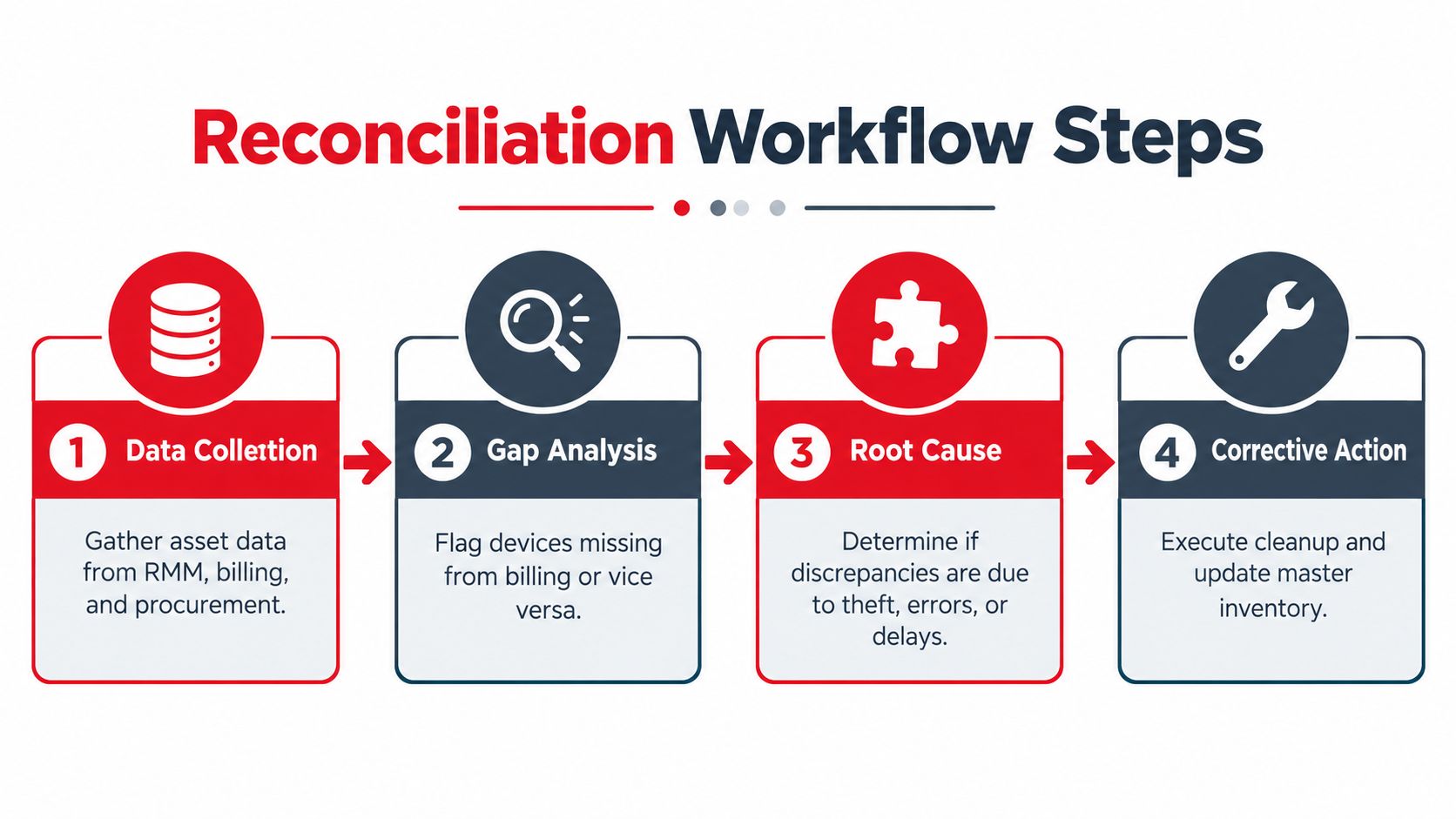
A practical reconciliation sequence
1. Establish the customer scope. Confirm which locations, users, servers, endpoints, and device categories belong in the review. Include remote workers and known nontraditional devices where they affect network or service decisions.
2. Collect records from each system. Export the relevant fields from the RMM, PSA, EDR, identity directory, licensing system, and procurement or asset register. Preserve source identifiers and timestamps instead of flattening everything into a spreadsheet immediately.
3. Normalize matching fields. Compare serial numbers, asset tags, hostnames, assigned users, customer identifiers, and device types. Treat hostname matching as a clue, not proof, because names can be reused or changed.
4. Compare the important pairs. Match the PSA billing list against RMM-managed devices to find potential unbilled or incorrectly billed endpoints. Compare RMM records with EDR records to identify managed devices without expected protection. Compare identity data with active devices to find ownership or offboarding problems.
5. Classify every mismatch. Each exception needs a reason code, such as deployment delay, duplicate record, retirement not recorded, ownership uncertainty, unauthorized device, missing agent, or contract scope question.
6. Assign an action and owner. A technician may investigate a missing EDR agent, while service delivery confirms contract treatment and finance corrects billing. Avoid assigning every exception to “IT,” because that hides the actual handoff.
7. Close the loop. Update the relevant systems, retain the decision, and schedule a follow-up for unresolved items. A master view is useful, but it shouldn't become another disconnected list.
An MSP can perform the first cycles manually. Over time, a cross-tool visibility layer can reduce repetitive comparison work. For environments where identity context is part of the problem, Volgap's multi-tenant identity visibility page provides relevant product context. Supported data sources and behavior should still be confirmed against the MSP's actual stack.
Run the workflow on a regular cadence, with a monthly review often fitting naturally alongside billing and service reporting. The exact cadence should reflect client risk, contract complexity, and the rate of environmental change.
Identifying Common Inventory Discrepancies
Most inventory failures fall into recognizable categories. The first is the stale record. A retired laptop remains active in the RMM, a former employee still appears as its owner, or a server replacement leaves the old asset attached to the customer contract. Stale records distort billing, reporting, and incident response because the MSP spends time investigating devices that no longer exist in the operating environment.
The second is duplication. Manual imports, reimaging, hostname reuse, and inconsistent identifiers can create two records for one physical device. Duplicate records may split ownership and lifecycle history, making one endpoint appear inactive while another appears newly deployed.
The third is a coverage gap. A device may appear in network discovery, identity data, or procurement records while remaining absent from the RMM or EDR. Conversely, it may be managed but omitted from the PSA, which creates a commercial mismatch rather than a technical blind spot.
Why conventional endpoint lists miss connected devices
Traditional inventory workflows often assume that every relevant device runs a standard agent. That assumption fails in mixed environments containing IoT, BYOD, remote-work equipment, printers, phones, cameras, and operational technology.
Research cited in The Register's coverage of asset-inventory aggregation identified 16% of corporate-network devices as IoT and found that 38% of IT professionals lacked sufficient data about devices accessing their networks. The same source discusses the broader challenge of assets that sit outside conventional management and security programs.
A device inventory management process should therefore distinguish between visibility and control:
| Record state | What the MSP knows | What it does not prove |
|---|---|---|
| Discovered | A device or signal exists | The device is authorized |
| Identified | An owner or customer relationship is known | The MSP manages it |
| Managed | The agreed management process applies | Security protection is active |
| Protected | The expected security control reports | Billing or ownership is correct |
The coverage question matters more than the list
Analysis of more than 27 million devices across 1,803 enterprise networks found that 32.5% were unmanaged, while nearly 39% of devices registered in Active Directory lacked an active EDR or XDR agent, according to Palo Alto Networks' device-security infographic. Those figures don't establish the condition of every MSP client, but they illustrate why a single synchronized inventory can create false confidence.
For an SMB client, the right response to an unknown device may be enrollment, segmentation, contract clarification, owner confirmation, or removal. An MSP shouldn't label every discovered BYOD or IoT device as a managed endpoint. It should record the device, state the control boundary, and make the next decision visible.
Remediation Workflows for Cleanup and Coverage
Reconciliation produces a queue of exceptions. Remediation turns that queue into controlled work. The mistake is to delete anything that looks old or enroll everything that appears on the network. Both actions can destroy evidence or create obligations the client never approved.

Resolve stale and duplicate records carefully
For a stale record, first confirm the last known activity, assigned user, customer site, and replacement history. Check whether the device is offline temporarily, held in storage, awaiting disposal, or genuinely retired. Mark the lifecycle state and retain the retirement reason before removing it from active operational views.
For duplicates, select a surviving record using a stable identifier such as a serial number or asset tag. Merge history only after confirming that the records represent the same physical device. If identity is uncertain, keep the exception open rather than combining two devices because their hostnames look similar.
Investigate unmanaged and unprotected devices
A device missing from the RMM may be outside contract scope, newly deployed, technically incompatible, or deliberately excluded. A device missing from EDR may have an installation failure, a licensing issue, a disabled agent, or an approved exception. Each outcome requires a different action.
A useful ticket should contain:
- Device evidence: Source systems, identifiers, last-seen information, and customer context.
- Ownership decision: Named customer owner, department, site, or responsible MSP role.
- Control decision: Managed, protected, excluded, pending approval, or unauthorized.
- Commercial decision: Billed, not billed, contract review, or outside scope.
- Closure evidence: Updated record, remediation result, approval, or documented reason.
Coverage is not authorization. A visible device may need investigation, not automatic enrollment or billing.
BYOD and IoT devices require especially careful reporting. An MSP can identify a personal laptop or smart appliance without claiming that it manages the device's configuration, security, or lifecycle. Reports should separate observed presence from contracted responsibility, so clients understand the risk without receiving an inflated coverage claim.
Use lifecycle data to prioritize work
Lifecycle remediation extends beyond cleanup. Hardware warranty status, operating-system support, replacement plans, and business criticality can point to different priorities. A critical device with uncertain ownership deserves immediate clarification, while a low-impact retired record may require accurate closure before the next report.
The Volgap hardware warranty and OS lifecycle page is relevant to this planning use case. Product behavior and supported data should be validated for the proposed deployment. The same discipline applies to any platform: inventory should lead to an accountable action, not merely a cleaner dashboard.
Leveraging Accurate Inventory for Client Reporting
Clients rarely want another device list. They want to know whether the MSP understands the environment, where exposure remains, and what decisions need approval. Reconciled inventory gives service delivery managers the evidence to answer those questions without turning a quarterly business review into a manual scavenger hunt.
A useful report separates facts from recommendations. It can show the number of records reviewed without inventing a coverage percentage, identify devices with unresolved ownership, list endpoints that differ between billing and management records, and distinguish managed assets from observed but unsupported devices.
Turn exceptions into client decisions
A strong client-facing summary might group findings into four categories:
- Corrected: Duplicate, stale, or ownership records updated.
- Needs client input: Devices with uncertain ownership, BYOD status, or contract treatment.
- Needs technical remediation: Missing management or security controls.
- Needs planning: Hardware, warranty, operating-system, or replacement concerns.
That format helps the client see why the MSP performed the work. It also creates a defensible basis for discussing additional management or security coverage without presenting every discovery as a sales opportunity.
Monthly reporting can make the process repeatable. Volgap's automated monthly reporting page is relevant for MSPs evaluating ways to operationalize recurring client communication, but the exact reporting outputs and data coverage should be confirmed for each environment.
The best QBR discussion connects an exception to an owner, a risk, and a next action. “Three devices are missing from the EDR console” is more useful when accompanied by the customer names, investigation status, service responsibility, and approval required. Accurate inventory also reduces preparation time because the service team can work from reconciled records instead of rebuilding the client's environment from separate exports.
Streamlining Operations with Volgap
Cross-tool reconciliation is difficult because the underlying systems remain valuable for different reasons. The RMM is still the operational source for management activity. The PSA still supports contracts, tickets, and billing. The EDR platform still provides security telemetry. Identity and purchasing systems add ownership and lifecycle context.
The practical case for Volgap is therefore not replacement. It is a unifying visibility layer that can help MSP teams compare records across management, identity, security, license, and billing data. The Volgap platform page presents the product in that cross-tool visibility context for MSP environments.
Where a reconciliation layer can help
An illustrative operating procedure could use a visibility layer to:
- Compare managed endpoint records with PSA billing records.
- Flag devices that appear in management data but lack expected security coverage.
- Review stale or duplicate assets before a customer report is issued.
- Investigate licenses assigned to disabled users.
- Give service delivery managers a consolidated exception queue for ownership and customer-account review.
- Support monthly reporting and lifecycle discussions with customer-specific evidence.
The workflow remains illustrative until the MSP confirms the current product documentation, available data sources, connector behavior, and compatibility with the existing stack. The available product information does not verify connector names, manufacturer coverage, endpoint thresholds, reconciliation rules, or billing-match percentages. No MSP should assume that Volgap replaces its RMM, PSA, identity, EDR, licensing, or billing systems.

Keep human decisions in the loop
Automation can identify a mismatch, but it can't always determine whether the device is stolen, delayed in deployment, excluded from scope, or incorrectly recorded. Service delivery still needs a review policy for high-impact actions, especially billing changes, customer ownership decisions, security exceptions, and retirement status.
A workable implementation begins with one client environment and a narrow exception category. The MSP can validate how records match, confirm which team owns remediation, document false positives, and then expand the workflow. That approach protects trust in the reporting layer and avoids promising complete coverage before the stack has been tested.
Volgap is distributed by Veevoo, Inc., which is separate from the software vendor. MSP owners and technical leads should evaluate the current product documentation alongside their own RMM, PSA, EDR, identity, license, and billing architecture. The right outcome is a repeatable process that turns conflicting records into accountable service actions.
Veevoo, Inc. helps MSPs evaluate and enable software for operational visibility, including workflows that connect device, security, identity, license, and billing context. Visit Veevoo, Inc. to discuss how Volgap could fit the reconciliation and reporting process for a specific client stack.