

Fixed refresh cycles sound tidy, but they're usually the wrong answer. MSPs don't lose control because a laptop is “too old,” they lose control because inventory, warranty, operating-system support, and billing records stop agreeing with each other.
Hardware lifecycle management works when it's treated as a reconciliation problem. The job is to identify which devices are in service, which ones are still supported, which ones are unmanaged, and which ones should move to redeploy, repair, or retirement based on evidence, not habit.
Table of Contents
- Why Hardware Lifecycle Management Is Really a Reconciliation Problem
- The Five-Phase Lifecycle and the Dataset That Makes It Operational
- Procurement, Onboarding and Inventory Reconciliation
- Warranty, OS Support and Maintenance Triggers
- An Illustrative Client Walkthrough
- Maintenance, Repair Versus Replace, and Secure Retirement
- Turning Lifecycle Data Into Monthly Reports and QBR Recommendations
- A 90-Day Adoption Plan and Next Steps
Why Hardware Lifecycle Management Is Really a Reconciliation Problem
The common advice says to replace endpoints every three or five years and move on. That rule is convenient, but it ignores the question MSPs face, which is whether each device is still supported, still secure, still assigned, and still being billed correctly.
A refreshed fleet can still contain blind spots if the records are wrong. A “healthy” device can be a problem if it's missing from the PSA, absent from the RMM, or past a software milestone that changes the risk profile. That's why hardware lifecycle management should start with identity and status reconciliation, not purchase age.
The records that matter most
The same endpoint often appears in multiple systems with different truths attached to it. Procurement knows what was ordered, RMM knows what's checking in, PSA knows what's billed, and security tools know what's protected. None of those views is complete on its own.
The practical response is to compare those records on a fixed cadence and treat every mismatch as work. That includes devices that are managed but unbilled, billed but unmanaged, present on the network but missing an owner, or still in use after the contract scope has changed.
Practical rule: if the asset record, the support record, and the billing record don't match, the device isn't fully under control.
Volgap fits that operating model because it's built for cross-tool visibility and lifecycle reporting. Veevoo distributes Volgap, and the product page is the place to confirm supported sources for a given MSP stack: Volgap.
Why age alone fails
Age is only one signal, and often not the strongest one. The better question is whether the endpoint is still supportable, still productive, and still recoverable if something goes wrong. A newer device with repeated failures or an unsupported OS can be a worse operational risk than an older device that's still stable.
That's the mindset MSPs need going into every refresh discussion. Instead of asking, “How old is it?”, ask, “What does the full record say, and what exception needs action now?”
The Five-Phase Lifecycle and the Dataset That Makes It Operational
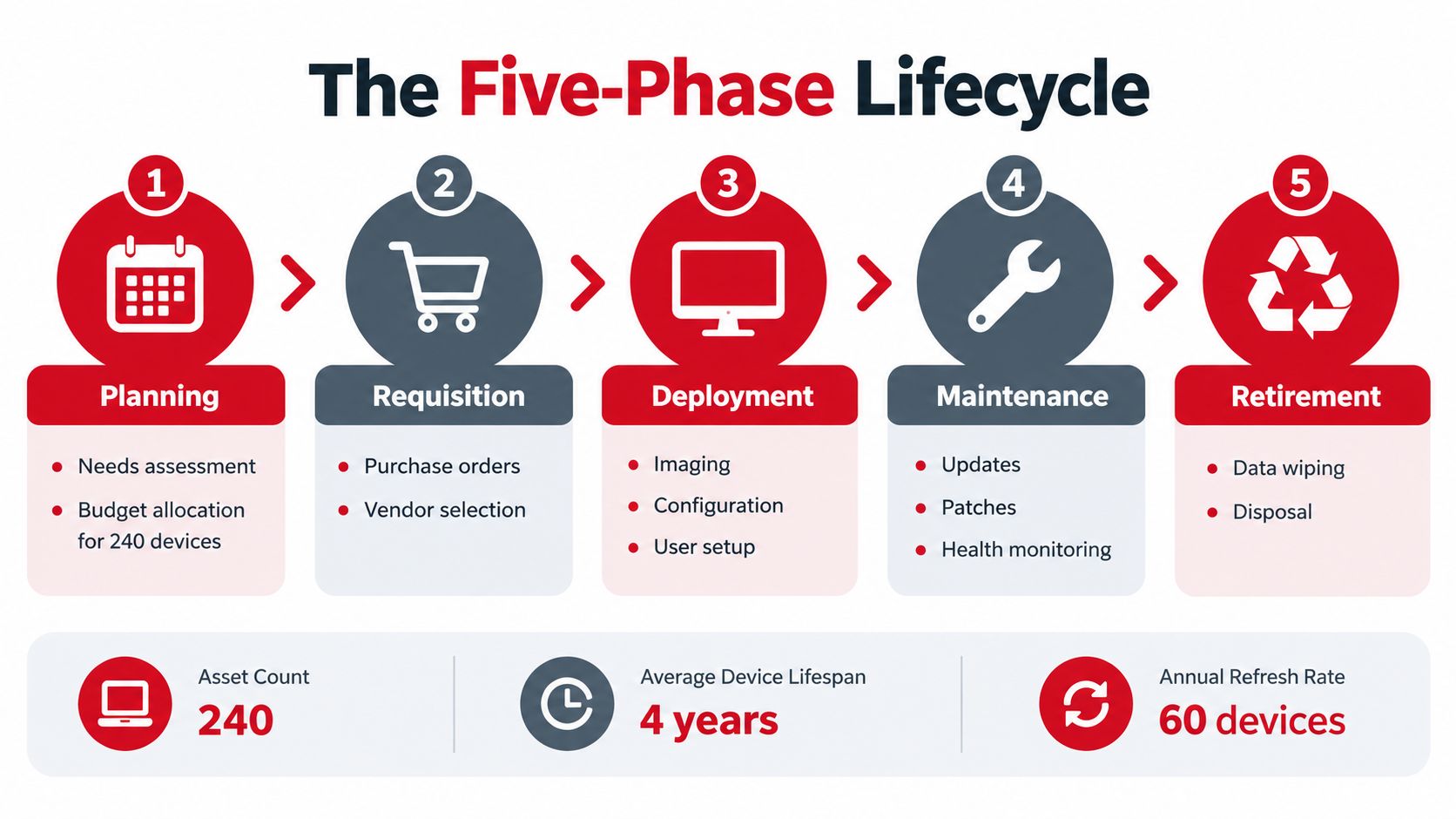
A useful lifecycle model is simple enough for the service desk to run and strict enough for reporting. The five phases are planning, requisition, deployment, maintenance, and retirement, and each phase should leave a record that survives handoffs.
The five phases
Planning sets the intended service life and minimum specs. Requisition confirms the order and vendor details. Deployment assigns the device to a user or location and captures the identifier. Maintenance tracks updates, condition, and health. Retirement proves the storage media was sanitized or destroyed before the device left service.
That structure matters because missing one phase creates downstream confusion. If ownership never gets recorded at deployment, support responsibility becomes fuzzy. If retirement evidence is incomplete, residual data risk stays open.
The minimum dataset
The record needs to be operational, not decorative. At minimum, each device should carry a serial number or asset tag, client, user, location, purchase date, warranty state, operating-system version, last check-in, security coverage, lifecycle status, and disposal evidence.
Those fields let a service team answer the questions that drive decisions. Is the device assigned? Is it still covered? Is it being managed? Is it close enough to retirement that replacement planning should start now?
CISA's Cybersecurity Performance Goals require organizations to maintain a regularly updated inventory of assets with IP addresses, including IPv6 assets, and to update that inventory at least monthly. The same guidance calls out known, unknown, shadow, and unmanaged assets, which gives the lifecycle process a hard operating rhythm, not just a nice-to-have standard. CISA Cybersecurity Performance Goals
Why this cadence matters
Monthly review forces the team to keep discovery, ownership, and management status aligned. It also prevents the slow drift that creates surprise renewals, surprise failures, and surprise audit work.
Devices don't become invisible all at once. They disappear one missing field at a time.
Procurement, Onboarding and Inventory Reconciliation
Procurement isn't finished when the box arrives. It's finished when the device is matched to the order, tagged, assigned, and visible in the systems the MSP uses.
Intake without shortcuts
Received equipment should be checked against the purchase record before anything is deployed. Serial number, asset tag, model, and quantity need to match what was ordered, and the intake record should show who accepted the device and where it went next.
Once the device is staged, assign it to a user or location and record that assignment immediately. If the device is going to sit in reserve, that should be explicit too. “Unknown” is not a status, it's a failure to decide.
Reconcile across the stack
After deployment, compare discovery data with RMM enrollment, PSA billing records, and the contracted scope of service. That reconciliation step is where most lifecycle leakage shows up.
A good service desk queue should classify every mismatch into a clean exception type. The point is not to create more documentation. The point is to decide what gets investigated, what gets corrected, and what gets removed from the environment.
| Reconciliation Exception Types | Signal | Next Step |
|---|---|---|
| Managed but unbilled | Device appears in RMM but not in PSA billing | Confirm service scope, correct billing record, document ownership |
| Billed but unmanaged | Device is invoiced but absent from RMM or discovery | Verify asset existence, install management agent, or remove from billable scope |
| Unknown device | Endpoint appears in discovery without an owner or assignment | Identify user, location, and business purpose before it stays active |
| Duplicate asset | Two records point to the same physical device | Merge records and preserve audit history |
| Stale record | Asset no longer appears in discovery but remains active in inventory | Validate retirement, redeployment, or offboarding |
The pricing page on Volgap's site is useful for teams that want to see how the product is positioned before a rollout, but the key operational question is whether the MSP can reconcile those records monthly and act on the exceptions. Volgap pricing
What good looks like
The intake process should leave no ambiguity about who owns the device and where it lives. If the service team can't trace a device from order to assignment to billing, the asset process is still broken.
That's the point where Volgap-style cross-tool visibility earns its keep. It helps MSPs compare the records they already have and surface the gaps that need human review instead of burying them in spreadsheets.
Warranty, OS Support and Maintenance Triggers
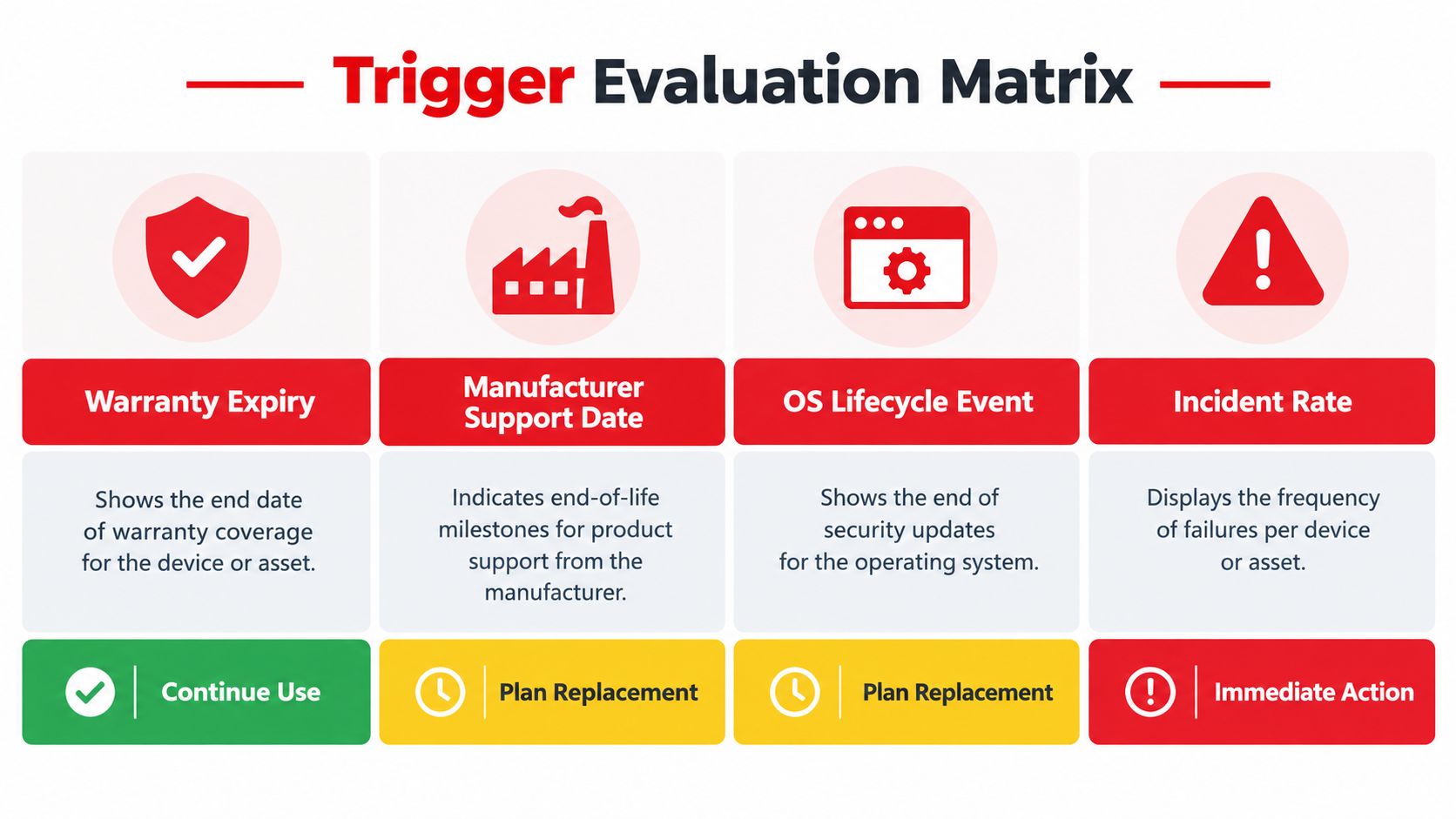
The worst refresh decisions happen when teams look only at age. A device should be reviewed against warranty, manufacturer support, OS support, incident history, and repairability together.
Build the trigger stack
Warranty expiry tells the team when vendor coverage ends. Manufacturer support milestones tell the team when hardware or firmware updates may stop. OS lifecycle events tell the team when security updates end. Incident rates tell the team whether the device is already becoming noisy in production.
Those signals don't all point in the same direction. A stable device with low incident history may deserve to stay in service even if it's older than its peers. A newer device with repeated repairs may need to move faster. The decision has to follow the evidence.
The European Commission's assessment of mobile phones and tablets found that most smartphones are used for roughly 1 to 4 years, tablets are commonly kept in active use for about 3 to 6 years, and the observed lifetimes across products ranged from 1 to 9 years. The same assessment links longer use to stronger design, better reparability, longer-lasting batteries, and modular components, which is a strong reminder that age alone doesn't tell the whole story. European Commission mobile device assessment
A practical decision frame
Use four actions: replace, redeploy, remediate, or hold.
- Replace when support is ending, risk is rising, or repairs are accumulating.
- Redeploy when the device still works well but belongs in a lighter-use role.
- Remediate when the problem is software, security, or configuration rather than hardware condition.
- Hold when the device is supported, stable, and not yet a budget priority.
Microsoft's 2025 retirement list states that products reaching end of support receive no further security updates, assisted support, or technical-content updates. That matters because support events often force synchronized refresh decisions, not gradual ones. Microsoft 2025 end-of-support list
Track the confidence level
The service team should never present a refresh recommendation without showing how much of the data is confirmed. If the warranty data is clear but the ownership record is stale, say so. If the device is healthy but the OS deadline is approaching, say that too.
Use this rule: recommend action based on the strongest risk signal, not the loudest one.
For teams that want a structured way to sort those triggers into a client discussion, the hardware warranty and OS lifecycle guidance on Volgap's page is the right place to anchor the workflow. Volgap hardware warranty and OS lifecycle
An Illustrative Client Walkthrough
A 240-device professional services firm is a useful stress test because the hardware picture looks tidy at first and messy once the records are compared. Discovery turns up endpoints on the network with no owner record, the PSA still bills for a few devices that never appear in RMM, and a cluster of workstations is nearing OS end-of-support while still showing low incidents and healthy warranty coverage.
What gets sorted first
Reconciliation comes first. Unknown devices need ownership, billed-but-unmanaged devices need validation, and the OS-ending workstations need a decision tree that separates immediate risk from planned refresh.
The refresh queue should hold only the endpoints with both a support problem and a business reason to act now. The redeployment list should capture machines that are still healthy enough for lighter workloads. The remediation queue should handle endpoints where software or policy changes can buy more time.
How the recommendation gets framed
A client-ready summary should separate confirmed facts from assumptions. Label a device as confirmed managed, confirmed billed, or pending verification. That keeps the MSP honest and gives the client a cleaner basis for budget planning.
Low incident volume does not cancel an OS milestone. If support is ending, the endpoint still belongs in the lifecycle queue even if it has not failed yet. The point is to move from reactive cleanup to planned service delivery.

How Volgap supports the discussion
Volgap is built to surface the cross-tool view that makes this kind of report possible. The MSP can compare inventory, identity, security, license, and billing data before presenting a recommendation to the client.
The point is not to promise automatic answers. The service team still has to sort the queue, document the exceptions, and justify the next action.
Maintenance, Repair Versus Replace, and Secure Retirement
The back half of the lifecycle is where value leaks if the MSP gets sloppy. Maintenance should extend useful life, repair decisions should be evidence-based, and retirement should close the loop with proof.
Plan maintenance before failure
NIST-aligned guidance supports estimating mean time to failure or using asset-failure metrics so replacement components or substitute devices are available before operational failure. That shifts maintenance from emergency break-fix into planned service work, which is where MSPs keep control.
The best trigger set combines warranty expiry, vendor support dates, incident trends, and device age. Age alone can't tell a service manager whether to repair, replace, or hold, and it shouldn't be treated like a universal rule.
Repair or replace
Use repair when the fix is targeted, the device is still supportable, and the remaining useful life justifies the work. Replace when the device is nearing support end, the repair path is unstable, or repeated incidents have turned it into a distraction.
For high-value endpoints, the decision should also consider business disruption. A device with moderate repair cost may still be worth fixing if it avoids user downtime and the support horizon is clear. A device with a poor track record should move out faster, even if it still boots.
Retire with evidence
Retirement has to be deliberate. Identify which storage media need sanitization, document chain of custody, verify the sanitization or destruction step, and retain disposal records. That evidence is what proves the device was removed from active use correctly.
In the European Union, WEEE rules require national reporting on collection, preparation for reuse, recycling, and recovery, and EU guidance supports preparation for reuse. For MSPs, that means retired hardware should be classified as redeploy, refurbish, certified recycle, or destruction, with proof kept for each path. EU WEEE implementation guidance
The retirement record is not paperwork after the fact. It's the evidence that the device really left service.
Turning Lifecycle Data Into Monthly Reports and QBR Recommendations
Lifecycle data only matters if it changes what the client sees each month. The report should be short enough to read, sharp enough to act on, and specific enough to support a QBR recommendation.
What the monthly report should show
The report needs to highlight unmanaged endpoints, expiring warranties, upcoming support milestones, retirement backlog, and license or billing exceptions. Those five categories tell the client where the environment is drifting and where the MSP wants action.
The language should stay practical. A device is not “bad” because it's older. It's a risk because it is unsupported, unassigned, unprotected, or blocking a clean billing picture. That difference matters in a QBR.
How the QBR should read
A strong QBR doesn't recite raw inventory counts. It explains which exceptions were resolved, which ones remain open, and which ones require budget or policy decisions. That framing turns lifecycle work into a management conversation instead of a cleanup call.
Volgap's role is to provide the cross-tool visibility layer that feeds that discussion, while existing RMM, PSA, and security tools keep doing their own jobs. The right implementation confirms the MSP's actual connectors and manufacturer coverage before anyone promises a reporting shape that the environment can't support. Volgap automated monthly reporting
What to say in the room
The QBR should answer three things plainly. What changed since last month? What is now outside policy or support? What should be approved next?
That's the difference between a report and a recommendation. One describes the environment. The other tells the client what to do with it.
A 90-Day Adoption Plan and Next Steps
Run the rollout in one quarter. Use the first 30 days to lock the baseline inventory, set reconciliation rules, and define exception categories. Use the next 30 days to validate warranty, support, and retirement triggers. Spend the final 30 days turning those exceptions into monthly reporting and a first QBR that management can act on.
What to track from month one
Start with the gaps that break control.
- Unmanaged endpoint count shows how much of the fleet still sits outside the control plane.
- Warranty and support exceptions show which devices are close to action.
- License and billing discrepancies expose scope drift and invoicing errors.
- Retirement backlog shows how much hardware is waiting for final disposition.
- Ownership gaps expose devices that cannot be tied cleanly to a user or location.
These KPIs are basic for a reason. If the MSP cannot report them cleanly, it does not have lifecycle control.
How to make the rollout stick
Assign one owner for reconciliation, one for exception review, and one for client reporting. That keeps the work from drifting into a group task with no clear accountability. Review the output every month, because inventory accuracy slips fast when no one owns the exceptions.
Veevoo, Inc. distributes Volgap as the visibility layer MSPs can use to reconcile inventory, warranty, support, and billing data across client environments. Teams that want to confirm fit with their own stack should review the product page first, then use the contact path for a guided walkthrough.
Veevoo, Inc. helps MSPs package and operationalize tools like Volgap so lifecycle management becomes a repeatable service instead of a spreadsheet scramble. For teams trying to tighten inventory, warranty, support, and billing reconciliation, the next step is to visit Veevoo, Inc. and request a walkthrough tied to their current environment.