

Monday's client review is about to start. The service delivery manager has an RMM device count, a PSA billing total, and an identity export that don't describe the same population. The slides look finished, but the manager still can't explain which endpoints are covered, which seats belong on the invoice, or who owns the mismatches.
A useful monthly business review template makes those discrepancies visible before the call. For an MSP serving SMB clients, the deliverable isn't a polished collection of charts. It's a defensible record of current exceptions, decisions, and operational commitments.
Table of Contents
- Why MSPs Need a Monthly Review Template Built for Exceptions
- Anatomy of the Monthly Business Review Template
- KPI Families and Metric Definitions for an MSP Review
- A Client-Ready Slide Deck Outline for the Monthly Review
- Automating Data Pulls and Reconciliation Before the Meeting
- Running the Meeting and Framing the Client Conversation
- The Owner Checklist and How a Steady Monthly Cadence Pays Off
Why MSPs Need a Monthly Review Template Built for Exceptions
The monthly review should answer a narrow operational question: What needs attention now, and who will resolve it? A strategic quarterly business review addresses longer-term investment, service direction, and business priorities. The monthly meeting should stay close to coverage gaps, unresolved service issues, billing discrepancies, and overdue remediation.
That distinction matters when different tools describe different parts of the client environment. An RMM records managed devices, an EDR records security-agent visibility, and a PSA records service and billing relationships. Identity and licensing systems add account status and entitlement information. None should be treated as a universal substitute for the others.
Define the Review's Operating Boundary
A practical scope statement should establish:
- Included environments: Client entities, locations, tenants, and service lines covered by the review.
- Excluded populations: Assets, accounts, or services outside the contracted scope.
- Required decisions: Exceptions needing investigation, remediation, approval, or a scope change.
- Escalation route: Urgent issues that require incident handling rather than waiting for the next review.
CISA's Cybersecurity Performance Goals call for an inventory of assets with an IP address, including IPv6 and operational-technology assets, updated at least monthly, with known, shadow, and unmanaged assets identified. That establishes a concrete inventory cadence, not a claim that any dashboard provides complete discovery.
Practical rule: An unresolved mismatch belongs in the review even when the dashboard displaying it looks healthy.
The template should function as a decision-and-control cycle. Each exception needs an accountable person, an agreed next action, and a persistent record that remains usable when technicians or account managers change.
Monthly review cadence doesn't justify delaying urgent work. A newly discovered protection gap should enter the appropriate response process immediately; the review confirms its disposition and identifies any wider pattern. Conversely, an isolated inventory mismatch shouldn't automatically become a strategic purchasing discussion.
The preparation test is straightforward: can the service delivery lead identify the current exceptions, explain their business relevance, and identify the person authorized to act? If not, the deck isn't ready.
Anatomy of the Monthly Business Review Template
The template should be a structured working record before it becomes a presentation. A spreadsheet, reporting table, or service-management register can support it, provided the mandatory fields remain consistent. Free-form slides make it too easy to omit an uncomfortable exception or lose the history behind a decision.
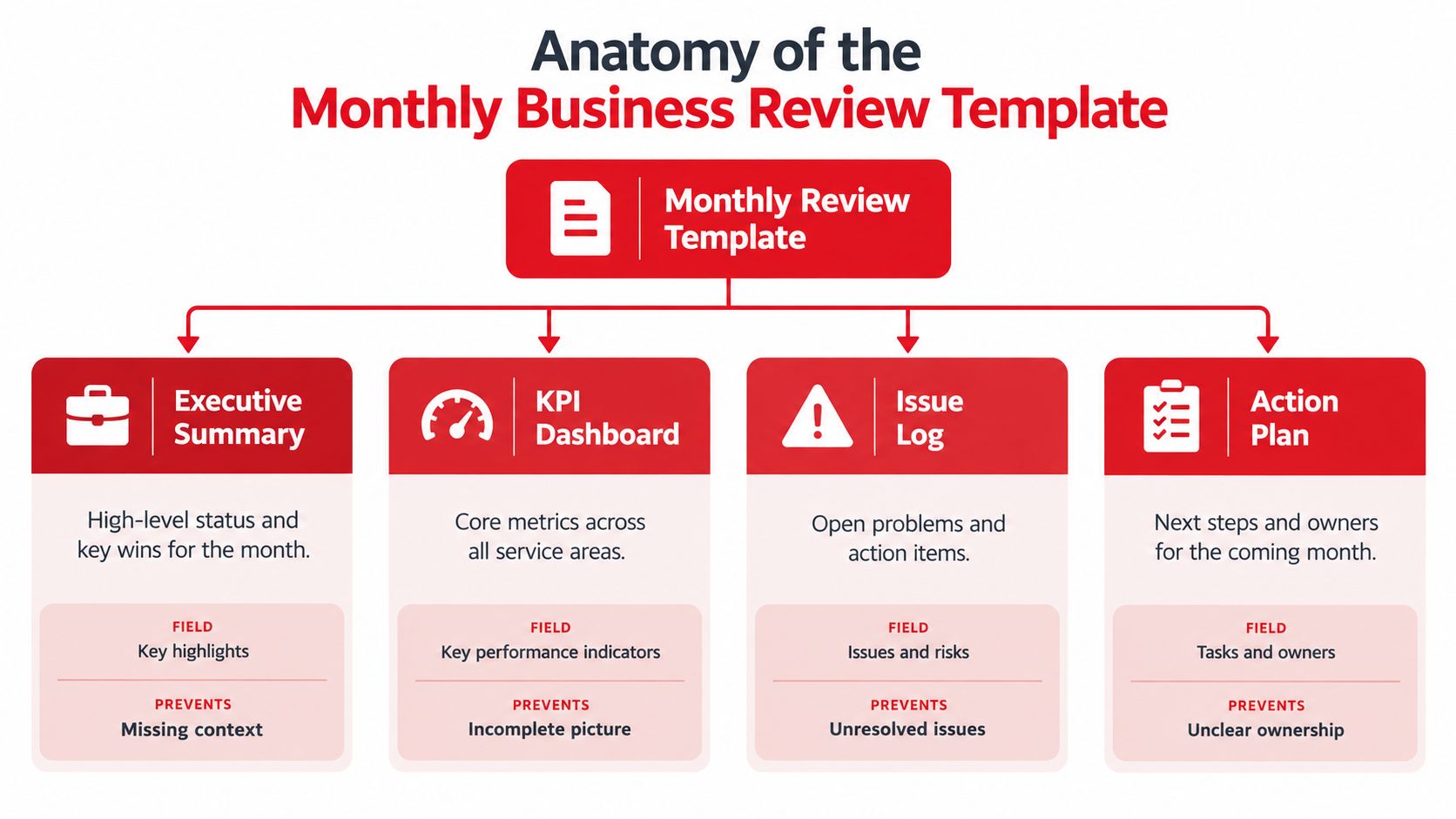
Build the Working Record
| Template block | Required fields | Failure it prevents |
|---|---|---|
| Review identity | Client, service line, reporting period, scope, preparation owner | Results being attributed to the wrong environment |
| Executive summary | Service status, verified improvements, material risks, requested decisions | A client receiving detail without operational context |
| KPI scorecard | Metric name, definition, actual, comparison, target, variance, trend | Unexplained numbers and inconsistent comparisons |
| Exception register | Exception ID, affected population, severity, evidence, proposed decision | Findings disappearing inside an aggregate chart |
| Action log | Accountable owner, due date, dependency, verification requirement | Tasks without a clear completion standard |
| Carry-forward register | Original commitment, current status, delay reason, next checkpoint | Overdue work being silently reset |
| Closing summary | Approved, deferred, disputed, and escalated decisions | Different attendees leaving with different expectations |
Every numeric field should have associated source system, extraction date, reconciliation status, and validation owner. These can live in linked metadata rather than crowding every client-facing slide, but they must remain accessible from the reported value.
The Deliberate Directions monthly business review template guidance supports recording KPI sources and separating evidence from a hunch. For MSP reporting, that distinction should be explicit rather than implied by confident wording.
Separate Evidence From Interpretation
An illustrative exception record might state that an identity export contains a disabled account with an assigned license. That's the observed evidence. A suspected offboarding failure is an interpretation until someone checks retention requirements, account history, and the client's approval process.
Use separate fields for observed condition, working explanation, and confirmed cause. Otherwise, a plausible explanation can become a client-facing fact without validation.
The executive summary should be written after the registers are complete. It should summarize verified changes and requested decisions, not introduce findings absent from the working record.
A useful template also preserves decision history. If the client defers remediation, the register should record the approver, rationale, review date, and any temporary measure. “Discussed with client” isn't an adequate decision record because it doesn't explain what was agreed.
KPI Families and Metric Definitions for an MSP Review
Define the metric before selecting its chart. A device count and a billed-seat count may both be accurate while remaining unsuitable for direct comparison. The metric dictionary must establish whether the service is contracted per device, per user, or under another documented entitlement model.
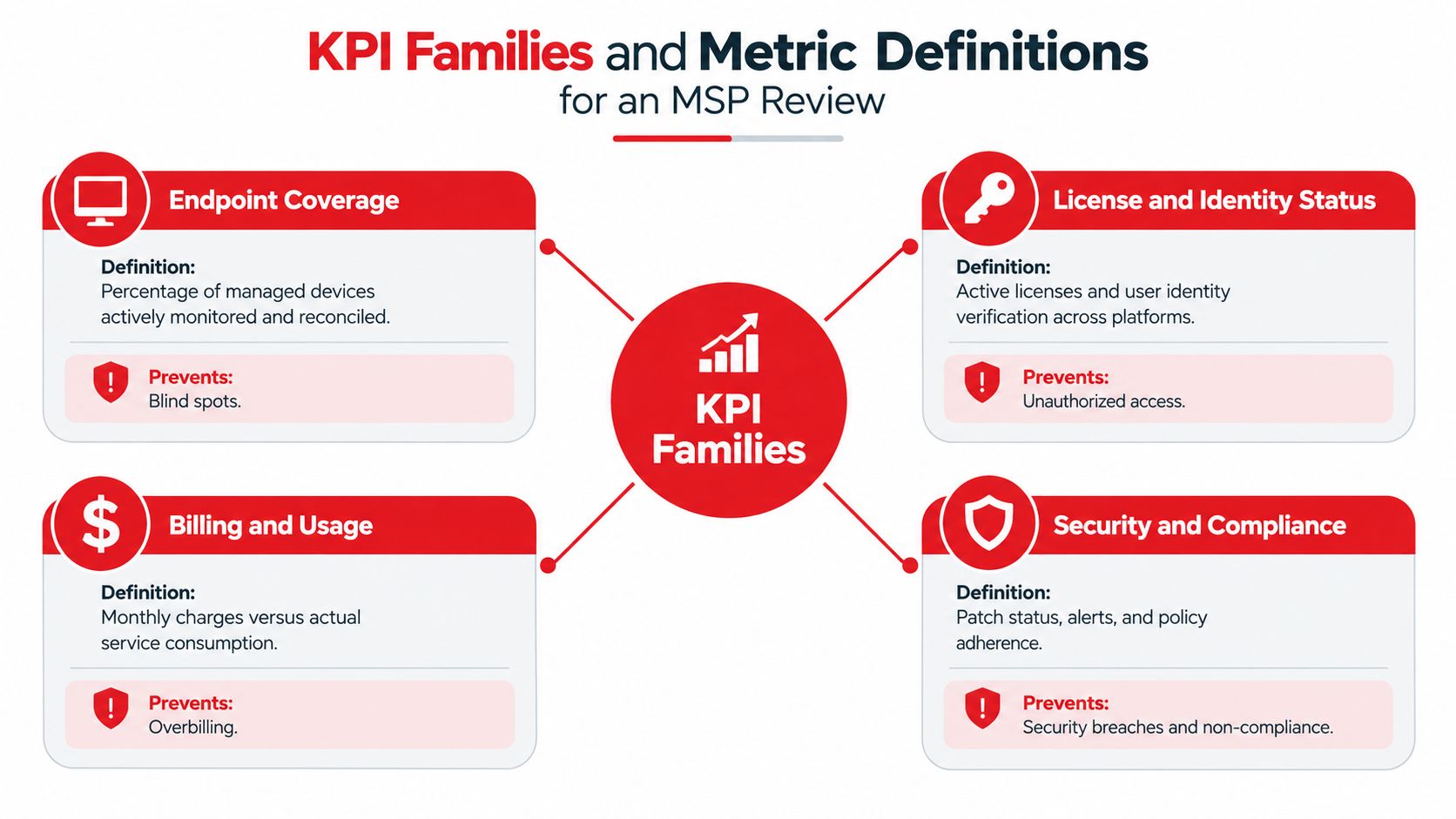
Define the Business Question and Calculation
The following are illustrative metric definitions, not promises about a particular platform's available fields.
| KPI family | Business question and calculation | Reconciliation rule |
|---|---|---|
| Endpoint coverage | Which in-scope discovered assets lack expected management or protection records? Compare eligible discovered assets with matched baseline records. | Match stable device identifiers and classify unmatched records separately. |
| License and identity status | Which assigned licenses belong to disabled identities? Select assigned licenses whose linked account status is disabled. | Confirm tenant, account identity, observation date, and approved retention exceptions. |
| Billing variance | Does invoiced service quantity match the contractual billable population? Subtract validated billable quantity from invoiced quantity. | Apply contract rules, billing cutoff, exclusions, and approved adjustments. |
| Ticket and SLA trends | Are service outcomes deteriorating, or is delivery pressure increasing? Calculate the selected outcome or backlog measure using documented ticket criteria. | Preserve priority, service calendar, reopening rules, and reporting-window definitions. |
For endpoint reconciliation, the system of record depends on the question. Discovery evidence can establish that a device exists, but the contract establishes whether it should be managed. The PSA's billed quantity alone establishes neither protection status nor inventory completeness.
For licensing, Microsoft 365 license management is a relevant workflow to evaluate. A disabled account with a license warrants investigation, not automatic removal: the service owner must check the client's retention and operational requirements.
Classify Indicators Before Setting Triggers
Outcome metrics describe delivered results, such as ticket resolution performance. Leading indicators describe developing pressure, such as backlog age. Control metrics describe whether the operating process works, such as verified exception closure.
Each dictionary entry should include its business question, formula, source, time window, owner, target, tolerance, and reconciliation rule. It should also explain what happens when the denominator is incomplete.
Kaufman Rossin's guidance on KPI accuracy warns that inaccurate or redundant data undermines confidence in management reporting. For an MSP, the practical response is to standardize identifiers and definitions before debating performance.
Thresholds should reflect service risk and contractual obligations, not arbitrary dashboard colors. Security and policy fields can supplement the operational families shown above, but a green status must never imply a compliance certification.
A Client-Ready Slide Deck Outline for the Monthly Review
An illustrative workflow starts with a technician investigating a mismatch in the reconciliation workspace. Where the deployment's documented connectors and fields support it, Volgap data can contribute to that investigation. The service delivery manager validates the finding, adds business context, and selects the decision the client needs to make.
The slide should present the conclusion and requested action, not an unexplained screenshot of unmatched records.

Give Each Slide a Conversation Job
- Cover and reporting boundary: Establish the client, reporting period, scope, and freshness of the evidence.
- Scorecard: Show current month, prior month, year-to-date position where relevant, target, variance, and trend.
- Current exceptions: Display material findings with the operational consequence and required decision.
- Trend and variance: Use a rolling three-month comparison, consistent with the review method described in management-reporting guidance, to distinguish isolated movement from persistent issues.
- Decisions and actions: Record approvals, assigned responsibility, deadlines, and dependencies.
- Next-month focus: Identify the operational change that will be checked at the following review.
For the coverage-gap example, the talking point might explain that a discovered device hasn't been matched to the expected management record. The client-facing decision is whether to authorize investigation, confirm an exclusion, or approve onboarding after validation. The slide shouldn't label the device unprotected unless the security evidence supports that conclusion.
Keep Supporting Detail Available
Device-level exports, matching rules, and historical notes belong in an appendix or controlled supporting record. The client should be able to challenge a number without forcing the meeting through every underlying row.
Lifecycle findings require different framing. A confirmed end-of-life condition may require a replacement decision rather than an inventory correction; hardware, warranty, and OS lifecycle planning should be evaluated against available manufacturer coverage.
The deck should mirror the approved register. If a slide introduces a new exception during the call, the manager should add it to the record before accepting an action.
Automating Data Pulls and Reconciliation Before the Meeting
Automate repeatable data handling, not judgment. A reconciliation pipeline can identify candidate mismatches; a service owner still decides whether they represent missing coverage, timing differences, approved exclusions, or incorrect source records.
Volgap is positioned as an MSP operating tool for connecting management, identity, security, license, and billing information across client environments. Its fit must be assessed against current vendor documentation and the actual deployment. Specific connectors, manufacturer coverage, accessible fields, and refresh behavior shouldn't be assumed.
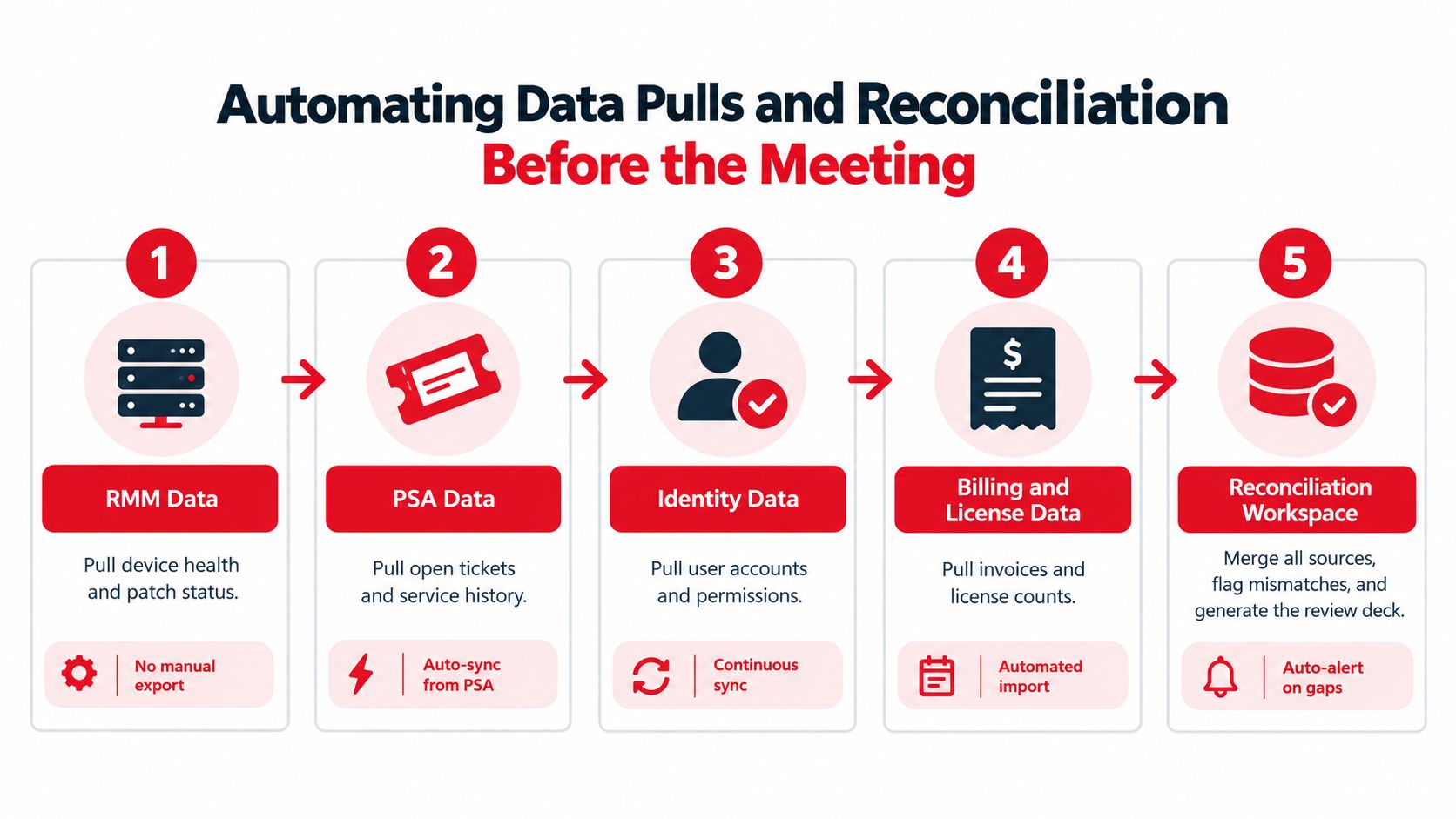
Establish the Preparation Pipeline
The diagram represents an illustrative target workflow, not a guarantee of connector availability, export elimination, automatic alerts, or generated decks.
- Align extraction windows: Record when each source was collected and which reporting cutoff it represents. A billing snapshot and a live device list need an explicit timing rule.
- Normalize identifiers: Map client, tenant, device, account, and service identifiers. Quarantine ambiguous matches instead of forcing them together.
- Run comparison rules: Compare the appropriate endpoint and billing populations, inspect licensed disabled identities, and identify assets absent from expected baselines.
- Route exceptions: Attach source evidence, severity, and a validation task to each candidate mismatch.
- Populate approved outputs: Move validated results into the scorecard and client presentation without overwriting unresolved decision history.
The available automated monthly reporting workflow should be assessed separately from reconciliation logic. Reporting support doesn't establish that every required source can be joined or that every client-specific rule is already implemented.
Keep Human Validation in the Loop
CISA's asset-inventory lifecycle guidance describes scope definition, asset identification, attribute collection, taxonomy, inventory management, and lifecycle management. Those practices support retaining ownership, operating system, lifecycle context, and planned disposition rather than reducing everything to a device total.
An unknown asset needs identification. A known obsolete asset needs a lifecycle decision. Combining them into a single “asset issue” category makes assignment less useful.
Before enabling thresholds, establish a baseline reporting period and inspect the exceptions manually. Then assess whether the rules produce actionable findings, overlook relevant conditions, or flag approved arrangements repeatedly.
Automation can join records. It can't authorize a billing change, accept a security risk, or confirm that the client approved an exclusion.
RMM, PSA, identity, and EDR tools remain complementary. The reconciliation layer helps the MSP compare their evidence; it doesn't remove their operational responsibilities.
Running the Meeting and Framing the Client Conversation
A client challenges a billed quantity while an unmatched identity record remains unresolved. Start by stating the reporting boundary, the source populations included, and any material limitation. The service delivery manager should distinguish a complete extraction from an incomplete population, then clarify which decisions can proceed and which need validated evidence. That keeps uncertainty visible rather than presenting an unsettled result as fact.
Review exceptions by risk and business impact, not dashboard order. For each, confirm the observed condition, explain its consequence, and identify the decision needed. Routine updates can stay in the written record, leaving meeting time for issues that require agreement.
Handle Disagreement Without Defending the Chart
When a client disputes a billed quantity, establish whether the issue concerns scope, timing, identity matching, or the contract rule. Keep the value marked as disputed until the relevant evidence has been reviewed.
A neutral way to frame it is: “The invoice population and the current management population haven't yet been reconciled.” This describes the evidence without accusing the client of withholding information or presuming the MSP billed incorrectly.
- Name the investigator: Assign one person to resolve the disputed record.
- Identify the authority: Record who can approve a billing correction, service change, or risk decision.
- Set the checkpoint: Agree when the validated evidence and recommendation will be returned.
- Preserve the boundary: Continue an urgent security response while investigating an unrelated billing question.
Turn Decisions Into Verifiable Commitments
Record a named accountable owner, due date, and evidence of the agreed outcome for every action. A technician's task completion alone doesn't confirm that management coverage was restored or that an approved correction appears on the next invoice. Define what proof will close the item before the meeting ends.
A starting benchmark of at least 80% action-item closure is a practical internal target, not an industry standard. Measure closure by verified outcomes, and record blocked items and changed commitments transparently.
Commercial boundary: Correcting an existing service failure isn't automatically an upsell opportunity.
Repeated findings may support a scoped proposal when the work falls outside the agreement. Identify the recurring condition, explain its business consequence, define the proposed service, and distinguish included remediation from additional work.
Close by reviewing approved, deferred, disputed, and escalated decisions. Record client approvals in the operating register used by the delivery team, rather than leaving them only in an account manager's notes. That gives the people responsible for follow-up a shared record of what was agreed and who owns the next action.
The Owner Checklist and How a Steady Monthly Cadence Pays Off
A dependable review process requires an owner who checks readiness before presentation and completion after delivery. That owner needn't personally validate every source, but must ensure the responsible technical, billing, and client contacts have completed their parts.
The checklist should remain short enough to use during routine preparation. Its purpose is to prevent omissions, not create another report that nobody maintains.
Monthly Review Readiness Checklist
- Reporting readiness: Confirm the period, scope, extraction dates, and disclosed limitations.
- Definition integrity: Check whether any metric calculation, source, or population changed.
- Exception readiness: Ensure material findings have evidence, severity, and a proposed disposition.
- Assignment readiness: Confirm that action owners can perform the work or obtain the necessary approval.
- Carry-forward integrity: Preserve overdue commitments, delay reasons, and changed decisions.
- Presentation consistency: Match the deck to the approved operating record.
- Client follow-up: Distribute decisions and record acknowledgments through the agreed channel.
- Completion evidence: Check that reported closures demonstrate the operational outcome.
Assess the Operating Habit, Not Just the Document
Evidence for frequent reviews should be interpreted carefully. A 2024 Forrester study surveyed 600 performance-management decision makers and conducted five interviews across 14 countries; organizations using monthly or continuous processes were 1.4 to 1.5 times more likely than those using annual reviews to describe themselves as highly effective at employee engagement and retention, according to the Forrester performance-management report. That research concerns employee performance management, not proof that an MSP template improves client retention.
The practical argument is narrower: a regular checkpoint gives service leaders opportunities to detect drift, confirm decisions, and inspect unfinished work. Client trust depends on how accurately the MSP reports those conditions and follows through, not on meeting frequency.
A stable monthly business review template also gives technical leads a documented basis for prioritization. Recurring exceptions can inform future service proposals, while isolated discrepancies can remain contained operational tasks.
The strongest review isn't the one with the most metrics. It's the one where the client understands the current operational position and the delivery team leaves with executable commitments.
Veevoo, Inc. distributes Volgap and provides software enablement support for MSPs evaluating cross-tool visibility and monthly reporting workflows. MSPs can visit Veevoo, Inc. and contact the team with their current stack, reconciliation needs, and sample review structure to discuss fit and confirm supported coverage.