

Across the MSP industry, integrating multiple tools and platforms ranks among the most common delivery and scaling challenges providers report. That reality reframes asset management. Collecting another device list is the easy part; the work starts when the lists disagree.
An RMM record can establish that an agent checked in without establishing whether the device belongs on an invoice. A security console can show protection status without explaining ownership. Each tool answers a different question, so a mismatch between them is evidence to investigate rather than noise to erase. Trustworthy client records preserve those distinctions, connect the evidence, and assign someone responsibility for resolving the gaps.
Table of Contents
- What MSP Asset Management Covers and Why It Matters
- Core Processes at a Glance
- How to Reconcile Client Records Step by Step
- Exception Cases Where Records Disagree
- Governance and Implementation Checklist
- Lifecycle Decisions and Coverage Metrics
- Connecting Volgap With Your RMM, PSA and EDR Stack
- Start Your First Monthly Reconciliation
What MSP Asset Management Covers and Why It Matters
In 2025, 30% of organizations reported tracking IT assets manually, while 12% reported no formal IT asset-management capabilities, according to SysAid's State of Service Management survey of more than 1,200 IT professionals. Those findings describe participating organizations, not MSPs specifically, but they highlight the recordkeeping gaps an MSP may inherit during onboarding.
MSP asset management is the continuously maintained record of devices, licenses, user relationships, and service commitments in each client environment. It connects what exists with who owns it, how it's managed, whether it's protected, and what the client has agreed to pay for.

A rental property manager keeps a unit-by-unit log of appliances, leases, and repair dates because a missed item can become an emergency. An MSP needs the same discipline for client technology, except the relationships also include users, software entitlements, security agents, and support contracts.
The multi-client responsibility
The MSP-specific challenge is separation without fragmentation. Technicians need enough consistency to work across clients, while each SMB client needs an accurate picture of its own environment, contractual scope, and pending decisions.
Without that shared understanding, a failed laptop can trigger several arguments at once. The client believes support is included, the technician can't find the asset, and the account manager sees no corresponding billing line. None of those records alone establishes the full answer.
Practical rule: A device record should explain both the technical state and the business relationship, without treating either as proof of the other.
The operating model combines inventory, reconciliation, license tracking, lifecycle planning, and reporting. Inventory establishes the candidate assets; reconciliation tests their relationships; license and lifecycle reviews identify decisions; reporting places those decisions in front of the client.
These aren't independent administrative tasks. A retirement decision changes inventory, license assignments, service coverage, and potentially billing. Asset management therefore works as a recurring operating routine, not a one-time audit. Its value depends on whether the records continue to represent what's running.
Core Processes at a Glance
The core MSP asset management processes answer different questions, but each should produce something a client or service owner can act on.
Core MSP asset management processes
| Process | Question it answers | Typical data sources | Client-facing output |
|---|---|---|---|
| Inventory | What devices, users and services exist for each client? | RMM discovery, network scans, cloud consoles, identity directory | Current asset register per client |
| Reconciliation | Do the records agree across tools? | Asset register, PSA billing, security console, identity directory | Mismatch list with named owners |
| License tracking | Which seats are assigned, unused or held by disabled users? | Identity and license records, vendor portals, PSA contract data | License-to-user review |
| Lifecycle and warranty planning | Which devices or OS versions need action in the next budget cycle? | Purchase dates, warranty records, OS build data | Quarterly refresh plan |
| Reporting | What does the client need to see, and what decision follows? | Outputs of the four processes above | Monthly report and QBR pack |
Inventory needs a trustworthy boundary before reconciliation becomes meaningful. That doesn't mean every record must be perfect. It means the team must know which client, sites, device classes, and services an export includes. Otherwise, a missing server may reflect an excluded site rather than a failed discovery process.
Reconciliation then tests specific relationships rather than comparing totals alone. A managed endpoint may have a valid contract relationship even when the PSA bills a bundled service instead of an individual device line. The comparison needs that commercial context.
Dependencies that affect the result
License tracking needs reliable user status and entitlement information. An inactive account isn't automatically a reclaimable license, particularly where the client still needs retained data, delegated access, or a transition period.
Lifecycle planning needs similarly explicit inputs. A purchase date establishes age; it doesn't establish warranty coverage, operating-system support, or business suitability. Those fields should remain separate so an account manager can explain the recommendation.
Reporting comes last because it should summarize reviewed evidence, not broadcast unresolved assumptions. A useful QBR pack distinguishes approved actions, open questions, and exceptions that require a client decision.
The sources in the table are typical examples, not a connector list. Before work starts, the implementation owner should confirm actual access methods, export fields, permissions, and integration coverage for each client stack.
The best starting point is the process producing the most unresolved mismatches today. If invoices generate repeated disputes, start with billing relationships. If technicians can't establish protection status, prioritize inventory-to-security reconciliation.
How to Reconcile Client Records Step by Step
A monthly reconciliation run should leave a traceable decision for each exception. The team needs dated evidence, stable matching rules, and clear ownership, not just an exported spreadsheet with colored cells.
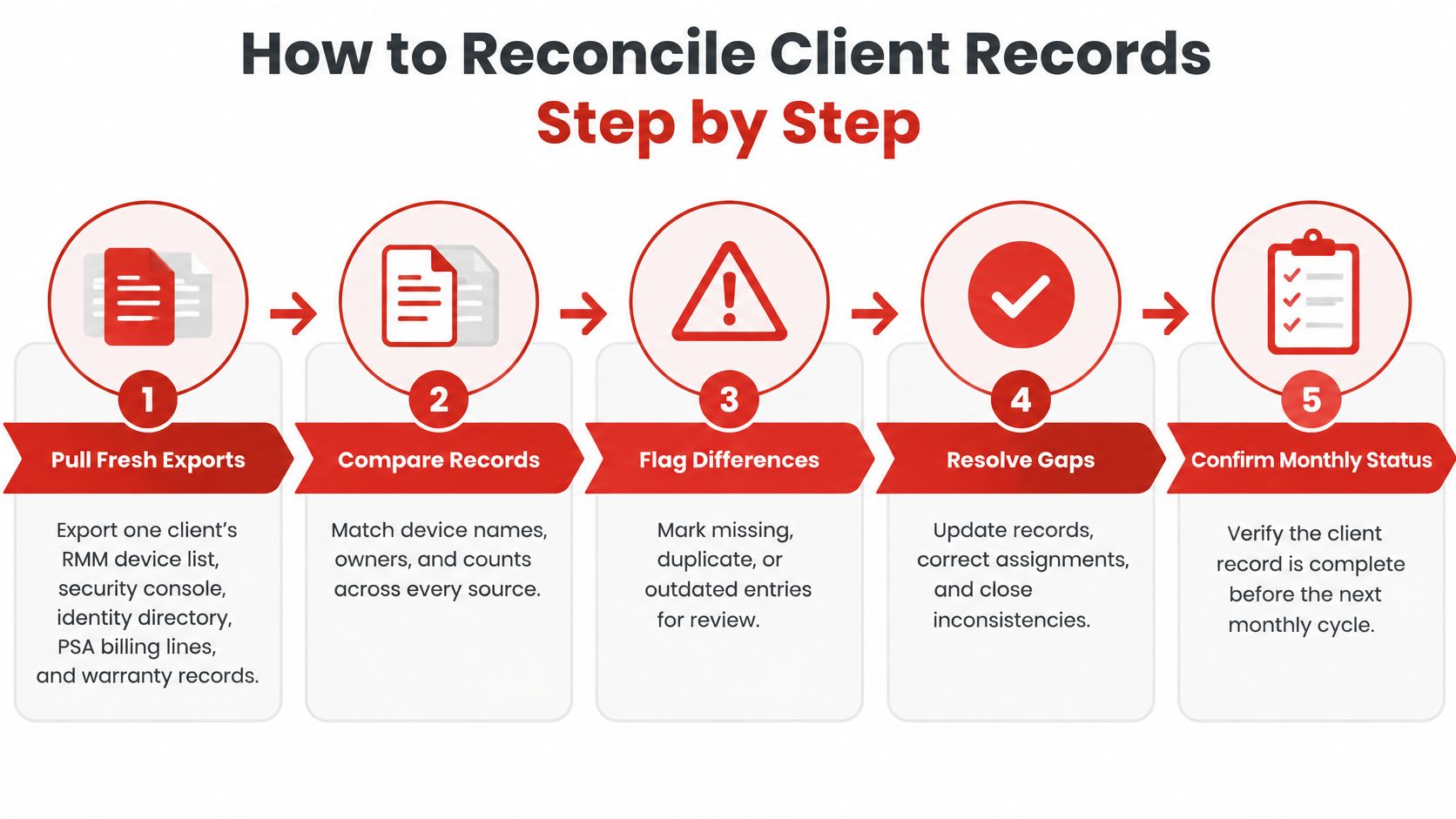
A repeatable reconciliation run
Pull fresh exports for a single client. Collect the RMM device list, security console records, identity directory, PSA billing lines, and warranty or purchase records, preserving source names and export timestamps. Comparable snapshots prevent an old billing export from appearing to contradict a newly onboarded endpoint.
Normalize the join keys. Standardize client IDs, serial numbers, device names, and assigned-user identifiers, recording which keys each tool supplies. Device names alone can produce false pairs after renames or rebuilds, so retain original values alongside normalized fields.
Match records pair by pair. Compare inventory with security, billing, identity, and procurement records, marking each relationship as matched, missing, or conflicting. Pairwise matching prevents a billing match from concealing a missing security record.
Assign confidence to each mismatch. Use last-seen timestamps, stable identifiers, and agreement between independent sources to label confidence as high, medium, or low. Confidence describes the strength of the evidence, not permission to change a contract or delete an account.
Route exceptions to named owners. Assign stale-agent investigations to the technician, scope questions to the account manager, and protection gaps to the security lead. An exception without an accountable person and review date is unlikely to close.
Record the decision and carry forward unresolved items. Log the evidence, action, approver, decision date, and next review date, retaining the link to the original exception. This prevents a recurring discrepancy from being treated as a new discovery every month.
Prioritize risk alongside record quality
Reconciliation becomes more useful when the device relationship includes operating system, software, exposure, business owner, and lifecycle state. A perfectly matched record can still describe an unsupported or exposed asset that needs urgent attention.
CISA's asset-inventory guidance recommends cross-referencing inventories with the Known Exploited Vulnerabilities Catalog as an input to vulnerability prioritization. Its guidance concerns operational technology, so MSPs should apply the relevant inventory principles within the client's actual environment rather than treating it as a universal endpoint checklist.
Rank remediation using exploitation evidence, internet exposure, business criticality, and patch availability. End-of-life, publicly reachable, or uncovered devices warrant escalation even when no current alert exists; the owner should document mitigation or an approved replacement path.
A healthy run doesn't require an empty exception queue. It requires matched assets, explainable exceptions, and no uncertainty about who acts next.
The client-facing result should show the open count, aging exceptions, and decisions awaiting approval. Inventory reconciliation supports security work and accountability, but it doesn't itself establish compliance or guarantee protection.
Exception Cases Where Records Disagree
A single source of truth is often the wrong objective for a heterogeneous MSP environment. Different systems answer different questions, and forcing them into one identical record can erase useful distinctions between technical activity, contractual entitlement, and user status.
Controlled disagreement is more useful: retain each source's evidence, identify the disputed relationship, and record who can resolve it. The team should distinguish confidence that a mismatch exists from confidence about its cause.
Common record mismatches, likely causes and actions
| Mismatch | Likely cause | Action | Confidence |
|---|---|---|---|
| Device in RMM, missing from PSA billing | Onboarding not yet billed, or client scope changed | Confirm contract scope, then bill or remove from managed scope as authorized | Medium until scope is confirmed |
| Device in PSA, silent in RMM | Powered off, retired or agent removed | Check last-seen date, then retire or redeploy as verified | High once last-seen is past the agreed threshold |
| Managed device without security coverage | Security agent missing or disabled | Escalate to the security owner the same day; track remediation during the same week | High |
| Disabled user still holds licenses | Offboarding ticket not closed | Reclaim licenses after client approval | High |
| Device with no warranty serial | Manual entry, or hardware bought outside the MSP | Obtain serial from the device or invoice | Low until verified |
A high-confidence stale-device exception doesn't establish that the hardware was retired. It establishes that the record crossed the agreed freshness threshold. Likewise, a missing security record should trigger investigation, not an assumption that the device is safe because another console reports it as managed.
An illustrative accounting-client review
Illustrative example: A 40-seat accounting client has 46 managed endpoints in RMM and 42 billable device lines in PSA. The four-device net difference isn't automatically four new charges, because user seats, endpoints, and billing lines measure different things.
The review identifies three devices onboarded last week and two retired laptops still reporting. Of those five flagged devices, one retired laptop still has a PSA line; the other retired laptop and the three new devices account for the four unmatched RMM entries.
The account manager separates the decisions into bill now for approved, in-scope additions, confirm scope for additions without documented approval, and retire for the old laptops, including correction of the remaining PSA line. The team resolves identities before adjusting totals.
Identity relationships need similar care across tenants. The multi-tenant identity visibility discussion provides a relevant starting point for reviewing how user status connects to client asset records.
Regardless of billing status, any exception touching security coverage reaches the security owner the same day. Commercial uncertainty shouldn't delay security assessment.
Governance and Implementation Checklist
The service delivery manager should establish decision rights before the first reconciliation run. Access to an export doesn't automatically give a technician authority to change a contract, remove a license, or approve replacement hardware.
Ownership and operating rules
- RMM owner: Investigates discovery gaps, duplicate agents, stale check-ins, and device identity problems.
- PSA owner or account manager: Confirms contract scope, billing relationships, bundled services, and proposed seat changes.
- Identity owner: Reviews disabled accounts, user assignments, and license exceptions with the client's approver.
- Security owner: Assesses protection gaps and receives security-related exceptions on the day they're identified.
- Service delivery manager: Maintains the cadence, reviews unresolved ownership, and checks completion each quarter.
Set a fixed monthly sequence for export, reconciliation, owner review, and client reporting. A scheduled reporting date makes delayed evidence visible instead of allowing the run to remain indefinitely unfinished.
During onboarding, document a freshness threshold and coverage target for each client. Mark an unsettled setting as pending client agreement, rather than treating a default as an accepted commitment. Record exclusions explicitly, including offline spares, approved unmanaged equipment, and services outside the agreed scope.
Before extending the routine
- Confirm connector scope: Verify supported sources, available fields, permissions, and data-transfer arrangements.
- Name exception owners: Assign accountable people and backups, not only team names.
- Agree thresholds: Obtain client approval for expected assets, freshness rules, and reporting boundaries.
- Pilot a client: Test matching, exception routing, and approval handling against real exports.
- Review after three cycles: Examine recurring mismatches, time spent, and unresolved decisions before extending the routine.
Keep a reconciliation log containing the run date, mismatch count, evidence, owner, decision, and approval record. Closed items should retain their history so a later reviewer can understand why the record changed.
Client sign-off precedes license reclamation, seat changes, and replacement orders. A recommendation can be technically sound while still requiring commercial authorization. That boundary protects both the MSP and the client from unapproved changes.
Lifecycle Decisions and Coverage Metrics
Asset records become operationally useful when the client can approve a decision before a failure or support deadline forces one. That requires a lifecycle view, not merely a list sorted by device age.
Connect lifecycle stages to client approvals
At procurement, record the intended user, business purpose, purchase date, supplier, and planned service coverage. At deployment, capture the verified serial number, assigned user, management status, and protection status before closing the installation ticket.
During active support, maintain warranty expiry and operating-system support information separately. The budget owner can then distinguish a warranty renewal decision from a hardware replacement or OS migration.
At end of support, present the available paths: replace, upgrade, isolate, or accept a documented exception where appropriate. Apply exploitation evidence, exposure, criticality, and available remediation when deciding which recommendations need attention first.
At retirement, obtain authorization, remove operational assignments, and identify any billing or license changes. At disposal, retain the disposition and sanitization evidence required by the client's policy and agreed service.
The hardware, warranty, and OS lifecycle planning overview is relevant when evaluating how those records will support a client's refresh decisions. Manufacturer coverage and the available lifecycle fields still need confirmation for the proposed stack.
Group replacement recommendations by age and risk, then schedule proposed purchases by quarter with the budget owner. Review disabled-user license assignments monthly and align approved seat changes with billing. The output remains an approval list, not an automatic order.
Measure completeness and currency separately
CISA's cybersecurity performance checklist recommends regularly updated asset inventories and specifies refreshing inventories containing IP-addressed assets at least monthly. It also recommends tracking enumeration frequency, asset coverage, and vulnerability-signature currency.
Core coverage and freshness metrics for client reviews
| Metric | How to calculate | Review cadence | Data source |
|---|---|---|---|
| Asset coverage | Discovered assets divided by expected assets | Monthly | RMM discovery and PSA expected list |
| Inventory freshness | Share of records with last-seen date inside the agreed threshold | Monthly | RMM and security telemetry |
| Enumeration frequency | How often each client's asset list is refreshed | Monthly | Reconciliation job log |
| Unprotected device count | Managed devices without security coverage | Monthly | Security console and RMM |
| Unused license count | Licenses assigned to disabled or inactive users | Monthly | Identity and license records |
| Billing mismatch count | Managed endpoints not matched to a billable PSA line | Monthly | RMM and PSA |
| Hardware past refresh policy | Devices older than the client's agreed lifecycle | Quarterly | Asset register with purchase dates |
The expected asset list needs client validation; PSA records alone may omit equipment outside per-device billing. Unexpected discoveries should trigger a scope review rather than being added to the denominator. Disabled or inactive users also identify license-review candidates, not proof that every assignment can be removed.
Measurement guardrail: Better coverage is meaningful only when the scope remains comparable and unprotected devices remain visible.
Illustrative trend: Coverage rising from 88% to 94% over three cycles offers a stronger QBR discussion than a larger device count alone, provided the expected population hasn't changed. Pair that trend with freshness, unprotected-device counts, and pending decisions. Leave targets pending until agreed, and never present these measures as proof of security posture or compliance.
Connecting Volgap With Your RMM, PSA and EDR Stack
No single tool gives one answer for a client environment. The RMM counts the devices it manages, the PSA bills the endpoints under contract, and the security console reports the machines it protects. The three lists overlap, and the differences between them are what reconciliation exists to surface.
Volgap sits alongside these tools rather than replacing them, bringing inventory, protection, and billing into one client picture. The Volgap product page sets out its scope, which should be checked against the proposed deployment. Where records disagree, the useful output is a labeled difference that names each contributing source and carries an owner who can resolve it.
That requirement holds on any platform. Repeatable reconciliation means the same exports and join rules produce the same result every month, and every exception reaches someone with the authority to decide it.
Validate the proposed flow
The intended operating flow has three stages: source records enter from management, billing, identity, and security systems; reconciliation identifies relationships and exceptions; reviewed actions and reports reach the people responsible for delivery. No particular connectors, write-back functions, or ticket-routing automation are promised by this description.
Before committing, confirm the proposed connector list can answer:
- Supported sources: Which connectors cover the MSP's exact RMM, PSA, EDR, and identity tools?
- Manufacturer coverage: Which hardware vendors and warranty records are covered?
- Refresh behavior: How frequently does each source update, and how are stale records identified?
- Disagreement handling: When two systems report different values for the same asset, does the output show both values and where each came from?
- Integration ownership: Who maintains permissions and handles failures on the MSP and vendor sides?
- Unavailable sources: Are older records retained, clearly marked, excluded, or retried?
- Output handling: Which reporting and exception workflows are supported in the proposed configuration?
Supported connectors, manufacturer coverage, deployment, pricing, service levels, and support responsibilities are confirmed in a separate agreement, so this list functions as a validation checklist rather than a commitment.
A single-client test settles the practical question: whether the available fields support reliable joins, and whether each mismatch arrives with enough source detail for a technician to act on. If exceptions reach the right owner with both versions of the record visible, the flow is doing its job. If disagreements disappear into a single reconciled value, the tooling is hiding the very evidence it was brought in to manage.
Start Your First Monthly Reconciliation
The first move is a bounded pilot, not a portfolio-wide cleanup. The service delivery manager should choose a client with a clean PSA record and at least two exportable sources, then run the reconciliation routine once.
The pilot log should capture the mismatch count, elapsed effort, missing fields, and decisions requiring client input. The client and account manager should agree an initial coverage target after validating the expected asset population.
Evaluate the operating result
- Compare effort: Assess reconciliation and review time against the current reporting workload.
- Check accountability: Confirm that exceptions reached the right owner and produced documented decisions.
- Test repeatability: Determine whether another technician could reproduce the result using the same exports and rules.
- Assess reporting fit: Review the automated monthly reporting overview against the client's required decisions and reporting format.
Veevoo, Inc. distributes the platform and isn't the software vendor. Its first step is a fit discussion covering the MSP's stack or client use case, with attention to relevant integrations and controls; deployment, licensing, onboarding, pricing, and terms are addressed before commitment.
The MSP should bring the export list, current mismatch count, and unresolved questions to that conversation. A fifteen-minute contact conversation with LeeJay Stewart can focus on IT visibility needs without requiring a broader rollout decision.
The pilot should end with an approved action list and a scheduled next run. Expansion makes sense when the team can explain the records, assign the exceptions, and repeat the work.
Veevoo, Inc. offers software distribution and enablement for MSPs evaluating Volgap for client IT visibility. MSP owners and service delivery leads can visit Veevoo, Inc. with a pilot client's export list and open mismatches to discuss platform fit, integration requirements, and next steps before committing.