
A client's leadership team wants an approved AI workspace. Employees are already trying personal AI accounts, and the client's security lead wants clear answers about data handling. The service delivery manager gets the assignment on a Tuesday: propose something controlled, useful, and ready to discuss by Friday.
The wrong response is to send a list of model names and ask the client to choose. The MSP needs to decide how the service will work: which tasks the workspace should support, how users get access, what data rules apply, how outputs are reviewed, and what happens when the selected model isn't a good fit.
That's the difference between reselling access and delivering a service. Multi-model AI becomes valuable to an MSP when model choice, client policies, onboarding, and ongoing support are packaged together. The workspace is where the client's employees work. The MSP designs the operating layer around it.
Table of Contents
- A Familiar MSP Tuesday Morning
- What Multi-Model AI Means for an MSP
- Matching Models to Client Tasks
- Deployment Options You Need to Discuss With Each Client
- Building the AI Service You Can Resell
- Governance and Moderation After Deployment
- Concrete SMB Use Cases a Branded Workspace Can Carry
- A 30 Day MSP Launch Plan and What to Confirm Next
A Familiar MSP Tuesday Morning
By midmorning, the client's operations manager has forwarded requests from several teams. Marketing wants help with campaign drafts and images. Finance wants to summarize documents. A developer wants code assistance. Leadership wants a policy that stops employees from entering sensitive material into unsanctioned tools.
The MSP can't responsibly answer with “use this model for everything.” The client's tasks differ, and so do its data rules. Before proposing a workspace, the service delivery manager needs to find out what users want to do, which information they'll handle, and who's accountable for checking the results.
That discussion also changes what the client is buying. It isn't a login or a bundle of assistants. It's a defined way to access AI, supported by onboarding, administrator guidance, user education, and regular service reviews. The MSP needs to explain what the proposed setup supports, what still requires client approval, and which behaviors remain the user's responsibility.
The service decision comes before the model decision. Define the client workflow and its guardrails first, then assess which models and deployment choices fit.
A Friday proposal doesn't need to settle every technical question. It should identify the client's initial use cases, outline the operating rules, and list details that must be confirmed for the proposed configuration. That gives the client a practical path forward without promising capabilities that haven't been verified.
This is how an MSP turns urgent demand into a managed offer. The goal isn't to make AI use sound risk-free. It's to give the client a workable environment, clear expectations, and a named service team to help manage adoption.
What Multi-Model AI Means for an MSP
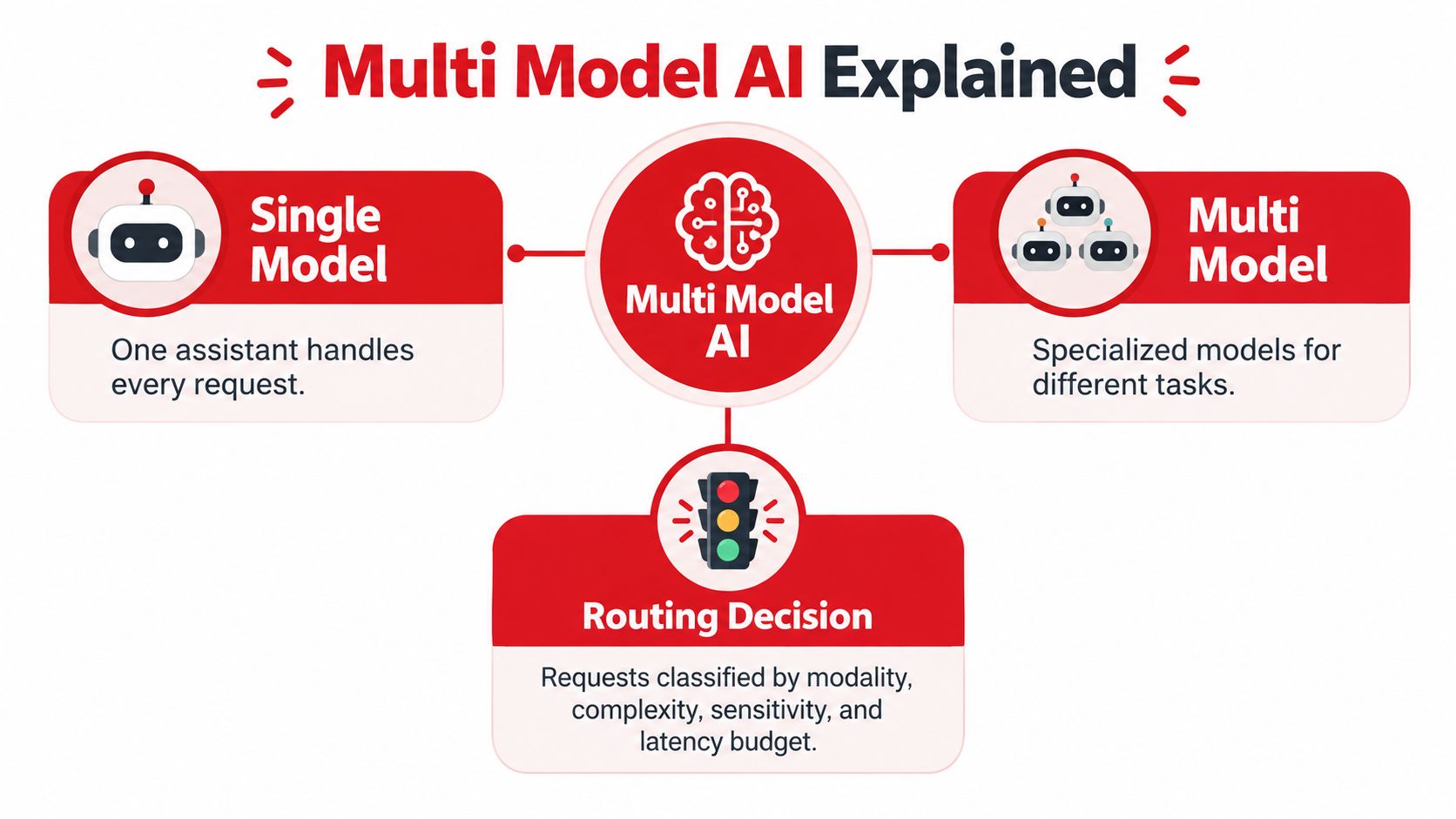
A single-model deployment puts one assistant in front of users and expects it to handle every request. Multi-model AI gives a workspace access to different models or assistants, with the selection made by a user or, where supported, by a routing process. For an MSP, that selection is a deliverable. Which models get exposed, how requests are routed, and where moderation limits sit are decisions you package and operate as part of the service.
A project manager assigns each job to the specialist with the right skills and availability. An AI workspace can apply the same principle, matching a drafting task, a code question, or an image request to an appropriate model. The client's gain is an environment where that matching follows agreed rules.
That approach builds on foundation models that adapt across tasks, where a single trained system covers work that once demanded a separate model for each narrow use case. OpenAI's GPT-3 research evaluated eight model sizes, ranging from 125 million to 175 billion parameters, and described few-shot learning, where users give instructions and examples in a prompt without changing model weights through additional training (GPT-3 background). You don't need to walk clients through model history. What matters is that one general-purpose model can support a range of tasks, while a broader ecosystem gives your service team more options to evaluate.
The ecosystem keeps widening. Stanford's 2025 AI Index reports 149 foundation models released globally in 2023, more than twice the number in 2022; it also reports that 65.7% of the models released in 2023 were open-source, compared with 44.4% in 2022 and 33.3% in 2021 (Stanford AI Index research and development). Treat model selection as an operating choice you revisit at each service review, and write that expectation into the client agreement.
Prox.ia is documented as a multi-model AI workspace that brings several assistants into one client-facing environment, including ChatGPT, Claude, Gemini, Mistral, and Perplexity (Prox.ia workspace details). Present it as governed access and enablement under your service wrapper, and confirm per client which assistants, branding options, and moderation controls the proposed configuration supports before committing them to a proposal.
Matching Models to Client Tasks
Routing is a service decision about where a request goes. A client's request can be assessed by modality, complexity, sensitivity, and response-time expectations. The MSP then considers the available models and the client's rules before deciding whether to route, restrict, escalate, or ask the user to choose.
The exchange-routing analogy works well with clients. A broker doesn't send every transaction through the same route regardless of its requirements. Similarly, a routine summary may not need the same model as a difficult reasoning task, and an image request requires a model that supports the relevant input or output. These are illustrative routing patterns, not guaranteed Prox.ia defaults.

Test the route, not just the model
A router can make the wrong choice. If its classification is weak, it may send a request to an unsuitable model even when a better candidate is available. That's why an MSP should test actual client tasks rather than assume that adding more choices automatically improves results.
RouterBench provides 405,467 precomputed inference outcomes across representative language models and eight datasets, with performance and cost metadata for evaluating routing strategies (RouterBench research). For service design, the useful principle is to compare a fixed-model baseline with the proposed routing approach under the same workload. Review task-level quality, latency, cost, and whether the selection followed the client's policies. An aggregate score can hide a poor outcome on a workflow that matters to the client.
RouteLLM evaluates preference-trained routers on MMLU, MT-Bench, and GSM8K, covering broad knowledge, open-ended instruction following, and mathematical reasoning (RouteLLM research). An MSP doesn't need to reproduce a research benchmark for every client, but it should adopt the same discipline: record the task class, selected model, fallback events, user feedback, and policy outcomes. Periodically compare routing decisions with a stronger-model reference sample, and escalate when the system's confidence or the task's risk makes an automatic choice inappropriate.
Quality and price aren't the only constraints. A client's data-handling rules must be checked before routing is optimized for cost or speed. That makes routing a governed decision, not merely a performance feature.
Deployment Options You Need to Discuss With Each Client
Clients often ask where their data goes before they ask which assistant writes the best draft. The MSP should treat hosting as a client-specific decision and verify the current offer's capabilities for the proposed configuration. Cloud, private, and on-premises options can involve different trade-offs, and the name of a hosting mode alone doesn't establish retention, residency, or access controls.
| Hosting mode | Best fit for | Key trade-off | Typical MSP action |
|---|---|---|---|
| Cloud | Clients seeking a managed workspace without operating local infrastructure | The client must confirm applicable data handling and processor terms | Verify providers, processing locations, retention, and available administrative controls |
| Private | Clients with specific hosting or data-residency requirements | The intended controls and model availability depend on the proposed arrangement | Confirm where processing occurs, who operates the environment, and what models are available |
| On-premises | Clients that require deployment within their own environment and can support its operation | The client takes on infrastructure and operational responsibilities | Review capacity, support ownership, model options, and ongoing maintenance requirements |
These descriptions are decision prompts, not product guarantees. Before making a recommendation, ask which data classes users may submit, whether any information must stay within a defined location, what retention terms apply, which processors are involved, and what administrative or audit access the client needs. Then document what the proposed Prox.ia configuration supports and what remains outside the workspace's control.
The same verification discipline applies when a client has multiple tools and identity records. For MSPs evaluating a separate cross-tool visibility need, Volgap's multi-tenant identity visibility overview concerns a different operational function. It isn't a substitute for confirming AI workspace deployment or data-handling terms.
The MSP's proposal should state the client's chosen hosting approach, the assumptions behind it, and any open questions that must be resolved before users receive access. Don't tell a client that private hosting automatically satisfies its obligations, or that a cloud option is unsuitable by default. The actual configuration and the client's requirements decide the fit.
Building the AI Service You Can Resell
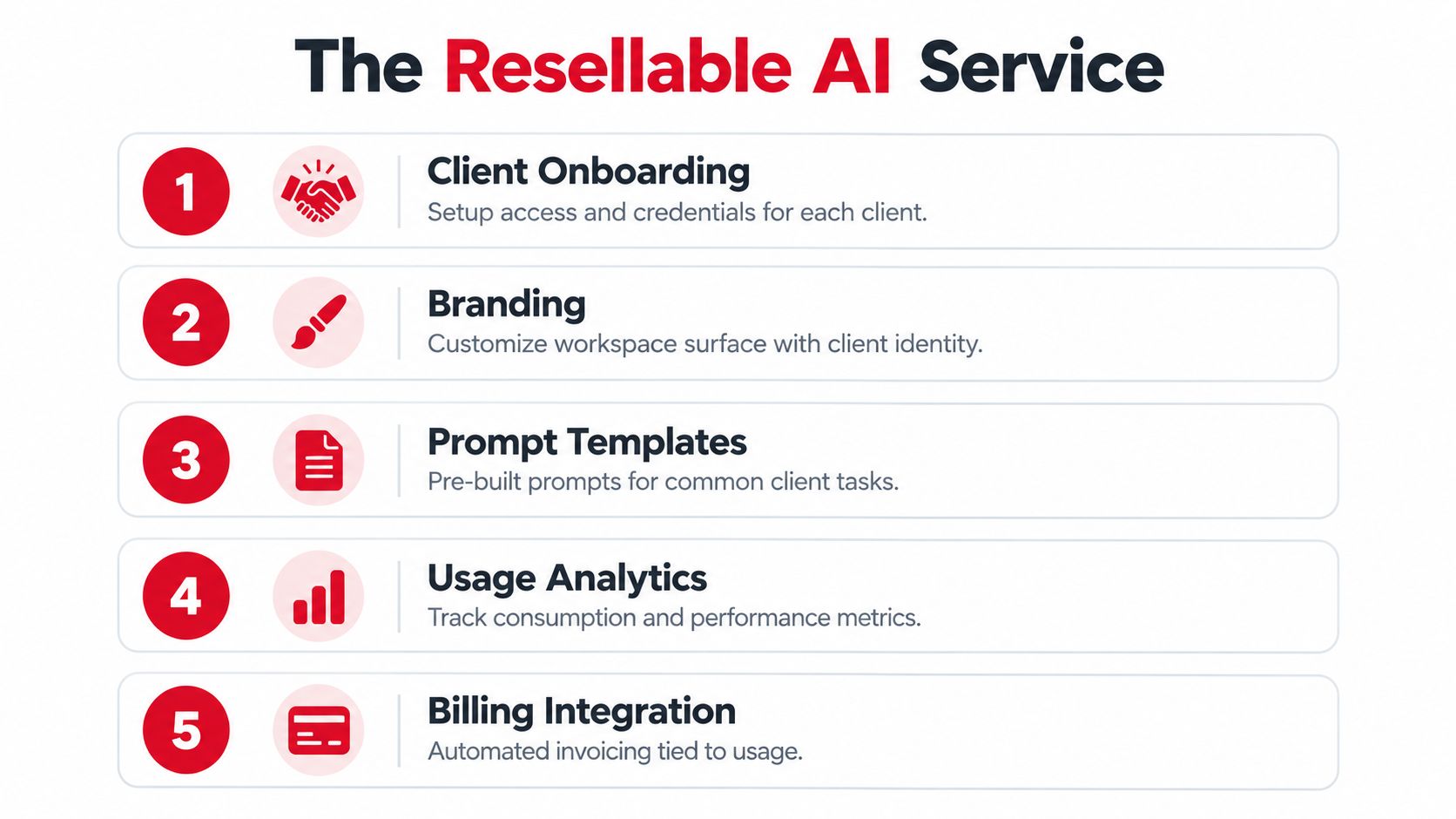
A reseller offer becomes durable when the MSP owns the operational work around the workspace. Put that work in the scope document with owners and hours attached. Informal help that nobody budgets or assigns turns into unpaid support tickets within the first quarter.
Define the service components
Onboarding and access: Decide who approves users, who configures the workspace, and how access changes when an employee changes roles. Give the client administrator a clear handoff instead of treating setup as a one-time account task.
Branding: A client-facing workspace may carry the client's identity where the proposed deployment supports it. Branding shapes how the service is presented to the client's users; it does not add security, so confirm the available branding options before including them in a statement of work.
Prompt workshops: Train users around their actual jobs. A finance team may need practice summarizing approved materials, while marketing may need guidance on drafting and image workflows. Agree on which data is off limits and how staff should check outputs before the workshop date.
Consumption budgets and alerts: Establish who monitors usage, who receives notices, and what happens when a budget threshold is reached. Set expectations with the client before launch. Verify that the specific budget controls and alerts you plan to sell exist in the proposed configuration.
Moderation and support reviews: Define what the workspace's moderation does, how users report questionable responses, and who investigates. Schedule a recurring review of adoption, usage patterns, support issues, and policy changes.
Illustrative service design: An MSP could onboard one department first, hold a prompt workshop tied to its approved tasks, then review user questions and consumption before expanding access. Treat that sequence as a rollout pattern you can adapt per client, and confirm the underlying capabilities in the proposed offer first.
The resale value lives in this operating layer. Clients can compare assistant names on their own; they need an MSP to turn access into a service with clear onboarding, practical training, named support, and agreed controls. Veevoo, Inc. distributes and supports enablement for Prox.ia, while the software vendor remains distinct from the distributor. Confirm which branding, usage, and reporting capabilities are available in the proposed offer before writing them into the client scope.
Governance and Moderation After Deployment
Moderation is useful, but it isn't a compliance program. It may help identify or restrict some content, yet it can miss sensitive information and can't guarantee that users will follow policy or that every output will be appropriate. An MSP that sells a workspace without an ongoing governance plan is leaving the client with access but no dependable operating practice.
NIST's generative-AI risk framework groups concerns that include confabulation, data privacy, value-chain integration, harmful bias, information integrity, and security (NIST AI risk management profile for generative AI). That's a useful risk taxonomy, not a checklist of product features. It helps the MSP ask whether the client's safeguards cover the full workflow, including user behavior, model providers, connectors, and review of outputs.
Keep the controls active
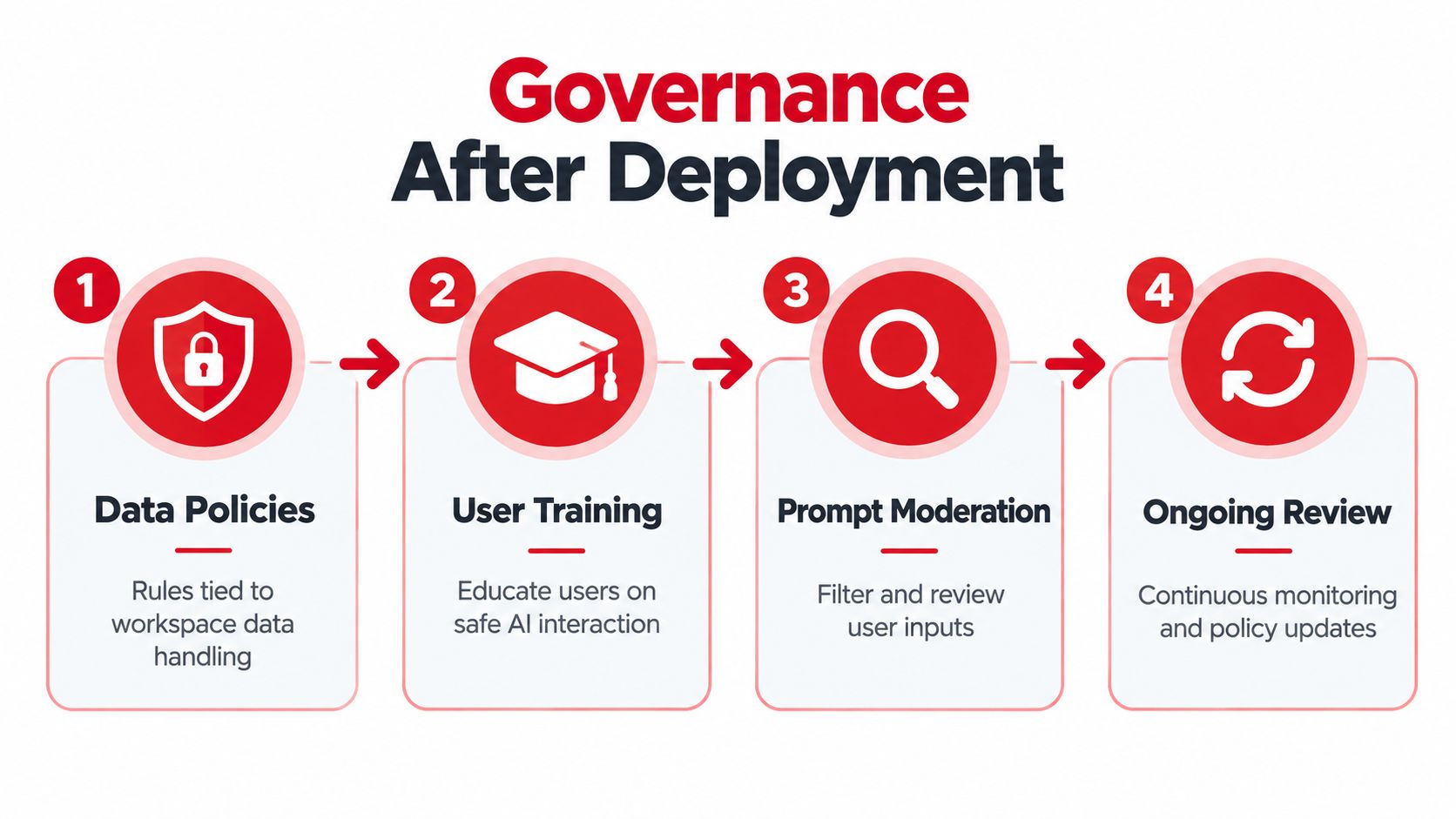
A workable governance plan should include written data policies, user training, prompt practices, human review checkpoints, incident procedures, and periodic reassessment of the models and services in use. For example, a client may require approval before employees submit confidential documents or use generated content in customer communications. The client, not the workspace alone, must define those rules and assign owners.
Administrators should know how to investigate a questionable response, preserve relevant details, and escalate a suspected policy breach. Monthly service reviews can cover usage patterns, reported issues, changes to allowed workflows, and whether the current model selection still fits the client's requirements. Maintain the policy, runbook, escalation path, and review cadence as operating documents rather than relying on an informal launch conversation.
For a closer look at moderation considerations, review Prox.ia's AI prompt moderation information. The MSP should confirm what the proposed configuration provides and explain the remaining responsibilities plainly: users must follow policy, the client must decide which data may be processed, and human review remains necessary for consequential work.
More model choices can improve task fit, but they also increase the number of provider-specific behaviors and terms a service owner may need to manage. Treat governance as a continuing control loop: define, train, review, investigate, and update.
Concrete SMB Use Cases a Branded Workspace Can Carry
Four workflows cover most of what SMB clients will ask for. Each scenario below names the team, the allowed inputs, and the reviewer, and each one only works if you confirm the models and limits in the proposed configuration before it goes into a proposal. Treat these as illustrative starting points for a service conversation, not capabilities you can promise out of the box.
Drafting and customer communication
Start here when you package the offer. An operations team uses a suitable text model to prepare a first draft of a customer update or turn rough notes into a clearer response. A prompt workshop teaches staff to supply relevant context without pasting restricted information, and the client requires a human read before anything reaches a customer. A shared, branded workspace gives you a managed environment with shared expectations. A personal login gives you nothing to govern.
Document and policy review
A client's administrator can use a document-capable model to summarize an approved internal procedure or locate sections that need human review. Before offering this workflow, get three answers in writing: which documents are eligible, who checks the summary against the source, and whether the client's data rules permit it. The model organizes reading. It does not replace the person accountable for the policy.
Marketing images
A small marketing team may want image generation or edits to existing assets for campaign work, where the supported model and deployment allow it. In the workshop, cover which brand materials are approved as inputs, who reviews generated assets, and how the client confirms rights and accuracy. Check image support per assistant before you quote it in a proposal. Capabilities vary, and promising them unverified creates a support problem you own.
Code assistance
A developer can ask a suitable model to explain a code snippet or help draft an internal automation. The client decides whether source code may be submitted, which systems are in scope, and who reviews the output before it runs. Every response is a suggestion that still needs testing, not a production change.
These four give the service lead a concrete starting point for client discussions. Package each workflow with the team, task, allowed inputs, reviewer, and support path written down, then confirm which available model fits before you price it.
A 30 Day MSP Launch Plan and What to Confirm Next
A controlled launch starts with a narrow scope. The MSP should choose one client and a small set of approved workflows, then work through the operational details before expanding access.
- Scope the client: Identify the first user group, intended tasks, data classes, and client decision-makers.
- Confirm the configuration: Verify available assistants, document and image support, deployment choices, data handling, and moderation limits for that client.
- Prepare the workspace: Agree on access, administrator responsibilities, and any client branding options available in the proposed offer.
- Train and set expectations: Walk the administrator through the workspace, then hold a prompt workshop for the initial user group.
- Review after launch: Set the client's consumption expectations, establish how moderation concerns are reported, and review adoption and support issues after the first month.
This sequence is a practical rollout plan, not a guarantee that every listed control is included by default. Prox.ia is documented as a multi-model AI workspace with several assistants in one client-facing environment, while deployment details and specific capabilities still need confirmation for each client. Veevoo is the distribution and enablement partner, not the software vendor. Its automated monthly reporting information for Volgap describes a separate operational offer, not a Prox.ia capability.
MSPs can review the Prox.ia workspace and confirm the intended client configuration before making promises about model access, hosting, branding, or moderation.
Veevoo, Inc. distributes Prox.ia and provides enablement for MSPs assessing AI use cases, controls, and deployment requirements. Visit Veevoo, Inc. to discuss scoping a governed multi-model AI workspace for a client.