
“Upgrade before support ends” is useful advice, but it isn't a complete operating model. MSPs still have to manage the machines that remain afterward: the specialist workstation awaiting application approval, the laptop that never checks in, and the server whose support status nobody has verified.
OS lifecycle management is the ongoing governance of that mixed estate. The deliverable isn't a completed deployment ticket. It's an asset-level record showing support status, verified evidence, an accountable owner, and a funded next action.
Table of Contents
- Support Dates That Set the Planning Calendar
- How to Run the Monthly Control Loop
- Sequence Work After Support Has Ended
- Pilot Rings and a Tested Rollback
- Show Residual Exposure in the QBR
- Review Your Stack Before the Next QBR
Support Dates That Set the Planning Calendar
A device can boot, connect to the network, and run a line-of-business application while sitting outside a documented support window. Availability answers whether someone can work today. Lifecycle status answers whether the organization has a defensible maintenance path.
Microsoft's Windows end-of-support notice states that Windows 10 support ended on October 14, 2025, ending free software updates, technical assistance, and security fixes. That milestone requires a support decision, not an assumption that every remaining machine must immediately be discarded.
Third-party reporting from SecurityWeek observed that more than 40% of desktop devices were still running Windows 10 in September 2025. That's an external observation, not a Veevoo customer result or a benchmark for an individual MSP's estate.
Support windows MSPs should re-verify
The following milestones are planning references, not fresh confirmation of current support eligibility. Before any client commitment, the technical owner should recheck Microsoft's lifecycle records and the current kernel release table, then retain the applicable evidence in the client record.
| Platform or release | Milestone | Date to re-verify | What the MSP still must check |
|---|---|---|---|
| Windows 10 | End of free updates, assistance, and security fixes | October 14, 2025 | Eligibility for a supported upgrade, hardware replacement, or separately documented extended updates |
| Windows product example in Microsoft lifecycle catalog | Published product end date | Microsoft's lifecycle catalog lists October 9, 2029 | Exact product, edition, servicing channel, architecture, and system requirements |
| Linux kernel 5.15 | Projected end of life | December 2026, a projection in the kernel.org lifecycle reference | Whether this branch is installed and whether the date was extended |
| Linux kernel 6.6 | Projected end of life | December 2027, a branch projection in the same kernel.org reference | Same-family devices may sit on other branches with different windows |
| Linux kernel project | Typical new major release | About every 2 to 3 months, according to that kernel.org reference | Only selected releases receive long-term support |
The catalog example isn't a generic deadline for all Windows installations. Unless the technician has matched the exact product record to the installed edition, servicing channel, and architecture, that date isn't ready for a client-facing refresh plan.
Likewise, a Linux distribution name doesn't establish the installed kernel's maintenance status. The kernel.org reference describes a new long-term release as commonly starting with an approximately two-year projected end of life; only selected branches receive that treatment, and projected dates can change.
Build the asset record around eligibility
Each asset needs a record that supports a decision rather than merely identifying a machine:
- Installed software: Exact OS version, edition, build or kernel, and release date.
- Support evidence: Projected end of support, official reference, verification timestamp, and separately documented extended support.
- Upgrade eligibility: Hardware requirements, application constraints, and the supported destination.
- Replacement context: Warranty status, procurement owner, and planned retirement action.
A sample client should be scored by documented support coverage. Online status can remain an operational field, but it shouldn't determine whether the asset passes a lifecycle review.
Planning rule: An unverified support date is an unresolved asset record, not permission to assume coverage.
How to Run the Monthly Control Loop
The monthly review should refresh evidence and move decisions into assigned work. A project closeout can record a successful upgrade, but it can't establish that every later-discovered device has joined the supported baseline.
CISA's end-of-support advisory explains that unsupported systems may continue operating without vendor security updates. It recommends identifying affected devices, assessing the risk, migrating systematically, and replacing devices when supported upgrades can't be applied.
Follow the operational handoffs
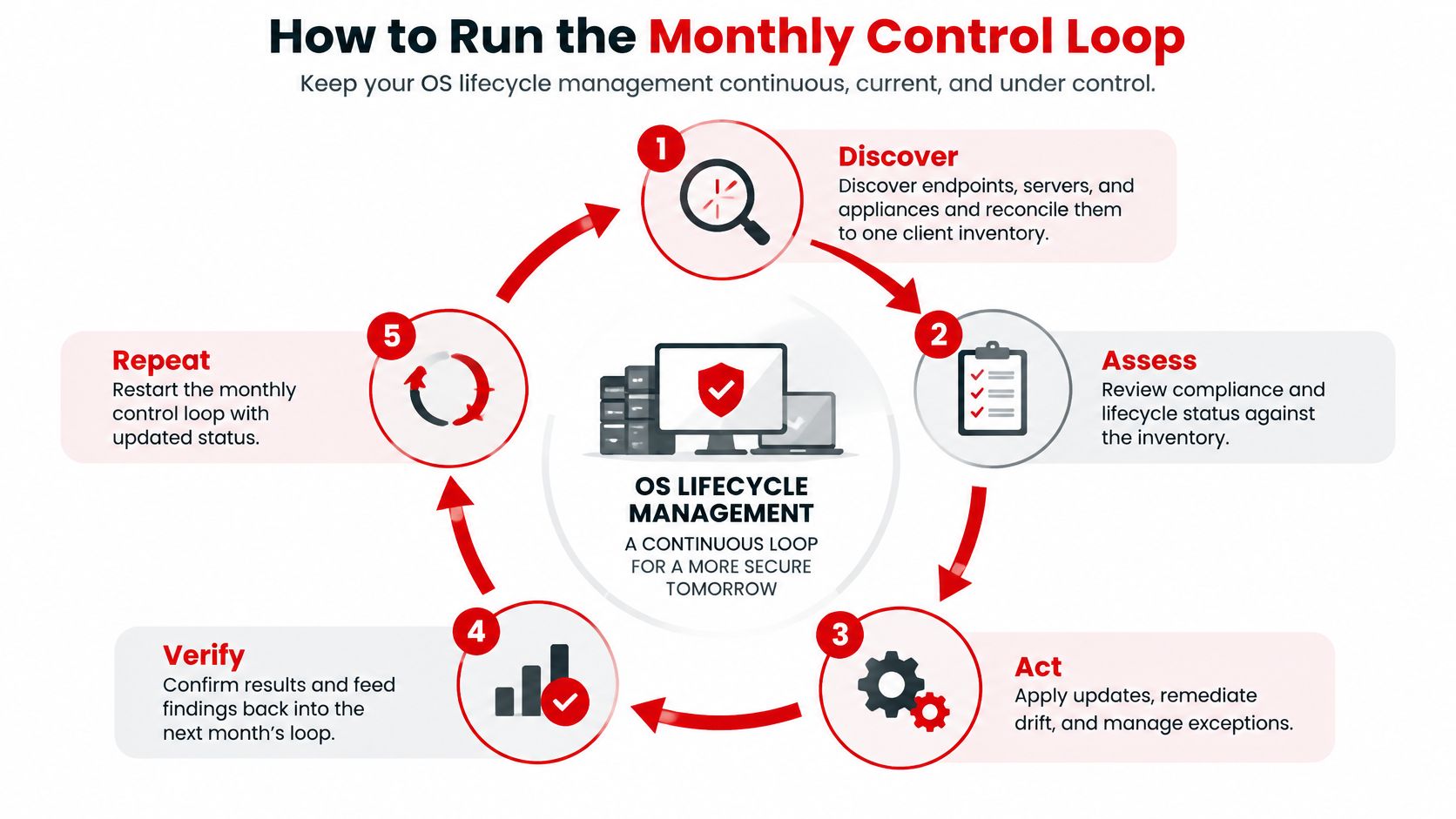
Discover and reconcile. Gather endpoints, servers, and appliances into an authoritative client inventory using existing RMM, identity, and security records. Match stable device identifiers rather than relying solely on hostnames. A common discovery failure is counting duplicate records as separate protected assets while missing an unmanaged machine entirely.
Record lifecycle metadata. Capture version, edition, build or kernel, vendor support status, and end-of-support date. Add the last verification timestamp and flag stale or unknown fields. A device listed as managed can still fail this step because its support eligibility hasn't been established.
Classify the work. Record business criticality, exposure, known exploitability, and upgrade dependencies. The application owner should identify specialist software constraints; the service team shouldn't infer compatibility from a successful login.
Pilot the successor release. Select representative hardware and applications. Assign the application acceptance decision to someone who understands the workflow, not only the installation process.
Deploy in staged rings. Release the approved change through controlled groups after rollback and recovery testing. The change owner holds the expansion decision.
Validate the result. Check patch installation, encryption, security-agent health, backup status, and user-impact exceptions. The failure to avoid is treating a successful deployment command as proof that the endpoint returned to a usable, protected state.
Report and assign. Publish unsupported, failed, deferred, and unverified assets monthly. Every unresolved asset needs a named remediation owner and a next action that can become a ticket.
The operational steps fit within a repeating discovery, assessment, action, and verification cycle.
Apply the loop to an illustrative client
Consider an illustrative 40-seat professional-services client. Most PCs run a supported Windows release, a handful remain on Windows 10, and a Linux file server's ticket names only its distribution.
The Windows exceptions need eligibility decisions. The Linux server needs its running kernel and vendor maintenance path verified before the technical lead assigns an upgrade. Neither task is complete merely because the RMM displays a green connection indicator.
NIST's enterprise patch-management guidance calls for current software inventories across physical and virtual computing assets, including operational technology where applicable. For an MSP, that means identifying the OS, version, associated asset, and maintenance state across the scope it manages.
The implementation worksheet should map device and OS fields to RMM records, user ownership to identity records, agent health to security tools, and billing contacts to the PSA. The multi-tenant identity visibility review is a relevant discussion point for ownership mapping, but supported connectors must be confirmed against the actual stack.
The useful coverage metric is the share of assets with recently verified lifecycle metadata and a named owner, not the share appearing in an export. The service lead should define the freshness requirement and keep its denominator tied to the reconciled inventory.
Sequence Work After Support Has Ended
Upgrading in release-date order is easy to administer and often wrong operationally. A disconnected training laptop and an exposed administrative server shouldn't receive equal priority because both passed the same support deadline.
End of support isn't an instantaneous compromise. Exposure increases as unpatched vulnerabilities emerge, so the technical lead should sequence work by attack exposure, exploitability, and business consequence.
Risk order for a mixed OS estate
| Order | Start with | Typical action | Exception rule |
|---|---|---|---|
| 1 | Internet-facing and privileged systems | Supported upgrade or replacement in the first ring | Only with a short expiry and named owner |
| 2 | Assets with actively exploited or high-impact vulnerabilities | Patch, upgrade, or isolate while the change is scheduled | Compensating control plus a milestone, not an open-ended waiver |
| 3 | Business-critical workloads | Pilot on representative hardware and applications, then a planned window | Document the application dependency that blocks the date |
| 4 | Remaining fleet | Staged rings after the higher bands | Group by hardware eligibility and reboot constraints |
| Ongoing | Written exceptions | Review before expiry | Expiry date, controls, owner, and upgrade or replacement milestone |
Independent survey findings published by the Ponemon-Sullivan report in 2024 found that 54% of respondents identified unpatched vulnerabilities as a major concern, while only 15% rated their organization's ability to identify vulnerabilities and patch them promptly as highly effective. Those figures provide industry context, not an MSP performance target.
The table should produce an ordered backlog with an action and an accountable decision-maker. A high-risk machine awaiting procurement still needs an interim containment decision; a purchase order alone doesn't address exposure.
Route each asset to a viable outcome
For the illustrative professional-services client, the remaining Windows machines should enter distinct paths:
- Windows 11 eligible: Schedule the supported upgrade after compatibility acceptance and user coordination.
- Hardware replacement required: Assign procurement, migration, and disposal work rather than repeatedly attempting an ineligible upgrade.
- Temporary extended updates: Require vendor-documented eligibility, activation evidence, scope, and an exit milestone.
- Production dependency blocks change: Record the application dependency, business owner, compensating controls, and replacement or upgrade milestone.
An exception needs an expiry date. It also needs a named owner who can obtain a business decision, not merely a technician assigned to keep the device running.
Controls such as restricted access or network isolation may reduce exposure while the organization completes remediation. They don't convert an unsupported OS into a supported one or eliminate lifecycle risk.
A client-approved delay is a documented risk decision. It isn't successful remediation.
Progress can be overstated through incomplete discovery, a legacy application blocking upgrades, reboot deferrals, devices disconnected from management, or dashboards counting deployment attempts as success. The backlog should therefore retain asset-level evidence rather than closing a batch ticket after the package launches.
The next-ring rule should be explicit: anything without an unexpired exception moves to the front of its applicable risk band. Urgent exposure still takes precedence, but expired paperwork must not become an informal route to permanent deferral.
Pilot Rings and a Tested Rollback
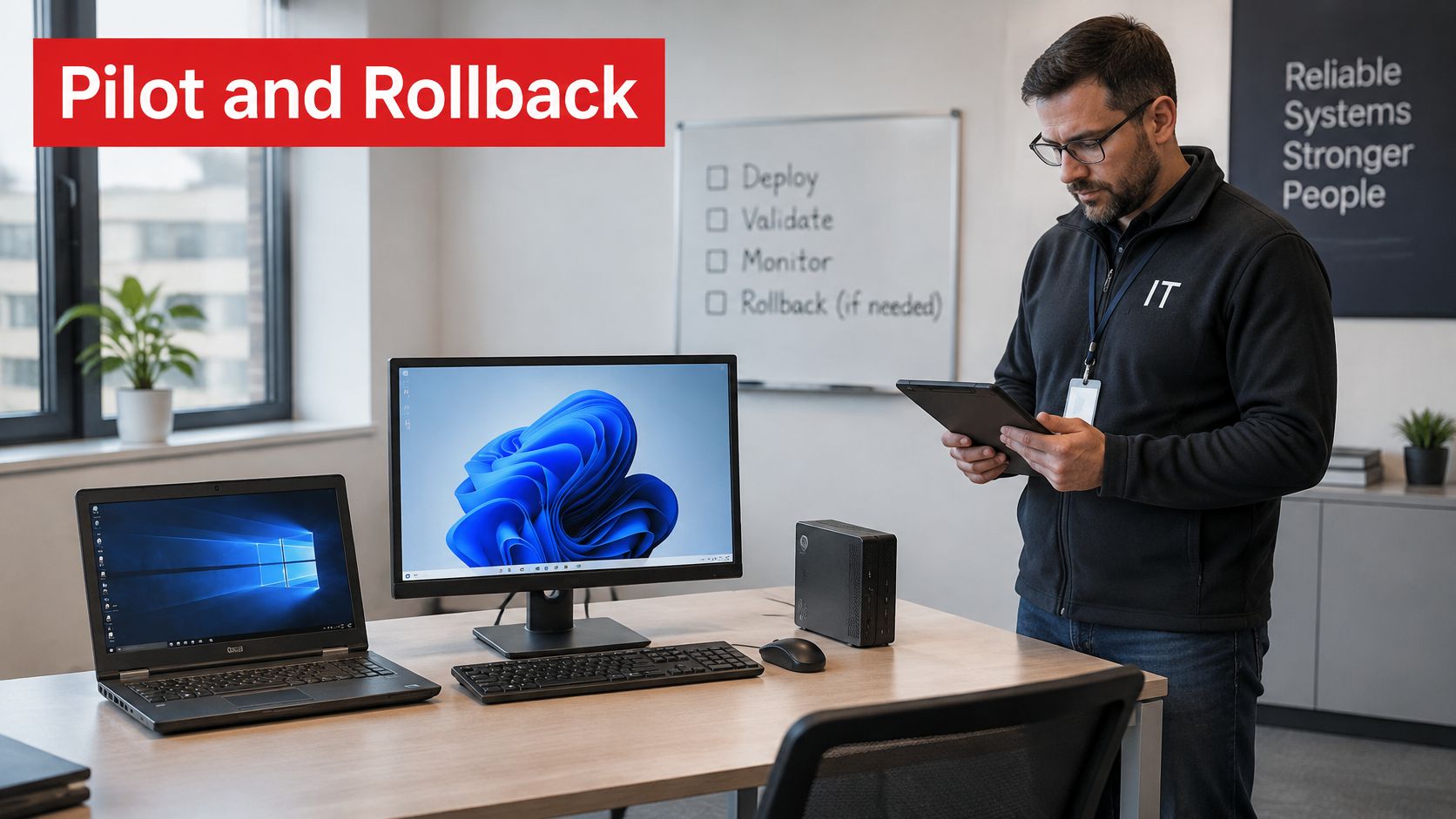
A pilot should represent the client's awkward cases, not just the newest machines available to the service desk. An older laptop, a standard desktop, and a device running the specialist application reveal different compatibility and recovery requirements.
The Linux file server belongs in the pilot only when its kernel or OS change is in scope. Combining unrelated changes makes it harder to identify which change caused a failure and who can approve recovery.
Make acceptance observable
The change ticket should state what must pass and who supplies the evidence. “Upgrade completed” is too narrow when the user still can't open the document-management application or the backup agent has stopped reporting.
| Gate | Evidence required before expansion |
|---|---|
| Installation | Successor OS and expected build or kernel confirmed on the asset |
| Application acceptance | Required applications open and representative work completes |
| Security controls | Security agent healthy and encryption enabled |
| Recovery protection | Backup completes and the recovery path is available |
| User readiness | User can work after the first reboot |
| Change control | Exceptions recorded and expansion approved by the change owner |
An illustrative deployment pattern starts with a canary group, expands to a department ring, and then reaches the rest of the eligible fleet. Each wave proceeds only after the previous wave meets the acceptance gates.
Hardware-ineligible machines should leave the deployment queue and enter the replacement list. Forcing them through the standard package creates avoidable failures without changing their eligibility.
Test recovery before approving expansion
Rollback means a usable recovery path, not a note saying that an image exists. Before deployment, the change owner should confirm recovery media or the previous image, access to recovery credentials, and a method for restoring the required user data.
The ticket must also identify who can approve rollback and how long the business can tolerate the device being offline. For a server, the recovery check should include dependent services and application consistency, not just whether the operating system starts.
After each ring, deployment success and verification success should remain separate fields. A reboot deferral remains open, and an unreachable endpoint remains unverified.
Troubleshooting should enforce clear stop conditions:
- Specialist application fails: Stop expansion and return the affected asset to the exception path with an expiry.
- Agent or backup check fails: Repair the control before counting the OS change as complete.
- Devices fail to check in: Repair management coverage before scheduling the next wave.
Change-ticket exit criterion: Close only when the destination OS, application acceptance, security controls, backup result, and post-reboot usability have evidence attached.
The handoff to service delivery should include unresolved devices and their owners. That prevents a project team's completed deployment wave from becoming an unexplained support queue the following morning.
Show Residual Exposure in the QBR
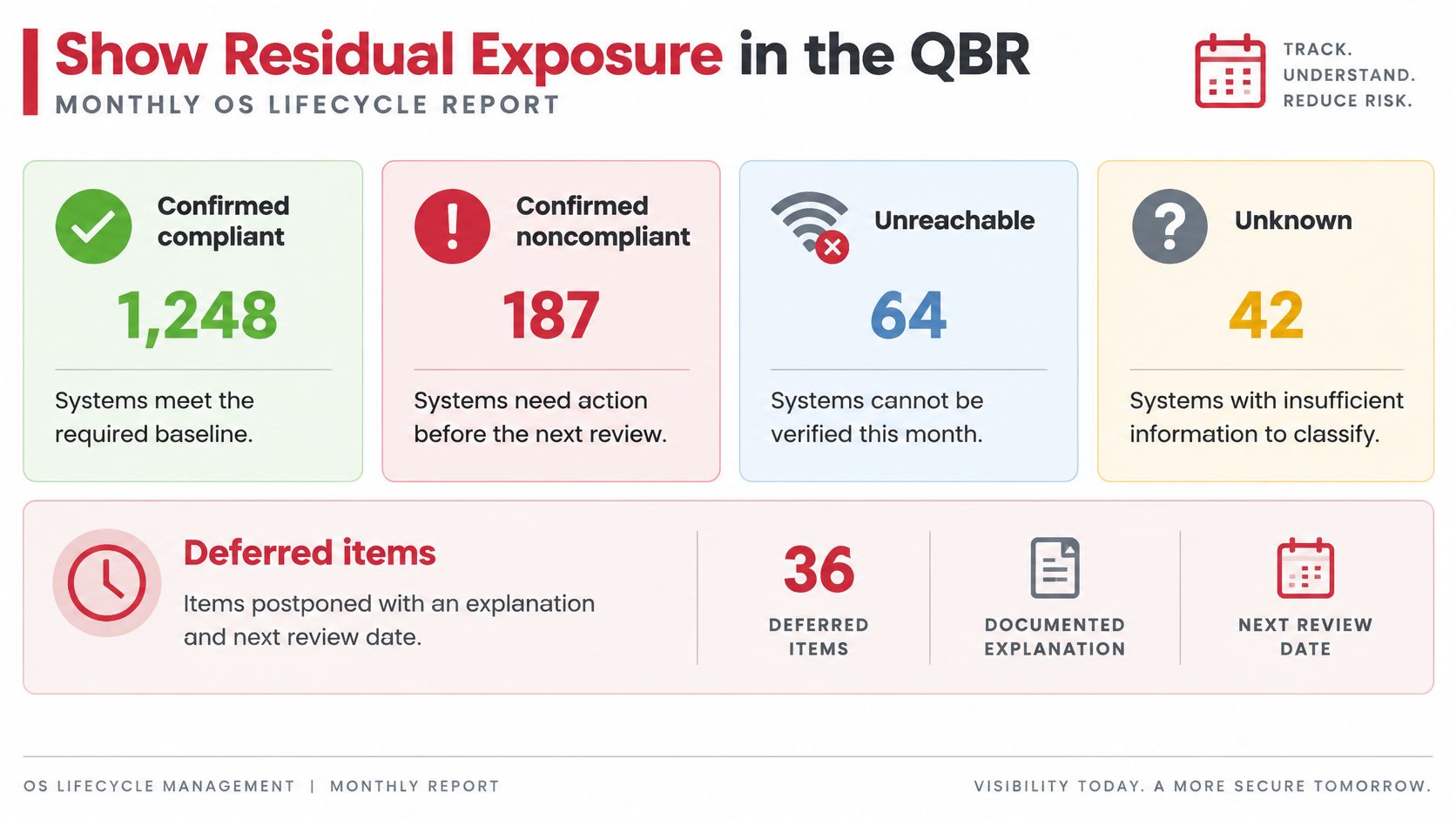
A monthly lifecycle report should distinguish confirmed compliant, confirmed noncompliant, unreachable, and unknown. Each state answers a different client question, and combining them into a single success percentage hides work that still needs a decision.
Confirmed compliant means the asset meets the agreed baseline with current evidence. Confirmed noncompliant means the team has evidence of a gap; unreachable means the team couldn't contact the asset; unknown means the available information can't support classification.
Deferred work should remain attached to the underlying state. A deferral requires an expiry, an owner, and a milestone, rather than a reporting label that makes the asset appear compliant.
Translate exposure into service labor
A TechRadar report on Windows technical debt cites a 2025 Cloudhouse survey in which 90% of organizations carried some form of Windows technical debt, 51% experienced related downtime, 48% encountered audit-related compliance issues, and 41% said legacy Windows made regulatory compliance harder. The same report describes another survey in which 60% of finance IT leaders still operated many servers and desktops on unsupported Windows versions, while more than 59% spent excessive time maintaining or troubleshooting legacy infrastructure.
Those findings don't predict a particular SMB's costs. They justify asking better questions about the labor attached to aging systems.
For the illustrative client, the QBR should connect unsupported assets to tickets, patching exclusions, and technician time. Repeated application workarounds, manual update checks, and exception renewals belong in the service discussion even when no security incident has occurred.
Billing reconciliation adds another decision point. The account manager should establish whether PSA billing matches the devices protected, while the technical lead identifies warranties that end before the planned OS remediation can finish.
Prepare decisions rather than a dashboard tour
- Refresh lifecycle fields: Verify support evidence before the QBR, not during the meeting.
- Age every exception: Show when the delay began, who owns it, and when authorization expires.
- Fund the next action: Pair unsupported counts with approved upgrade work, replacement procurement, or a decision deadline.
- Confirm removal: Retain evidence that the obsolete OS was replaced or the asset retired; a historical export isn't proof.
- Attach service effort: Associate relevant tickets and labor with the asset so the client can distinguish routine support from recurring lifecycle debt.
Volgap can be evaluated as the MSP-side visibility layer for this review, bringing inventory, protection, and billing into one client picture. It complements RMM, PSA, and security tools rather than replacing their operational responsibilities.
The evaluation should test the required reconciliation, unmanaged-device investigation, endpoint-to-PSA comparison, warranty coverage, and OS lifecycle fields against the proposed deployment. Any unconfirmed capability or connector should remain a fit question, not a feature promise.
The automated monthly reporting discussion should establish which report inputs are available, how exceptions appear, and what still requires technician review. Supported integrations and manufacturer coverage need confirmation against the MSP's stack, and website examples don't guarantee savings or a technical outcome.
Review Your Stack Before the Next QBR
The service-delivery lead should select a client whose tickets already expose uncertain OS support dates, unmanaged devices, or billing mismatches. The evaluation should begin with that client's unresolved decisions and a list of the RMM, PSA, identity, and security tools that must remain in place.
A concise fit worksheet is more useful than a broad feature checklist:
- Required evidence: Which lifecycle, protection, ownership, and billing fields are missing?
- Operational handoffs: Who investigates mismatches, approves exceptions, and funds replacement?
- Adjacent scope: If license reconciliation matters, the Microsoft 365 license-management discussion should remain a separate acceptance question.
- Acceptance test: Which client decision should become possible with the proposed visibility?
Veevoo, Inc. is the distributor and enablement partner, not the software vendor. The platform can be evaluated independently.
The initial conversation lasts fifteen minutes with LeeJay Stewart and can cover IT visibility needs, AI service plans, or both; this use case should stay focused on IT visibility. Veevoo first discusses the MSP's stack or client scenario, emphasizing the platform, integrations, and controls that matter to the business.
A focused walkthrough follows after the prospect identifies the platform and desired business outcomes. Before commitment, Veevoo discusses deployment, licensing, onboarding, and the implications for the MSP's team and clients.
Availability, supported connectors, pricing, service levels, support responsibilities, and agreement terms require separate confirmation. Product captures may differ from the eventual deployment, so the fit discussion should establish requirements rather than promise an outcome.
Veevoo, Inc. offers software distribution and enablement support for MSPs evaluating client IT visibility. For an OS lifecycle review grounded in a real client's inventory and reporting gaps, visit Veevoo, Inc. and arrange a short fit conversation with the relevant stack details and unresolved decisions ready.