
A client's operations manager has a useful prompt saved in a personal notes app. The finance team has another version in a shared document, while a project manager asks an unsanctioned AI tool to recreate the same workflow from scratch. Nobody knows which instruction is current, who approved it, what data it can safely receive, or whether its output still works after a model change.
That is the point at which prompt management becomes an MSP service-delivery problem. A prompt library can preserve useful working knowledge, but only when the MSP treats each prompt as a managed operational asset with an owner, defined boundaries, review evidence and a clear retirement path.
Table of Contents
- Understanding the Prompt Library as an MSP Service
- Why Ad-Hoc Prompting Fails Growing SMB Teams
- Designing a Production-Grade Prompt Architecture
- Enforcing Security and Data Boundaries
- Onboarding Clients and Driving Workspace Adoption
- Managing the Prompt Lifecycle and Evaluation
Understanding the Prompt Library as an MSP Service
A personal collection of saved prompts helps one employee work faster. A governed prompt library helps a client team perform a repeatable business task with greater consistency. The difference isn't the storage location. It's the operating model around the prompt.
In an SMB environment, a library might contain approved instructions for drafting customer updates, summarizing internal documents, classifying service requests or preparing meeting briefs. Each entry should connect the instruction to a specific workflow, intended users, permitted inputs and expected output. The library becomes institutional memory, not a folder full of text that only the original author understands.
Research analyzing 24,800 open-source prompts from 92 GitHub repositories found that 67 repositories, or 72.8%, stored large collections of prompts intended for reuse (the empirical prompt-management study). The significance for an MSP isn't that every client needs a public code repository. It's that reusable prompts are already being handled as shared technical assets in software projects, rather than only as private notes.
From saved text to managed workflow
A practical MSP service can make prompt curation part of AI onboarding and recurring support. The service owner can help a client identify useful workflows, remove unsafe or redundant instructions, document approved examples and assign business ownership. The MSP doesn't need to write every prompt. Its value lies in creating the conditions under which client teams can reuse, test and improve them responsibly.
A useful library entry answers questions such as:
- What task does this prompt support? “Summarize a customer call for internal follow-up” is more useful than “meeting prompt.”
- Who may use it? A general drafting prompt has a different audience from one used by human resources or finance staff.
- What data is allowed? The entry should state whether users may include public information, internal business content or sensitive client records.
- What output is expected? The record should specify format, audience, tone and any required review.
- Who owns the result? A named client owner can confirm whether the prompt still reflects the business process.
Prox.ia can fit into this service model as a multi-model AI workspace for client employees working with text, documents, images and code, subject to the available models and deployment. Its AI workspace and prompt guidance can support an MSP-led process for reusable templates, onboarding and review. Product deployment details, branding options, cloud choices and private or on-premises arrangements should be confirmed for each proposed environment rather than assumed.
Practical rule: A prompt shouldn't enter a client's shared library merely because it produced one good answer. It should enter after the task, data boundary, owner and review method are clear.
This framing also changes the commercial conversation. The MSP isn't selling a pile of prompts. It's packaging discovery, curation, workspace adoption, governance and ongoing maintenance around the client's actual work.
Why Ad-Hoc Prompting Fails Growing SMB Teams
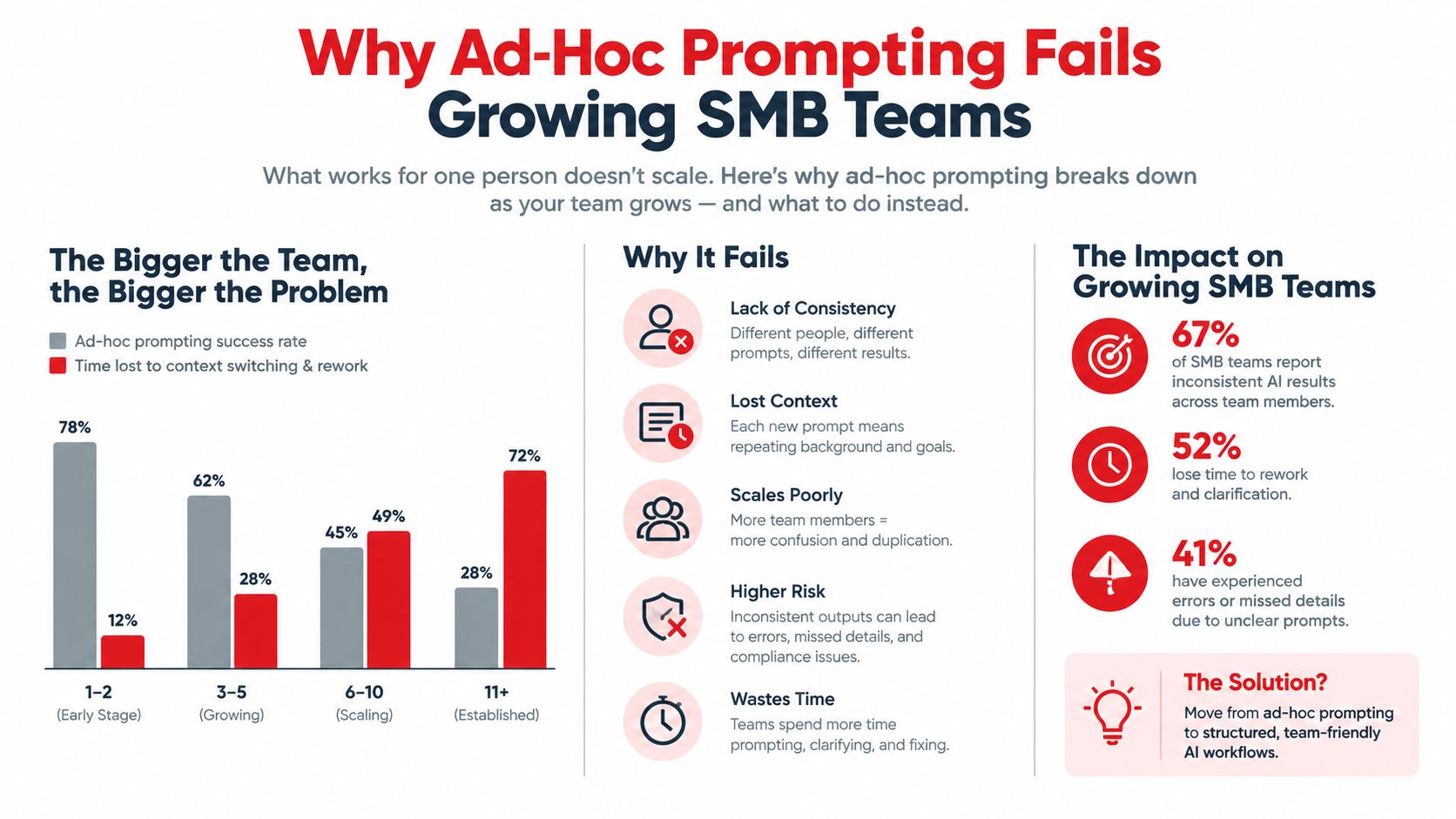
Ad-hoc prompting creates a version-control problem before it creates an AI problem. Employees use different wording for the same task, omit important context, apply inconsistent formatting instructions and save successful experiments in places colleagues can't find. The next employee then starts over, often without knowing that a tested approach already exists.
Evidence of this maturity gap appears in research that reported 11% of surveyed or analyzed users reused prompts regularly, while 46% never reused them (the research agenda on prompts as software-engineering artifacts). Those figures aren't universal workforce statistics, because the underlying work is a research agenda rather than a population census. They do, however, show why prompt reuse remains a capability that organizations must deliberately establish.
The operational cost of starting over
An employee who recreates a prompt may produce an acceptable answer, but the team loses the reasoning behind the original workflow. Another employee may request a different format. A third may add confidential material without understanding the applicable data policy. The organization then has several informal variants, no reliable approval trail and no easy way to identify which version should be supported.
Shadow AI intensifies that uncertainty. Microsoft's 2024 Work Trend Index surveyed 31,000 full-time employees and self-employed knowledge workers across 31 markets and found that 75% of knowledge workers use artificial intelligence at work. It also reported that 46% of AI users began using it within the previous six months, while 78% of AI users bring their own AI tools to work (Microsoft's 2024 Work Trend Index). These are survey findings, not universal adoption rates, and they don't prove that every unsanctioned tool exposes sensitive data. They do give MSPs a concrete reason to address usage that is already happening.
A prompt library helps only when it reduces uncertainty rather than hiding it. An unlabelled collection can standardize a bad instruction across multiple users, making a shared error easier to repeat. The service should therefore distinguish between an experiment, a reviewed draft and an approved production prompt.
The MSP's intervention point
Service delivery managers can turn this weakness into a defined onboarding workstream:
- Map recurring tasks. Interview department leads and identify work that employees already repeat.
- Collect existing prompts. Include personal notes, shared documents and useful examples, while treating each item as unverified until reviewed.
- Select safe candidates. Prioritize workflows with clear inputs, predictable outputs and an identifiable business owner.
- Document boundaries. State what information users may provide and what requires human review.
- Schedule service reviews. Revisit prompts when the workflow, model, policy or client data changes.
This gives the client a repeatable path away from prompt hoarding. It also gives the MSP a service artifact that can be discussed during onboarding, adoption reviews and recurring governance meetings.
Designing a Production-Grade Prompt Architecture
A production prompt needs more than polished wording. It needs enough surrounding information for another employee, administrator or service desk analyst to understand what the prompt does and when it should not be used.
The simplest useful architecture treats each prompt as a lightweight software component. The instruction is the template. The input schema defines what the user supplies. The output contract describes what the system must return. The owner and revision history explain who is accountable for change.
A practical record structure
Naming should describe the business task, not the author's personal preference. A name such as “Customer Call Summary, Internal Follow-Up” gives a service desk analyst more context than “New Version 3.” Categories can then reflect department, workflow risk, output type or client process.
The following schema is a practical starting point:
| Metadata Field | Purpose | Example Value |
|---|---|---|
| Prompt name | Makes the task searchable and recognizable | Customer Call Summary, Internal Follow-Up |
| Business intent | Explains why the prompt exists | Convert approved call notes into internal action items |
| Intended users | Limits use to the right audience | Account managers and service coordinators |
| Input schema | Defines required and optional information | Call notes, customer name, open actions |
| Safe example data | Demonstrates use without exposing real records | Redacted call notes with fictional names |
| Output contract | Specifies structure and quality expectations | Summary, action list, owner and due-date fields |
| Model assumptions | Records model or configuration dependencies | Approved workspace model and documented settings |
| Data boundary | States what users must exclude | No credentials, payment data or unnecessary personal details |
| Owner | Assigns business accountability | Client service operations manager |
| Reviewer | Identifies technical or governance approval | MSP service delivery lead |
| Revision history | Shows what changed and why | Updated output fields after workflow review |
| Review date | Establishes the next validation point | Scheduled service governance review |
| Retirement rule | Defines when the prompt must be withdrawn | Replace when the workflow or output contract changes |
The example values are illustrative. Each client should replace them with its own roles, policies and workflow language.
Make context survive staff turnover
Documentation should explain why a prompt includes an instruction, not merely repeat the instruction. If a prompt requires a fixed output structure because another system consumes the result, that dependency belongs in the record. If the prompt is suitable only for drafting and not for sending, that limitation should be visible before use.
The Prox.ia multi-model AI workspace can be considered within this architecture, but the MSP should confirm the proposed deployment, available models and administrative behavior before promising a specific implementation. The library itself may be maintained through the workspace, a connected governance process or another approved repository. The important control is the documented lifecycle, not the assumption that storage alone creates governance.
A prompt without an owner is an orphaned workflow. A prompt without an input boundary is an unreviewed data path.
The architecture should also separate approved prompts from candidate prompts. Candidates can be tested by a limited group using safe examples. Approved entries can be exposed to the intended client users after review. Retired entries should remain available for historical reference where appropriate, but clearly marked as unavailable for new work.
Enforcing Security and Data Boundaries
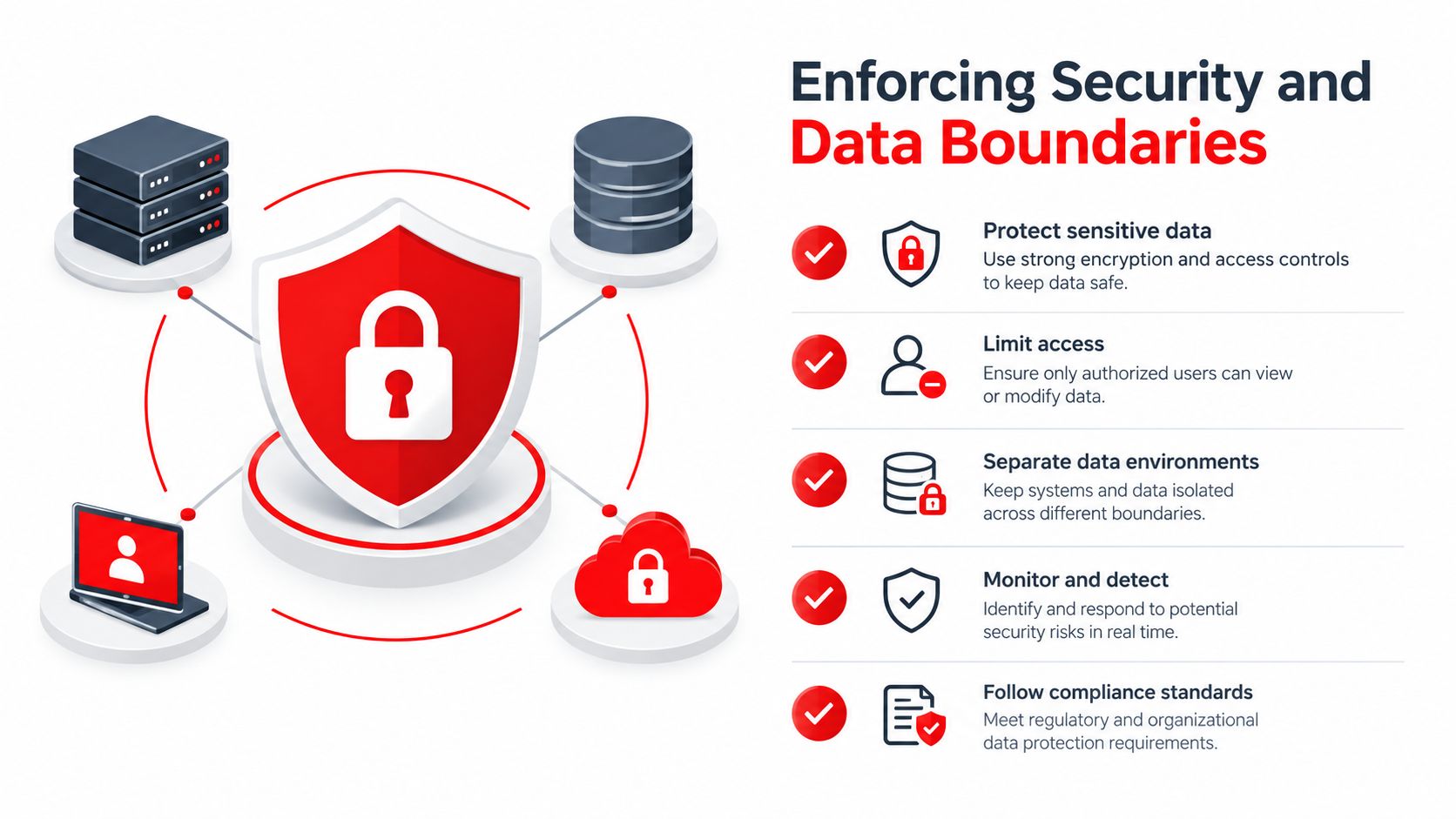
A well-written prompt isn't automatically safe. External documents, web pages and connected tools can contain instructions designed to redirect an AI system. Prompt injection can interfere with the intended task, while careless reuse can expose information or authorize actions beyond the user's legitimate purpose.
The library must therefore describe how a prompt may be used, not only what it should say. A template for rewriting public marketing copy carries a different risk from one that analyzes employee records or initiates an action in a connected system.
Put risk labels beside the prompt
A useful library can label entries by data and action risk:
- Public content: Suitable for information that contains no confidential client material.
- Internal business content: Requires an approved workspace and ordinary organizational access controls.
- Sensitive information: Requires defined authorization, minimal necessary data and additional review.
- External-content processing: Treats uploaded files, retrieved pages and copied text as untrusted inputs.
- Consequential action: Requires a human approval gate before a message, record change or external action occurs.
These labels should be visible in search results and in the prompt's usage guidance. They shouldn't be buried in a policy document that users rarely open.
The NIST AI RMF Playbook recommends documenting the collection, use, management and disclosure of personally sensitive information according to privacy and data-governance policies. It also recommends documented protocols for authorization, duration and access type when training or production data contains personally sensitive information. MSPs can translate those principles into client-specific access decisions, review procedures and audit-oriented service reports.
Treat external content as untrusted
A prompt should never imply that every instruction found inside a client file is authoritative. The workflow can tell the model to separate the user's task from instructions contained in source material, identify suspicious requests and stop when the requested action exceeds the approved scope. That helps, but it isn't a complete defense.
For high-risk workflows, the MSP should require a human to verify source material, confirm the requested action and approve the final output. Sensitive inputs should be minimized, and credentials, secrets and unnecessary personal information should be excluded. Moderation can reduce some risks, but it doesn't detect every sensitive item or guarantee compliance.
The identity-visibility perspective in multi-tenant environments is relevant to the access question, but it isn't a substitute for Prox.ia-specific deployment validation or a client privacy program. RMM, PSA, identity and security tools remain complementary. The service owner must establish which system records authorization and how administrators investigate exceptions.
The prompt library should also define escalation. A user who sees an injection attempt, unexpected disclosure or unsafe recommendation needs a clear route to the client owner and MSP service desk. That accountability prevents the library from being marketed as a compliance guarantee and positions it candidly as a lightweight operational control.
Onboarding Clients and Driving Workspace Adoption
A library can be technically sound and still fail if employees don't use it. Adoption improves when the MSP connects each prompt to a task the client already performs, demonstrates the boundaries in a real workshop and makes feedback easier than creating a private alternative.
Consider an illustrative onboarding for a growing professional-services client. The service delivery manager begins with interviews involving operations, account management and finance. Each group brings examples of repetitive drafting and summarization work. The MSP doesn't promise automation for every request. It selects a small set of low-risk workflows, removes real customer information from demonstrations and asks the client to nominate an owner for each candidate.

Make the first workshop task-based
The workshop should show employees how to use a prompt, change approved variables and recognize when a request falls outside the template. A variable might be the audience, document type or desired tone. The employee should not be encouraged to rewrite the core instruction casually, especially when that instruction contains a data boundary or required output structure.
A workable session includes:
- Workflow selection: The client owner describes the business outcome and identifies the final human reviewer.
- Safe demonstration: The MSP uses fictional or redacted material, then explains why real sensitive data isn't needed for the exercise.
- Controlled adaptation: Employees change permitted fields while preserving the task, boundary and output contract.
- Review practice: Participants compare the generated result with the source and correct unsupported or incomplete content.
- Feedback capture: Users record what was useful, confusing or missing directly against the prompt entry.
The service delivery manager should avoid presenting the prompt as an answer machine. The correct message is that the workspace accelerates drafting and analysis while the employee remains responsible for business judgment and final use.
Assign roles that fit the client
The client owner decides whether the prompt still matches the business process. The MSP service owner maintains the governance workflow, supports technical questions and coordinates review. Department reviewers check language, accuracy and usability. Workspace administrators handle user access and approved configuration, subject to the capabilities confirmed for the deployment.
Adoption feedback should enter a queue rather than disappear into chat. A request to change a prompt can be classified as a wording improvement, a new workflow, a security concern or a model-specific issue. That classification helps the MSP decide whether the prompt needs a minor revision, a new variant or immediate withdrawal.
Adoption test: If employees can't explain what data a prompt accepts and who reviews its output, the workflow isn't ready for broad reuse.
A recurring service review can examine prompt usage patterns, user feedback, unresolved exceptions and changes in the client's processes. The MSP can then refresh training and recommend approved alternatives without claiming that every user must work identically.
Managing the Prompt Lifecycle and Evaluation
Prompt maintenance is where a library proves whether it is an operational service or a static collection. Ad-hoc tweaking is fast at first. Someone changes wording after a disappointing response, keeps the new version because it feels better and moves on. That approach can't show whether the improvement came from the prompt, the model, the input or random output variation.
A structured lifecycle keeps those variables visible. PromptBench demonstrates an extensible framework that combines prompt construction, prompt-engineering methods, dataset and model loading, adversarial prompt attacks, dynamic evaluation protocols and analysis tools (the PromptBench framework). An MSP doesn't need to reproduce that full research framework to adopt the underlying discipline.
Compare variants with fixed evidence
A useful evaluation record preserves the baseline prompt, candidate version, representative test inputs, model and relevant configuration, output requirements, cost or latency observations and known failure modes. The test set should include ordinary examples and edge cases. Security testing should include hostile or misleading external content when the workflow processes documents, web material or tool output.
Different tasks need different checks:
- Structured classification: Exact-match or F1 can assess whether labels are correct.
- Knowledge work: Human review can assess factuality, completeness and suitability for the intended audience.
- Structured output: Schema-validity checks can determine whether the result can be consumed safely.
- Code workflows: Executable tests can identify whether generated code behaves as required.
- High-risk tasks: Review should include unauthorized actions, sensitive disclosures and prompt-injection behavior.
Prompt optimization research found that results vary by task and optimizer. In one modular comparison, improvements reached 15 percentage points in accuracy for CAPO on GSM8K, while the study also identified specific cases involving GEPA on SST-5 and OPRO on GSM8K (the comparison of discrete prompt optimizers). That result supports controlled experimentation, not a promise that every revised prompt will improve every client workflow.
Set promotion and retirement rules
A candidate should be promoted only when it improves the primary task measure without exceeding agreed limits for safety, format compliance, latency or token cost. A prompt optimized for one model may not transfer reliably to another, so the library should record model compatibility and test important variants across the models used in the client workspace.
Model change is a normal maintenance trigger. A 2025 survey of 500 AI practitioners reported that 50% updated models monthly or more often, including 17% who updated weekly, while 31% relied on ad-hoc or manual prompt-management processes (the 2025 State of AI Engineering survey). The survey also identified evaluation as the most painful AI-engineering problem. For an MSP, those findings reinforce the need for scheduled regression checks rather than informal confidence.
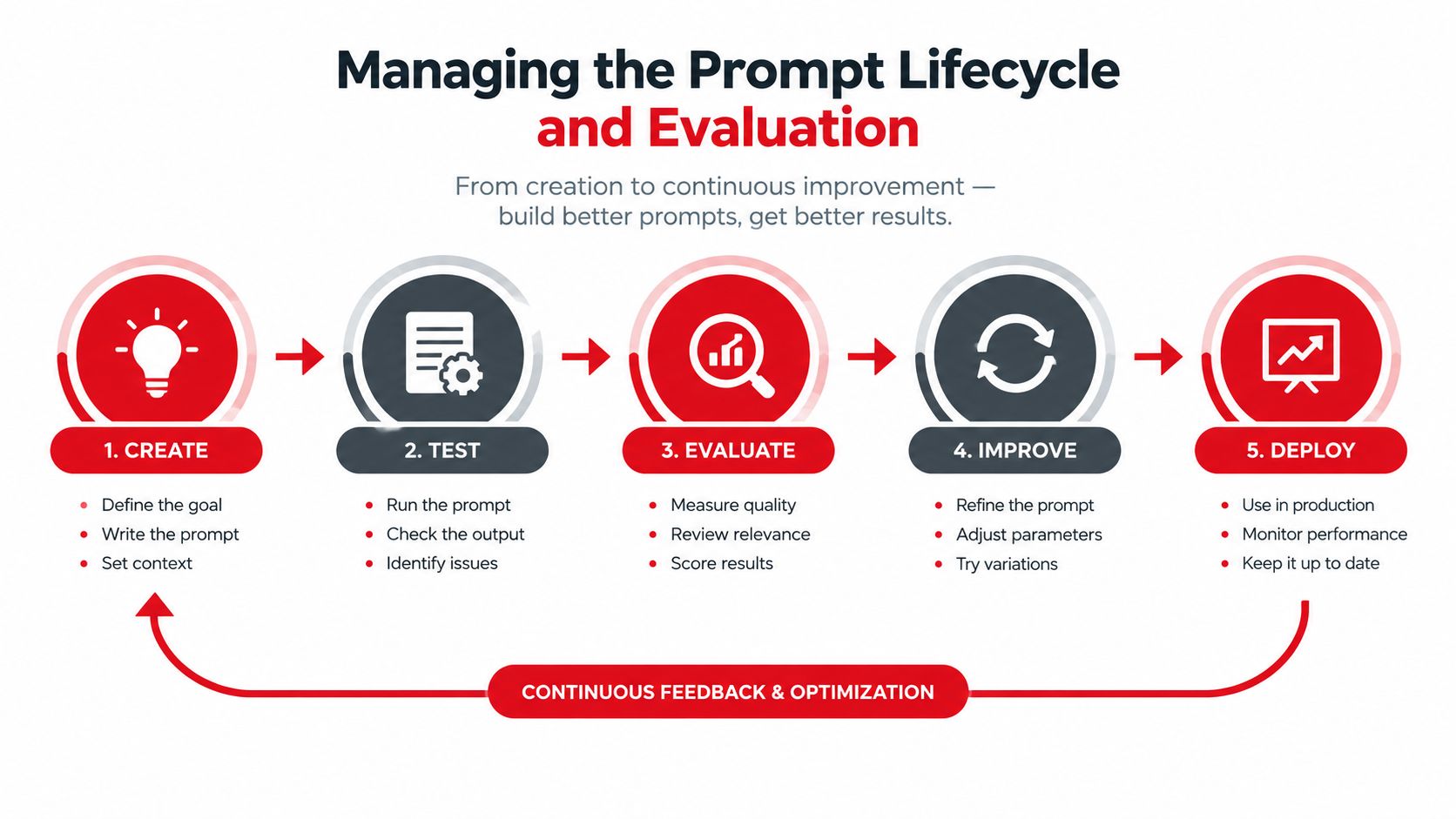
The lifecycle can be simple:
- Create: Define the task, owner, boundaries and output contract.
- Test: Run safe representative examples and adversarial cases.
- Evaluate: Compare the candidate with the approved baseline.
- Improve: Record the change, failure notes and model assumptions.
- Deploy or retire: Publish the approved version or withdraw the candidate.
Prox.ia's AI prompt moderation can be considered as part of a broader service design, subject to confirming the specific capability and deployment behavior. Moderation shouldn't replace prompt review, access controls, human approval or regression testing.
Veevoo, Inc. helps MSPs evaluate and enable Prox.ia for governed AI workspace services, including client onboarding, prompt workshops and ongoing adoption support. MSP owners can visit Veevoo, Inc. to discuss how a curated prompt library could fit a client's data policies, workflows and service review process.