
Most MSP teams still talk about unmanaged devices as if the main job is finding rogue hardware. That framing is too small. The harder problem is proving which records are truly risky, which are just stale, and which are only “missing” because RMM, EDR, PSA, billing, and identity systems disagree with one another.
In modern client environments, a single dashboard rarely tells the whole story. In a survey of 403 enterprise security professionals, 87% said the number and use of unmanaged or IoT devices connecting to their networks had increased in the prior 24 months, and 69% believed at least half of their network devices were unmanaged or IoT devices Armis research. That's why inventory work has to start with reconciliation, not assumption.
Table of Contents
- The Reality of Endpoint Visibility
- Classifying the Different Types of Missing Assets
- Building a Canonical Inventory Across Disconnected Tools
- Automating Reconciliation and Client Reporting
- Triage Workflows and Remediation Strategies
- Establishing Continuous Inventory Controls
The Reality of Endpoint Visibility
A clean RMM list can make a messy environment look orderly. It can't tell a service team whether a device is protected, whether it belongs in scope, or whether it exists in billing but not on the network anymore. That gap matters because unmanaged devices are no longer edge cases, they're a measurable part of the attack surface and the operational estate.
The better way to think about visibility is simple: if the same device appears differently in RMM, EDR, PSA, and identity tools, then the environment is not “known” yet. It's only partially described. In the same enterprise survey, 67% of organizations reported a security incident associated with unmanaged or IoT devices Armis research. That doesn't prove every discrepancy is a breach, but it does prove that unmanaged assets can't be treated as a paperwork problem.
Why one tool is never enough
A managed endpoint can leave footprints in multiple systems. A device can also disappear from one system while still showing up in another. That's why endpoint visibility has to be cross-tool, not tool-specific.
Practical rule: if the device count only comes from RMM or PSA records, it's probably understating what's actually connected to the client environment.
For MSPs, that means the first question isn't “How many endpoints are in the dashboard?” It's “Which devices are present in the environment, which are assigned owners, and which are outside normal management?” That distinction is where exposure, billing leakage, and remediation work separate.
See how Volgap approaches multi-tenant identity visibility.
Classifying the Different Types of Missing Assets
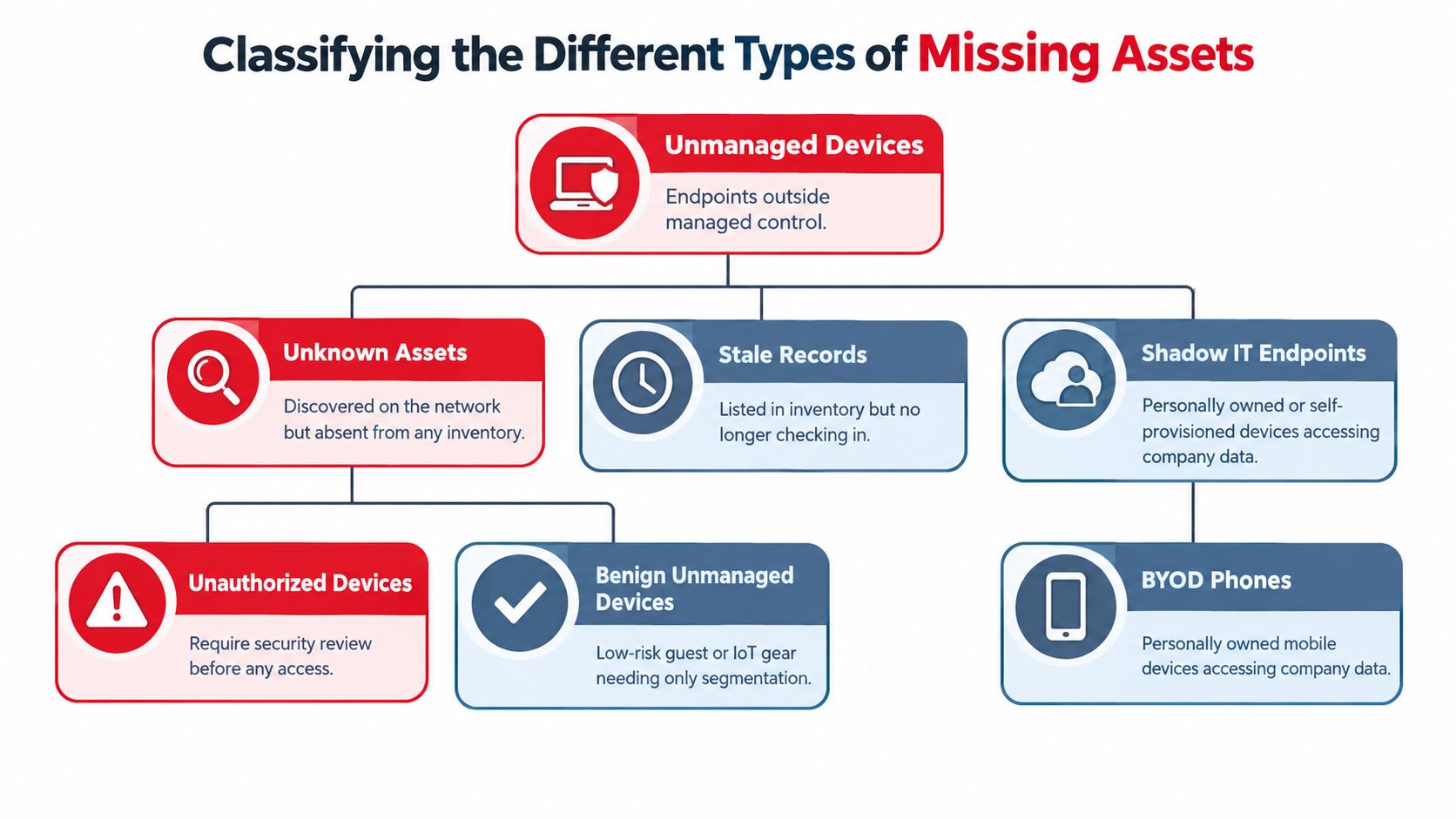
Not every missing device deserves the same response. Treating all of them as high-risk shadow IT creates noise, slows triage, and pushes the service desk toward blanket actions that don't fit the actual situation. The useful move is to classify exceptions before anyone starts remediating them.
A 2025 device-security report found that nearly 39% of devices registered in Active Directory lacked an active endpoint agent, which shows how often directory presence and actual management diverge device-security report. That doesn't mean every one of those devices is dangerous. It means directory membership alone is not proof of protection.
The main operational states
An unknown asset is one that appears on the network but not in the expected inventory set. A stale record is different, because it still exists in a system of record but no longer checks in. Shadow IT endpoints, BYOD phones, and unmanaged guest or IoT devices each need their own handling path.
- Unknown assets, these need investigation because there's no clear management relationship yet.
- Stale records, these need validation because the record may be dead, duplicated, or merely out of date.
- Shadow IT endpoints, these may be legitimate user-owned devices, but they still need governance if they touch company data.
CISA's device guidance uses a broad device definition that includes servers, desktops, laptops, printers, mobile phones, IoT devices, networking equipment, and other network-connected systems CISA device guidance. That breadth matters because MSPs often find the biggest mismatch in the “other” category, where the device is real, visible, and unmanaged, but not treated as part of the service scope.
Review Volgap's hardware, warranty, and OS lifecycle workflow.
Why classification protects delivery quality
A retired laptop still attached to billing is an admin issue, not a security incident. A corporate laptop with no active agent is different, because it needs a remediation owner and a deadline. A personally owned phone with work access might be acceptable in one client and unacceptable in another, depending on the data it touches.
That's why the best MSP reporting separates exposure from administrative inconsistency. When those two categories are mixed together, clients get the wrong message and technicians get the wrong work queue. The result is either underreaction to real risk or overreaction to records that only need cleanup.
Building a Canonical Inventory Across Disconnected Tools
A defensible inventory starts with discovery, not a single export. RMM, EDR, cloud, identity, mobile-device-management, and network data each show a different slice of the environment, and none of them should be treated as complete on its own. The job is to normalize those slices into one canonical view that can survive client scrutiny.
NIST recommends that inventories cover physical, virtual, remote, cloud, mobile, and IoT devices, and be reviewed at least twice yearly NIST inventory guidance. For MSP operations, monthly discovery is more practical because it keeps drift from compounding between service reviews.
A workable reconciliation sequence
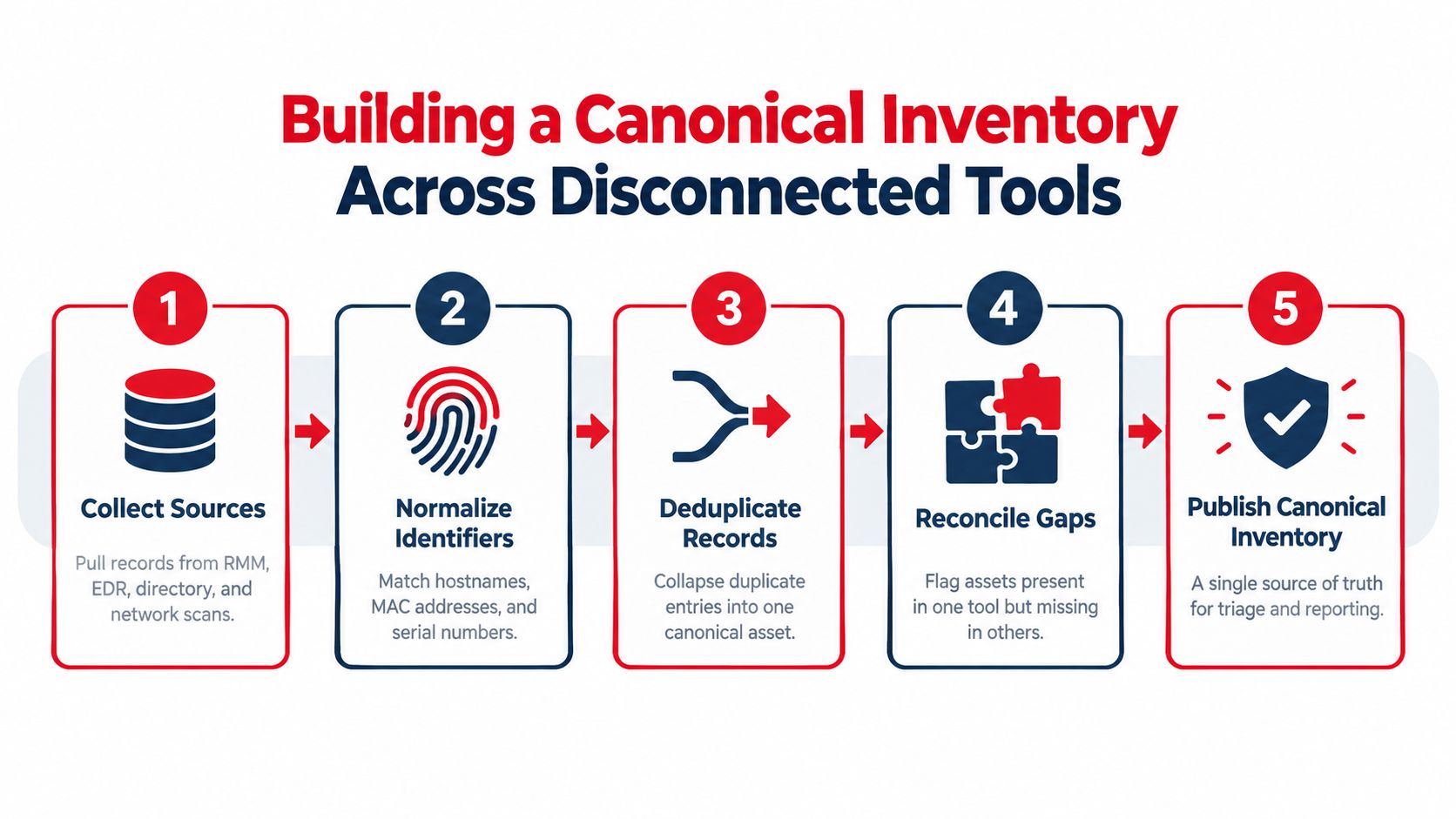
The first step is collection. Pull records from all the places that can legitimately describe a device, then normalize identifiers like hostname, MAC address, serial number, owner, location, operating system, and last-seen time. The second step is deduplication, because aliases and duplicate entries can make a single device look like three.
The third step is reconciliation. Compare the unified inventory against the devices expected to be managed, then flag assets that appear in one system but not in another. That's where a device can be marked as managed, authorized-but-unmanaged, unauthorized, stale, or unknown.
Discovery without reconciliation creates more noise than insight.
What usually breaks the count
The most common misses are predictable. Guest networks and IoT VLANs get excluded. Stale records stay active in one system after the endpoint is retired elsewhere. A device with an agent but no current check-in gets counted as protected when it isn't. Those errors are why a canonical inventory has to include both presence and recency, not just enrollment.
For MSPs, the true value is not the total count. It's the coverage ratio, the exceptions that remain, and whether every exception is assigned to someone who can act on it. That's the point where inventory work stops being a spreadsheet exercise and becomes an operating control.
Automating Reconciliation and Client Reporting
Manual spreadsheet reconciliation breaks down fast once multiple clients, multiple sites, and multiple toolsets are involved. The smarter model is to automate the comparison of management, identity, security, license, and billing records so the service team spends time on exceptions instead of on copying rows between exports. That's where Volgap fits naturally in the workflow, as a reconciliation layer rather than a replacement for existing RMM, PSA, or EDR tools.
Open Volgap's automated monthly reporting overview.
The business value shows up in two places. First, reporting becomes consistent enough to support monthly client reviews without rebuilding the same data set from scratch. Second, the data becomes usable for QBR prep, because the same reconciled inventory can support hardware lifecycle planning, warranty tracking, and OS planning without a separate cleanup pass.
What good reporting actually looks like
A useful monthly report doesn't just list devices. It highlights what changed, what still lacks coverage, and which exceptions need a decision. It should also separate a managed endpoint from a licensed user, because those are not always the same thing.
Illustrative workflow, not a vendor promise, a service team can generate a report that shows:
- Managed devices in scope, so the client can see what's actively covered.
- Devices missing expected protection, so gaps are visible without hunting through raw exports.
- Licenses attached to disabled users, so the client can review waste and entitlement drift.
- Hardware or OS lifecycle risks, so replacements can be planned before support pressure builds.
Why automation improves the conversation
Clients rarely need another raw inventory dump. They need a plain explanation of where the estate is clean, where it's inconsistent, and which items require action or acceptance. When that explanation comes from the same reconciled data every month, the conversation shifts from “Which tool is right?” to “Which exception should we fix first?”
That's a better service posture for MSPs. It reduces manual churn, improves consistency across technicians, and makes the reporting defendable when a client asks why a device appears in one system and not another.
Triage Workflows and Remediation Strategies
Once the inventory is reconciled, the next failure point is triage. Teams that skip prioritization end up treating every exception the same, which usually means the loudest item wins and the most important one waits. A better process assigns a response path to each exception before the queue grows.
Ponemon found that only 29% of 615 U.S. IT and security practitioners reported a complete IoT/OT inventory, and only 37% were confident their security tools had an accurate inventory Ponemon survey. Those numbers are survey results, not universal failure rates, but they do show why exception handling needs to be disciplined.
A practical queue structure
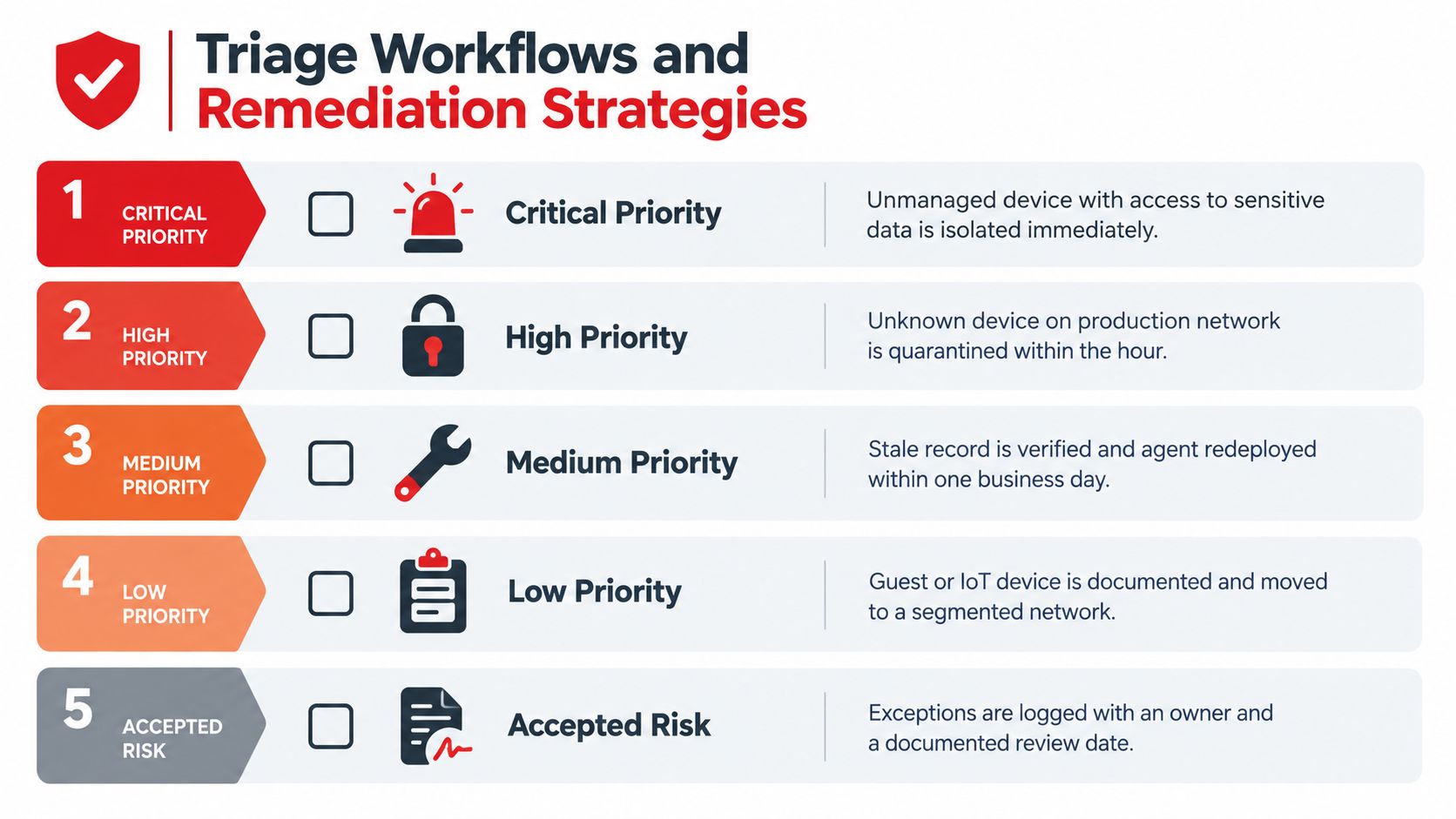
Critical exceptions should be isolated first when they combine unknown status with privileged access or sensitive data exposure. High-priority exceptions are the unknown devices on production networks that need quarantine and ownership review. Medium-priority items often include stale records or missing agents that can be corrected after validation.
Low-priority items are usually guest or IoT devices that are known, expected, and segmented. Accepted risk is different again, because the client has reviewed the exposure, named an owner, and set a review date. That final category matters because it prevents “we'll deal with it later” from becoming invisible debt.
What to assign to every exception
Each exception should have an owner, a remediation deadline, and a documented status. If the device is legitimate but missing an agent, the action may be redeployment. If the record is stale, the action may be retirement. If the asset is intentionally unmanaged, the action may be segmentation and approval.
An exception without an owner is just a recurring problem with a new label.
Benchmark the process against inventory completeness and reconciliation accuracy, not raw device counts. Raw counts can move up just because discovery got better. That isn't failure. It's visibility doing its job.
Establishing Continuous Inventory Controls
Inventory reconciliation stops being useful when it's treated like a cleanup project. The environments that stay under control are the ones that make discovery, comparison, and exception routing part of the monthly service rhythm. That cadence matters because the estate keeps changing after onboarding is complete.
CISA's Cybersecurity Performance Goals explicitly distinguish known, unknown, and unmanaged assets, and recommend a minimum update cadence of once per month for both information-technology and operational-technology inventories CISA Cybersecurity Performance Goals. That gives MSPs a defensible baseline for building a recurring control instead of a one-time project.
What to measure every month
The simplest useful measure is the gap between discovered devices and managed devices. If that delta shrinks and stays explainable, the control is working. If it widens, the service team has a visibility problem, a process problem, or both.
Monthly measurement should also track whether exceptions are being closed, reclassified, or accepted with documented ownership. That gives the client a much clearer picture than a one-time “clean inventory” claim, because it shows whether the environment is becoming more governable over time.
Why this changes the MSP conversation
This kind of control creates a better client discussion around lifecycle planning, access governance, and shadow usage. It also exposes where tool coverage is incomplete, which is useful even when the news is uncomfortable. Better visibility can make the apparent problem look larger at first, but that usually means the team finally has a truer view of the environment.
For MSP leaders, that's the right outcome. A reconciled inventory supports cleaner reporting, faster triage, and better service decisions than any single dashboard can provide. It also gives the account team a stronger basis for talking about hardware refreshes, proof of protection, and the difference between exposed assets and unaligned records.
Veevoo, Inc. helps MSPs build better operational visibility with Volgap and package governed AI services with Prox.ia, depending on what the client problem calls for. If the goal is to reconcile messy inventory data, tighten reporting, and turn unmanaged device gaps into something the service desk can act on, visit Veevoo, Inc. to see how the pieces fit together.