

A client message lands before the monthly review: "Is this laptop still covered?" The spreadsheet has a purchase year, a blank serial, and one cell that says "warranty." The RMM shows the machine online. The PSA still bills it. Nobody can say whether the next repair is a manufacturer claim, a parts-only case, or a bill the client will dispute. That blank is not a problem to tidy away before the report goes out. Unknown warranty status is a result you can show, with a source and a date, so refresh talk rests on records you can defend.
Table of Contents
- What Warranty Tracking Software Records for Each Device
- Three MSP Jobs That Warranty Data Makes Easier
- Data Sources a Warranty Record Must Reconcile
- Evaluation Checklist for Warranty Tracking Software
- How to Run a Monthly Warranty Review
- Metrics to Track and Sample Report Lines
- Confirm Connectors Before You Choose Volgap
What Warranty Tracking Software Records for Each Device
Say a finance lead asks about one laptop the day before a site visit. A single expiration date cannot answer. Year one may include service and parts. Later years may cover parts only. The operating system may already be past vendor support while the hardware term is still open. Warranty tracking software has to hold those facts as separate fields, the way a device passport holds more than one stamp.
The record should sit on the full hardware lifecycle, not on an isolated date. A public lifecycle model runs from planning and requisition through deployment, maintenance, and retirement, and maintenance records should capture controlled service activity. In practice, tie the serial number or asset identifier to purchase date, proof of purchase, client and site, asset owner, warranty type, coverage scope, service history, OS support status, and retirement status. That join is what lets a service desk tell a parts-only laptop from one that still has full service coverage, and plan the repair before the cost shifts to the client. The Chesterfield hardware management policy shows why the split matters: laptops, desktops, and tablets may carry three-year warranties, with year one covering service and parts while years two and three cover parts only, and printers commonly have one-year parts coverage.
| Coverage type | What it covers | Illustrative example | What to record |
|---|---|---|---|
| Full manufacturer warranty | Parts, labor, and onsite or depot service | Year one of a three-year laptop warranty in a public-sector policy | Expiry date, service level, serial number |
| Parts-only coverage | Replacement parts, not service visits | Years two and three of the same laptop warranty; a one-year parts-only printer warranty | Parts-only start and end dates |
| Reseller or distributor terms | Terms set by the seller, which may differ from manufacturer terms | A seller's 90-day dead-on-arrival window that ends while the manufacturer term continues | Seller name, terms document, order number |
| Service or extended contract | Scope and dates in the signed contract | A signed three-year accidental-damage agreement that starts after the sale | Contract ID, scope, end date |
| Software support status | Whether the OS or firmware still receives updates | OS past vendor support while hardware is still under warranty | OS version, support end date, asset owner |
Separate alerts, not one flag
Practical rule: Each coverage type needs its own alert, so a parts-only transition is never reported as full coverage.
Lifecycle work also includes patching, firmware, license renewals, and approved configurations. An unsupported OS or firmware state deserves its own notice, even when a manufacturer term is still open. Dashboards and scheduled client reports should show those relationships. A spreadsheet with one date column will not.
Three MSP Jobs That Warranty Data Makes Easier
Take a 40-seat client. Six laptops reach full-coverage expiry inside one quarter, and two of those six already run an unsupported OS. The useful question is not the calendar date. It is whether the record can support a defensible claim, a refresh recommendation, or a sentence you would put in a QBR.
Inventory reconciliation is the first job. The RMM device list, the PSA billed-seat list, and the purchase records often disagree on name, site, or even whether the unit still exists. Warranty data forces a match at serial-number level before anyone talks about entitlement. When an RMM, a PSA, a distributor invoice, a manufacturer portal, and a client spreadsheet conflict, the authoritative source has to be named. Silent automation that turns a partial match into "covered" creates false certainty.
Lifecycle planning is the second job, and expiry is not an automatic replacement. The decision is claim, repair, replace, or accept risk. It depends on age, OS support, endpoint protection status, repair history, and the client's refresh policy. A low-failure laptop on a current OS can be a poor early refresh. An in-warranty laptop with repeated incidents can justify escalation while coverage is still open. For this 40-seat example, the two unsupported machines go to a replace-or-risk conversation. The other four get a claim-or-keep review, not a blanket order.
QBR reporting is the third job. Clients respond to counts they can act on: covered devices expiring soon, eligible incidents never claimed, assets whose status is still unknown. U.S.-based manufacturers paid $29.176 billion in warranty claims in 2024, up 9% year over year, while average claims represented 1.329% of product sales, according to Warranty Week. That scale is a manufacturer figure, not an MSP bill, but it shows why evidence quality matters before anyone tells a client a unit is covered.
A date field alone cannot carry any of the three jobs. A claim needs asset identity, coverage type, and the evidence behind both.
Data Sources a Warranty Record Must Reconcile
A coverage flag is only as reliable as the join underneath it. Early-warning work treats warranty claims and installed-base information as primary inputs, and a broader model can include product lifecycle data, field service records, parts orders, call-center notes, and technician notes, as described in a TIBCO warranty and quality paper. Store structured event history: asset identity, failure symptom, claim eligibility, supplier response, parts used, labor, repair cost, resolution date, and a repeat-failure indicator. One claim and a recurring model problem call for different decisions. A yes-or-no flag hides that difference.
| Source | What it contributes | Reconciliation problem to flag |
|---|---|---|
| RMM or endpoint management | Device name, serial number, OS version, last check-in | Retired or renamed devices still appear as active |
| PSA billing records | Contracted and billed devices by client | Billed device with no matching managed endpoint |
| Reseller or distributor invoice | Order date, model, serial numbers where the invoice lists them | Invoice shows model but not serial number |
| Manufacturer coverage lookup | Coverage end date and service level, where exposed | Coverage not available for some models or regions |
| Identity and license platforms | Assigned user and license state for disabled accounts | Device still assigned to a departed employee |
| Client-maintained spreadsheet | Site, location, and asset owner | Stale after moves and replacements |
Route the conflict to a person
Joined records can support measures such as claims per asset cohort, failure rates by model, repair cost inside versus outside coverage, and unresolved claims nearing expiration. Installed-base reconciliation shows which devices are exposed. Claim history then shows whether that exposure is an isolated incident or a repeating component problem.
Software should not pick a winner in silence.
- Retired but still checking in: Mark the asset for review before any coverage check runs. A live agent on a retired serial will otherwise look covered.
- Billed seat with no managed endpoint: Match it against the client's site list before it appears in a report. It may be a spare, a lost device, or a billing error.
- Invoice without a serial: Keep the order number and leave warranty status unknown until a serial is confirmed.
The control is an exception queue: missing serials, duplicate assets, unmatched invoices, and coverage dates that conflict across systems, each with an owner and a due date. Connector-based sync with PSA, RMM, procurement, and manufacturer data only works for the tools that stack supports. Confirm that list with Volgap rather than assuming every portal returns an end date.
Evaluation Checklist for Warranty Tracking Software
Put these questions to a vendor in writing. Each one blocks a specific failure before a client report says "covered."
- Does the connector list cover this MSP's RMM, PSA, identity, license, and procurement tools, and which of those are native versus custom work? That question prevents a pilot that only works on the demo stack.
- How is manufacturer coverage checked, for which manufacturers, which fields come back, and what does the record show when a lookup returns nothing? A blank lookup must stay unknown, not become a guessed date.
- How often do assets and coverage dates refresh? Stale lookups turn last quarter's term into this month's advice.
- Is there an exception queue for missing serials, duplicates, and conflicting dates? Without a queue, conflicts disappear into the newest import.
- Does the record store evidence references, such as proof-of-purchase links, and not only dates? A claim without a purchase reference fails when the manufacturer asks.
- Is there a human approval step before any client-facing status says covered? Automation should not publish certainty the evidence does not support.
- Does OS support status sit beside hardware warranty? Hardware coverage alone does not show whether the device can still be patched.
- Do per-client monthly and QBR exports show unknown statuses? Hiding unknowns makes the report look cleaner and less defensible.
- Is change history kept for audit, including who changed a coverage field and when?
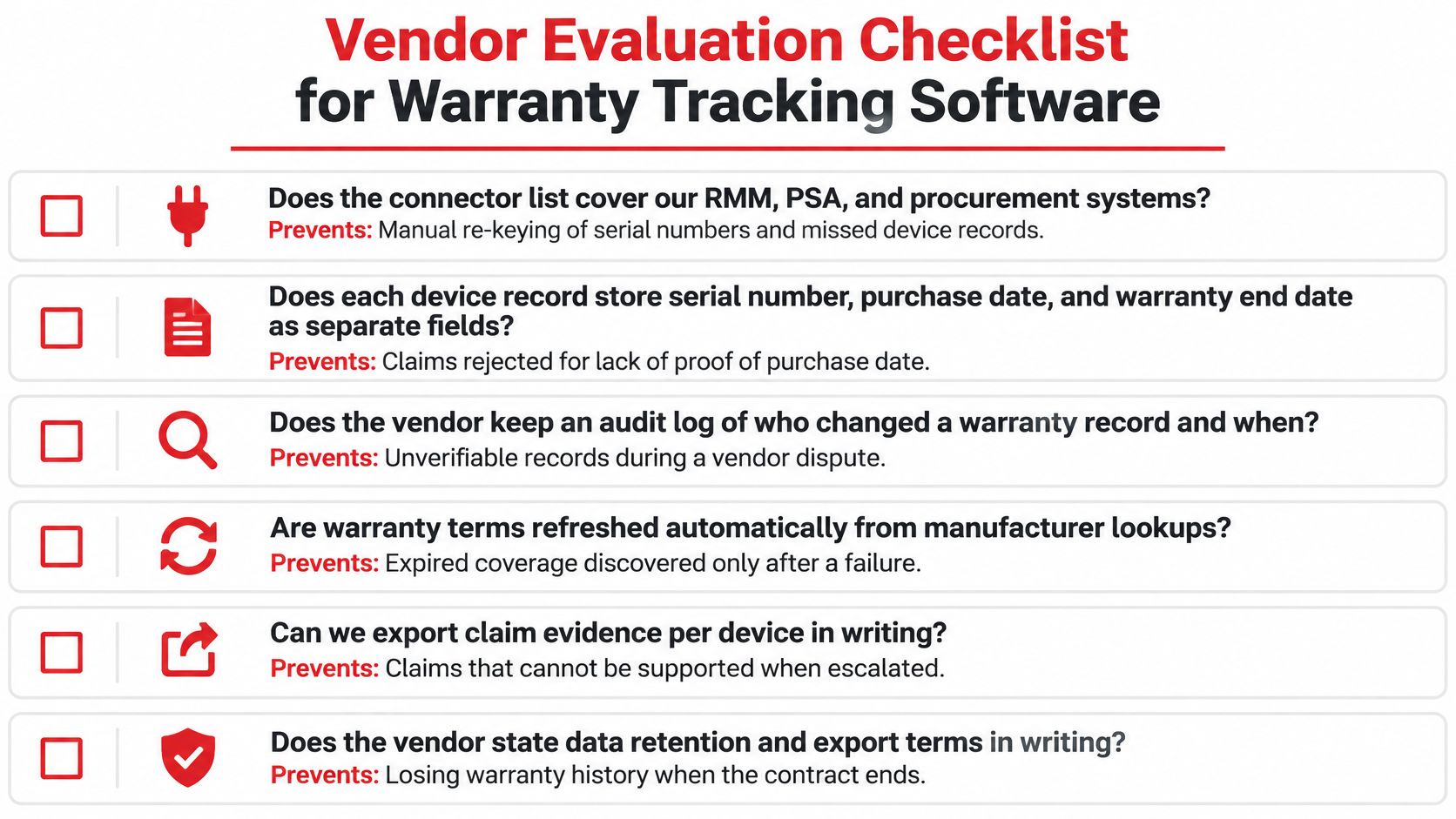
The minimum evidence before telling a client an asset is covered is an asset identity match, a verified coverage record, and a linked purchase or contract reference. Anything less is reported as unknown.
Availability, supported connectors, pricing, and service levels are confirmed in a separate agreement, so treat every item above as a written question, not a feature you can assume from a brochure. Compare published plan structure on the Volgap pricing page only after those answers are in hand.
How to Run a Monthly Warranty Review
Run the review on serial numbers, not on a count of "devices under contract." Volgap's hardware and OS lifecycle material separates manufacturer warranty from software support: a device can keep hardware coverage while the OS is unsupported, or keep a supported OS after hardware coverage ends. The documented order is to check the purchase date and available warranty record, review the OS version and support status, identify the asset owner, client, and business role, then agree on a renewal or upgrade action and a target date. Hardware detail depends on available inventory and supported manufacturer connections, so confirm those against the stack before promising complete coverage. The same pass can feed monthly reports and QBR material, including automated monthly reporting once the exceptions are cleared.
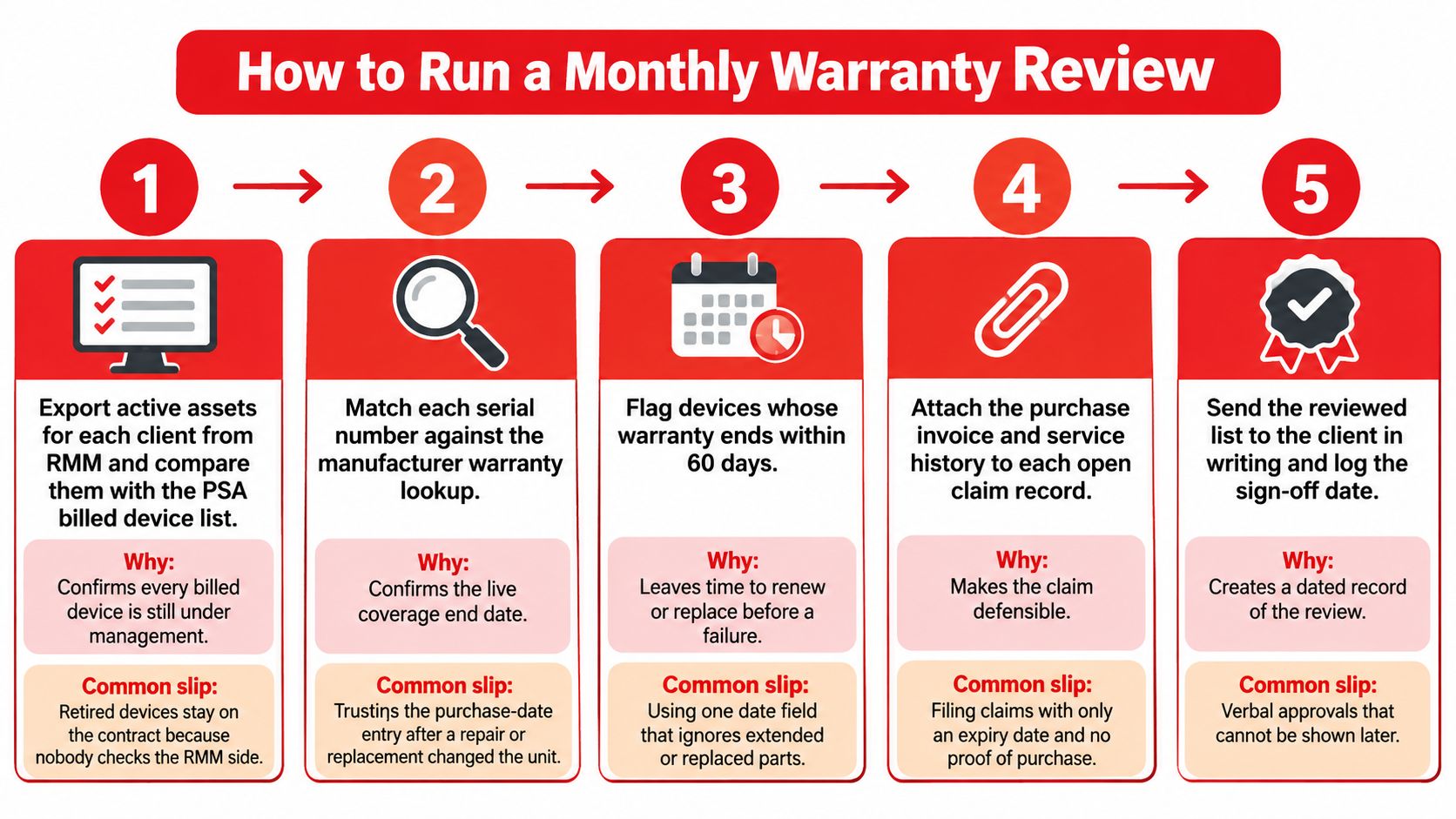
- Export active assets for each client from the RMM and compare them with the PSA billed device list. Totals hide mismatches. The slip is comparing headcounts instead of serial numbers.
- Resolve duplicates and retired devices before any coverage check. A retired serial that still checks in will look eligible. The slip is running lookups on a dirty list.
- Confirm the purchase date and warranty record, and attach a proof-of-purchase reference. The slip is trusting a typed date after a swap replaced the unit.
- Review the OS version and support status. Hardware coverage does not show whether the device can still be patched. The slip is treating a valid warranty as a clean bill of health.
- Identify the owner, client, and business role for each asset. A shared front-desk laptop and a finance laptop do not share the same refresh urgency. The slip is leaving owner blank because the hostname looks familiar.
- Classify every asset as covered, parts-only, expired, or unknown. Unknown is a valid result. The slip is forcing a status so the report has no blanks.
- Agree on the action and target date: claim, repair, replace, or accept risk, with a named owner. The slip is a recommendation with no date and no person.
- Publish the client report with unknowns shown and the exception count beside them. The slip is a verbal "we're fine" that cannot be shown later.
Clients with fast refresh cycles, such as project-based laptop fleets, need this pass every month. Stable fleets of desktops that rarely move can run monthly on exceptions and a fuller pass each quarter, as long as new purchases and retirements still hit the queue in the month they happen.
Metrics to Track and Sample Report Lines
The figures below are invented for a 212-asset sample. They are not benchmarks, and they are not results from any product.
| Metric | Definition | Illustrative value (212-asset sample) |
|---|---|---|
| Assets with unknown warranty status | Assets with no verified warranty record | 14 |
| Covered assets expiring within 90 days | Full coverage end date falls in the next 90 days | 9 |
| Assets in parts-only window | Service coverage ended, parts coverage continues | 11 |
| Eligible incidents not yet claimed | Incidents inside coverage with no claim record | 3 |
| Devices with unsupported OS | OS version past vendor support end date | 7 |
| Billed seats not found in management data | PSA billed devices with no matching managed endpoint | 4 |
| Refresh decisions recorded before expiry | Decisions logged within the agreed lead time | 8 of 9 |
How the counts lead to a decision
Read the rows together, not as a scoreboard. Fourteen assets with unknown warranty status are a reporting item in their own right. The client decides whether to supply proof of purchase or accept that those units stay off the "covered" list. Nine covered assets expiring within 90 days feed the refresh discussion, and eight of those nine already have a logged decision. The ninth is the open item, not a hidden failure.
Three eligible incidents not yet claimed are a cost-recovery item: open the tickets, confirm entitlement, and file or document why a claim will not be made. Four billed seats missing from management data are a billing reconciliation item, not a warranty story. They ask whether the contract should drop a device, or whether an endpoint was never enrolled.
Skip vanity lines such as total asset count by itself. A monthly note can be as short as: "14 unknown, 9 expiring inside 90 days, 3 unclaimed incidents, 4 billed seats with no managed endpoint. Please confirm proof of purchase for the unknowns and a decision on the one expiring laptop with no owner." A metric is only useful when its source and refresh date sit beside it.
Confirm Connectors Before You Choose Volgap
Volgap is the software. Veevoo is the distributor and partner, not the vendor. Volgap helps MSPs understand the IT environments they manage by bringing inventory, protection, and billing into one client picture, with coverage, billing, and reporting features. It is positioned to complement existing RMM, PSA, and security tools rather than replace them. Documented workflows cover reconciling inventory, comparing managed endpoints with PSA billing records, and warranty and OS lifecycle planning that feeds monthly reporting and QBR preparation. Use-case pages describe fit. They do not guarantee savings or a particular technical outcome.
Four items to verify first
Before anyone relies on a coverage column, confirm these in writing:
- Connectors for this stack: Which connections exist for the specific RMM, PSA, identity, and license tools, and which would need custom work.
- Manufacturer lookups: Which manufacturers have coverage checks, what fields each returns, and whether the result is an end date or only a status.
- Missing data in the report: How unavailable warranty data appears. It should remain unknown, with a reason, not a blank that looks like "no warranty."
- Exports: Whether monthly and QBR exports show unknowns with source and refresh date, so a client can see what was checked and when.
Availability, supported connectors, pricing, and service levels are confirmed in a separate agreement. A walkthrough is more useful after the MSP names the stack and the reporting gap that matters, such as serial mismatches or expiring coverage with no owner. Veevoo can be reached at info@veevooinc.com or (813) 445-3966. Review the Volgap product page, then contact Veevoo to discuss the stack before treating any connector or manufacturer lookup as available.
Veevoo, Inc. distributes Volgap for MSPs that need warranty status tied to device inventory, billing, and refresh reporting, including cases where coverage is still unknown. The conversation covers the current RMM and PSA stack, which manufacturer lookups matter, and how unknowns should appear in client reports. Visit Veevoo, Inc. to start that fit discussion.