

White-label AI can be easy to sell and still fail as a service. The provider supplies the technology, but the MSP has to shape how clients adopt and use it. A branded login is only the start.
The common pitch is simple: choose a platform, add your logo, and sell access. That skips the work that determines whether clients get value: onboarding users, setting usage budgets, defining acceptable use, and handling support. Before signing an agreement, confirm what the provider covers and what your team must own.
Branding may get a client through the login screen. Service design determines whether the offer is useful after that.
Table of Contents
- What White-Label AI Actually Means
- How the MSP Reseller Model Works
- Comparing Cloud, Private and On-Premises Deployment
- Branding and Contract Terms to Confirm Before Selling
- Building the Service Layer Around the AI Workspace
- Integrating White-Label AI With Your Existing MSP Stack
- Managing Governance, Privacy and Shadow AI Risks
- Evaluating Client Fit and Taking the Next Step
What White-Label AI Actually Means
A white-label AI offer succeeds or fails on its service design, not its logo. The AI provider supplies the underlying capability; the MSP packages it for clients and decides how the service is introduced, supported, and governed. The workspace is only one part of what the client buys.
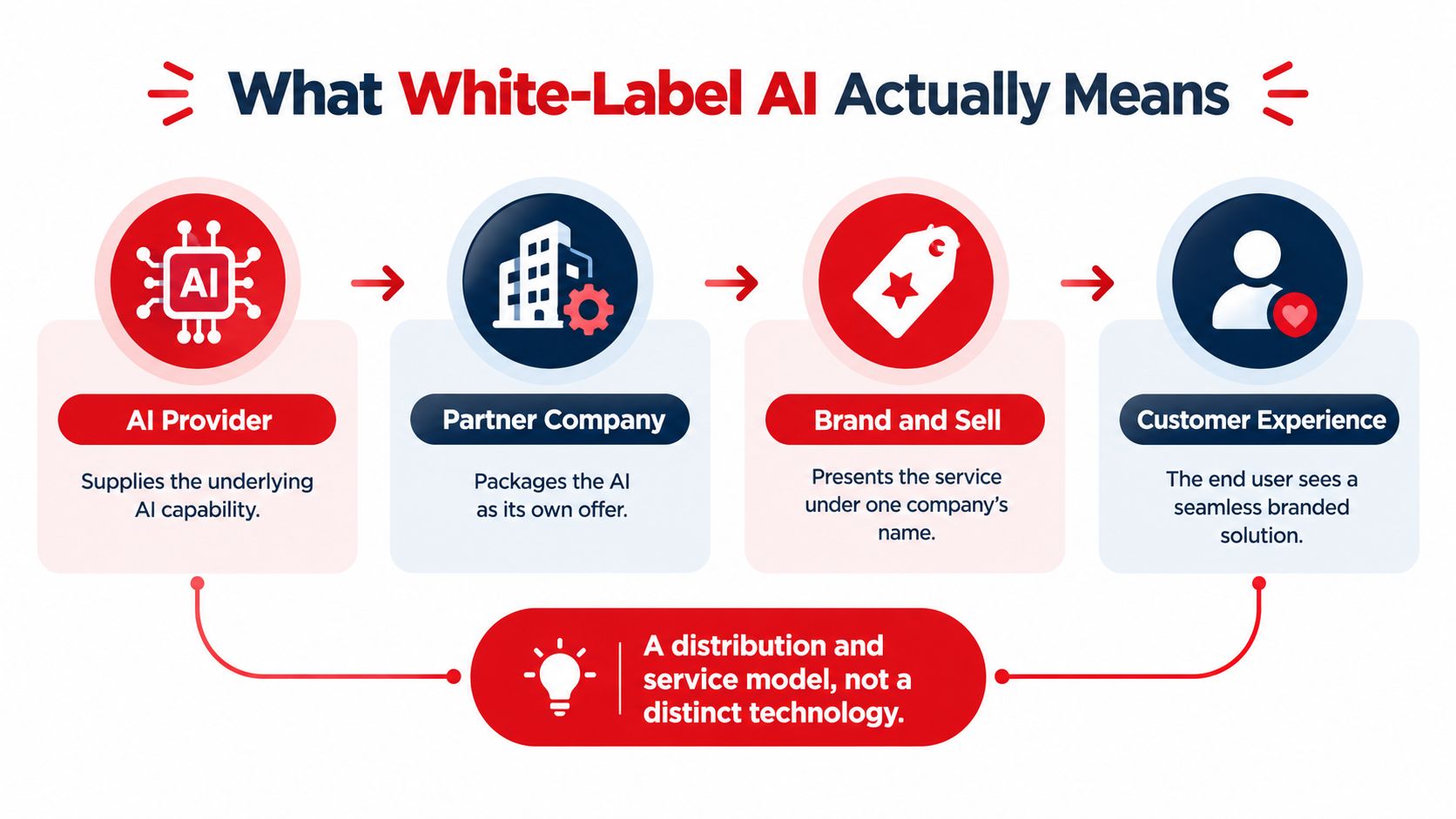
The MSP's choices shape whether clients can use the tool responsibly: who gets access, what guidance users receive, how questions are handled, and how usage is reviewed. Treat those decisions as part of the service before you promise a rollout. Branding identifies the offer; onboarding, governance, usage budgets, and policy operations make it useful.
Why timing matters
Clients may already be trying AI tools without shared rules. McKinsey's survey, as noted earlier, found broad growth in organizational AI use. That trend is not evidence of demand for a white-label deployment, but it does give MSPs a reason to ask clients how employees are using AI and where guidance is missing.
A branded workspace can give clients a managed option, but it does not resolve shadow AI by itself. The MSP and client need clear policies for permitted uses, sensitive information, and human review of AI-generated work.
What the MSP is actually selling
Model access is one component of the offer. The service may also include client onboarding, workflow selection, user guidance, usage budgets, policy updates, and ongoing support. Set those responsibilities before selling, then confirm which controls the platform provides.
Adoption alone does not prove business value. McKinsey reported that more than 80% of survey respondents had not yet seen tangible enterprise-level EBIT impact from generative AI. Sell a defined service for evaluating suitable workflows and managing their use, not a promise of automatic savings.
How the MSP Reseller Model Works
A white-label AI service has four distinct parties, and the MSP should know which responsibilities belong to each.
The software vendor builds and operates the platform. A distributor such as Veevoo, Inc. supplies and enables the MSP. The MSP brands and delivers the service. The SMB client's employees use the workspace and follow the client's policies. Veevoo is the distributor and enablement partner, not the software vendor.

An illustrative client scenario
Consider an MSP serving a 15-seat accounting firm. The MSP starts by asking the firm which employee tasks might be suitable for AI assistance, what information employees handle, and who should review AI-generated work. The firm's management decides which uses are permitted; the MSP helps translate those decisions into onboarding guidance and a support process.
The offer might include workspace access, an employee orientation, a practical prompt workshop, administrator guidance, and recurring service reviews. For example, the workshop could teach employees how to draft internal communications or summarize non-sensitive material, with a human responsible for checking output before it's used. That workflow is illustrative, not a claim about a guaranteed result or a particular product integration.
The vendor remains responsible for the platform it operates. The distributor supports the MSP relationship according to the applicable terms. The MSP owns the service promises it makes to the accounting firm, including how onboarding, policy discussions, and support are delivered.
Why clients need the service layer
Many smaller businesses have reasons to hesitate. OECD research found that 31% of SMEs use generative AI; among non-adopters, commonly cited concerns included whether AI suited their work (57%), legal or regulatory concerns (54%), uncertainty about information entered into AI systems (52%), and employee skill gaps (50%) (OECD research on generative AI and the SME workforce). Separate SMB research reported that only 25% had a formal process for reviewing AI-generated content.
Those concerns aren't solved by putting an MSP logo on a sign-in page. The resale value comes from helping the client decide where AI fits, what employees need to learn, and how work gets reviewed. If the MSP can't explain those parts, the offer is branding without a service plan.
Comparing Cloud, Private and On-Premises Deployment
Deployment language can sound reassuring while leaving important questions unanswered. “Private,” for example, doesn't tell the client by itself where prompts are processed, who can access the environment, or how retention is handled. MSPs should compare deployment choices as operational arrangements, then verify what the proposed product offers.
The table below is a decision framework, not a claim that every option is available in Prox.ia or any other specific platform. Cloud, private or single-tenant cloud, and on-premises arrangements differ by provider, product, and contract.
| Deployment Option | Where Data and Models Run | Typical Client Fit | What to Confirm First |
|---|---|---|---|
| Shared cloud | The platform and connected model services process data in provider-managed cloud environments. Exact locations and processing paths depend on the service. | Clients comfortable with a provider-managed service after reviewing its data terms and controls. | Data locations, providers involved, retention and deletion terms, access controls, support responsibilities, and latency expectations. |
| Private or single-tenant cloud | The environment may be isolated for a customer or group, but “private” can describe different architectures. | Clients seeking additional separation or operating requirements that may be served by a dedicated environment. | Whether the tenancy is actually dedicated, what isolation covers, who administers it, how updates work, and what data-handling terms apply. |
| On-premises | Components may run on infrastructure controlled by the client, but model access may still depend on external services. | Clients with specific infrastructure, data-residency, or operational requirements that justify added administration. | Which components run locally, whether external model calls occur, hardware and maintenance responsibilities, update paths, and support boundaries. |
Match the architecture to the client
The MSP shouldn't treat heavier deployment as automatically safer or better. A client that wants clearer separation may have good reasons to investigate a private environment, but that choice doesn't answer questions about user behavior, retention, or external model access. On-premises deployment can shift infrastructure and maintenance work toward the client or MSP, and it may not mean every part of the AI workflow stays local.
A client's requirements should drive the conversation. Ask what data the employees will use, what residency or access conditions apply, who administers the environment, and what the organization expects when a service changes. If the answer depends on an option the provider hasn't confirmed, don't quote it as a feature.
Before quoting a deployment: Ask the vendor or distributor to confirm data handling terms, expected latency, model access, retention and deletion, and who supports each layer. Get the answer for the specific product and proposed arrangement in writing.
Branding and Contract Terms to Confirm Before Selling
A client will judge the service by what your brand promises, not by the label on the agreement. Confirm what the vendor allows you to brand, what you control, and where your responsibility ends before you quote the offer.
Confirm the branding scope
Ask which parts of the experience can carry your identity: the workspace, sign-in page, reports, notifications, support materials, and client domain. Confirm where the vendor's name remains visible and whether clients receive vendor-branded communications.
Treat every surface as a separate commitment. A branded workspace does not guarantee branded billing or reports. Prox.ia supports white-label AI services; confirm the specific branding options with the distributor before promising them to a client.
Put the commercial terms on the table
The agreement should identify who bills the client, who owns the commercial relationship, and how support issues are escalated. It should also define acceptable use, responsibility for AI-generated output, and what happens if either party ends the arrangement.
Pay close attention to exit and migration terms. If the client's users, data, or workflows depend on the platform, specify what can be exported, how the transition works, and who provides assistance.
Keep promises traceable: Separate platform capabilities from MSP-operated services. The agreement governs the provider's obligations; your service description should define the onboarding, training, policy guidance, and support your team delivers.
That distinction limits avoidable disputes. If you present a platform capability as an MSP guarantee, you may be held responsible for something outside your control. Name what the provider delivers, what your team operates, and what the client must manage.
Building the Service Layer Around the AI Workspace
A white-label AI workspace is the starting point, not the service. The MSP creates value through the operating routine around it: client onboarding, workflow guidance, usage reviews, and clear follow-up when a concern arises.
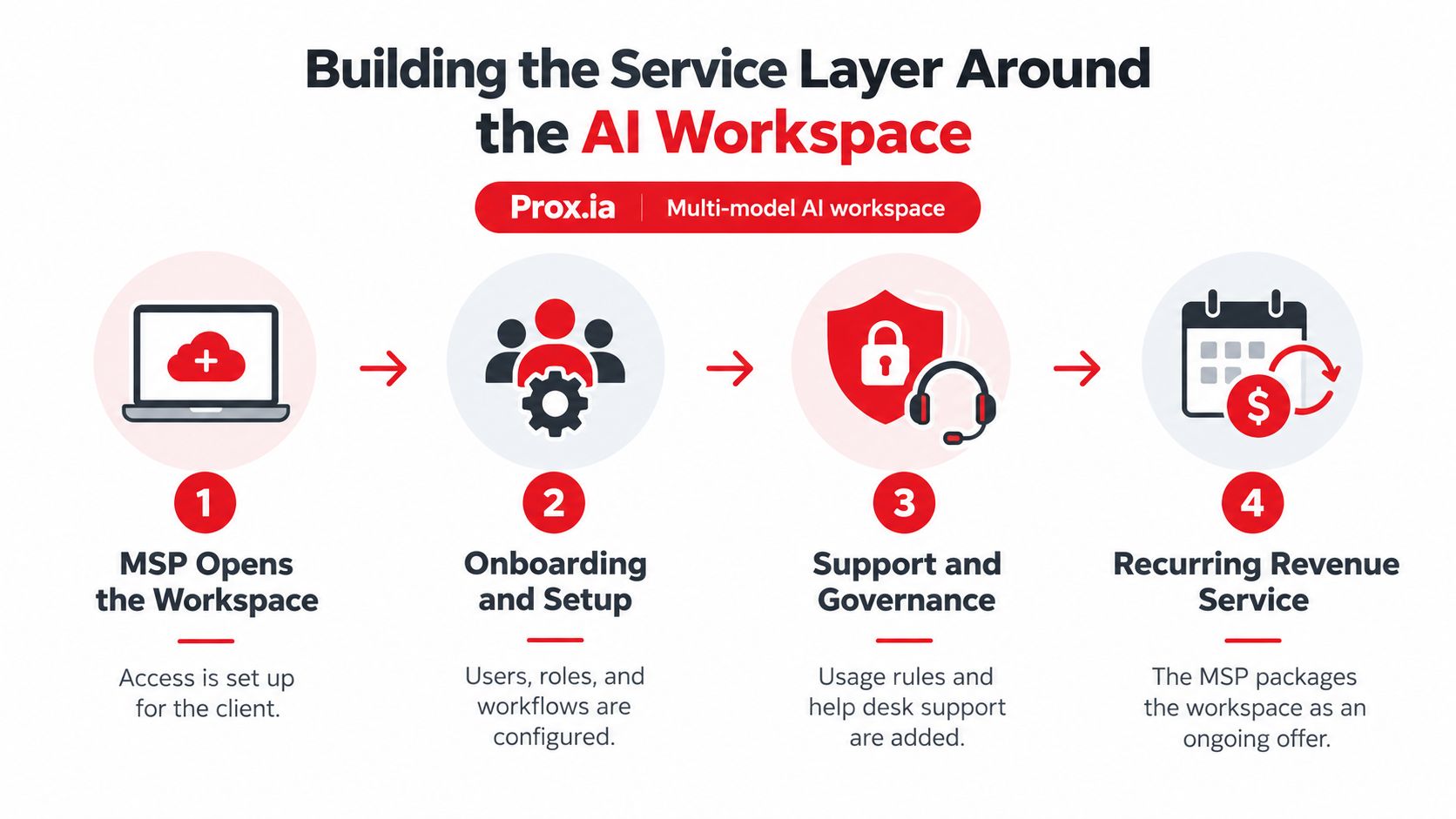
Build the routine around client decisions
Set expectations at onboarding. Agree on permitted uses, data rules, who administers the workspace, and which model providers suit the client's work. Record the client's responsibilities. A workspace setting does not replace an approved policy.
Give administrators a practical playbook. Document how to add or remove users, answer policy questions, and escalate concerns. Administrators should leave onboarding knowing what they own and when to contact the MSP.
Train around real tasks. Use workflows employees perform, with examples that follow the client's data rules. Make human review part of the process whenever AI output informs a decision or goes to someone outside the organization.
Review usage and moderation with clients
The platform describes team consumption budgets that administrators can review through credit usage, along with moderation for supported categories of sensitive content. Moderation does not replace client policy or guarantee that every sensitive item will be detected.
Build usage into recurring service reviews. Discuss whether consumption matches the client's needs, which workflows are delivering value, and whether moderation information or a reported exception requires follow-up. Do not sell moderation as complete sensitive-data detection or proof of compliance.
MSPs that want a regular reporting cadence can use automated monthly reporting as a separate reporting capability. It is not part of the AI workspace. Define what the MSP's AI review covers and who acts on its findings.
Package onboarding, administrator guidance, workflow training, budget reviews, moderation reviews, and support into a per-client monthly service. Set the scope and price yourself. Branding alone gives clients a new interface; consistent operations give them a service worth renewing.
Integrating White-Label AI With Your Existing MSP Stack
A branded AI workspace adds a service to the MSP's operating environment. It doesn't automatically become part of the RMM, PSA, EDR, identity, or billing tools the MSP already uses. Treat those as connected operational touchpoints unless a specific product integration is confirmed.
Connect the service to existing processes
Begin with identity and access decisions. The MSP should define who can request an account, who approves access, who administers the client workspace, and how access is reviewed when a person changes roles or leaves. If the product's supported identity features aren't confirmed, don't promise automated provisioning or deprovisioning.
Onboarding and offboarding should also connect to the client lifecycle. The MSP can include AI access in its existing client onboarding checklist and document the responsible contact, approved uses, and escalation path in the client's service records. That creates operational continuity without claiming an undocumented connector.
Billing needs similar discipline. The MSP should decide how the AI service appears in the client agreement and how consumption, platform costs, and recurring support are handled in its billing process. It should confirm whether any PSA or billing integration exists before claiming that charges sync automatically.
Keep adjacent tools in their proper roles
RMM, PSA, and EDR remain complementary tools unless a factually supported comparison says otherwise. The AI workspace is for client employees' AI use; the MSP's existing systems continue to manage their established functions. The operational task is to document how the AI service is requested, governed, supported, and reviewed alongside those systems.
Cross-tool visibility is a separate need from AI workspace management. Volgap's multi-tenant identity visibility is a distinct capability for MSP operations, not a Prox.ia integration claim or a reason to reposition an AI service as endpoint management.
Before making any connector claim, the MSP should check the product documentation and confirm support for its actual stack. A service can fit into established processes without a native integration, but the MSP must be clear about what is manual, what is automated, and who owns each step.
Managing Governance, Privacy and Shadow AI Risks
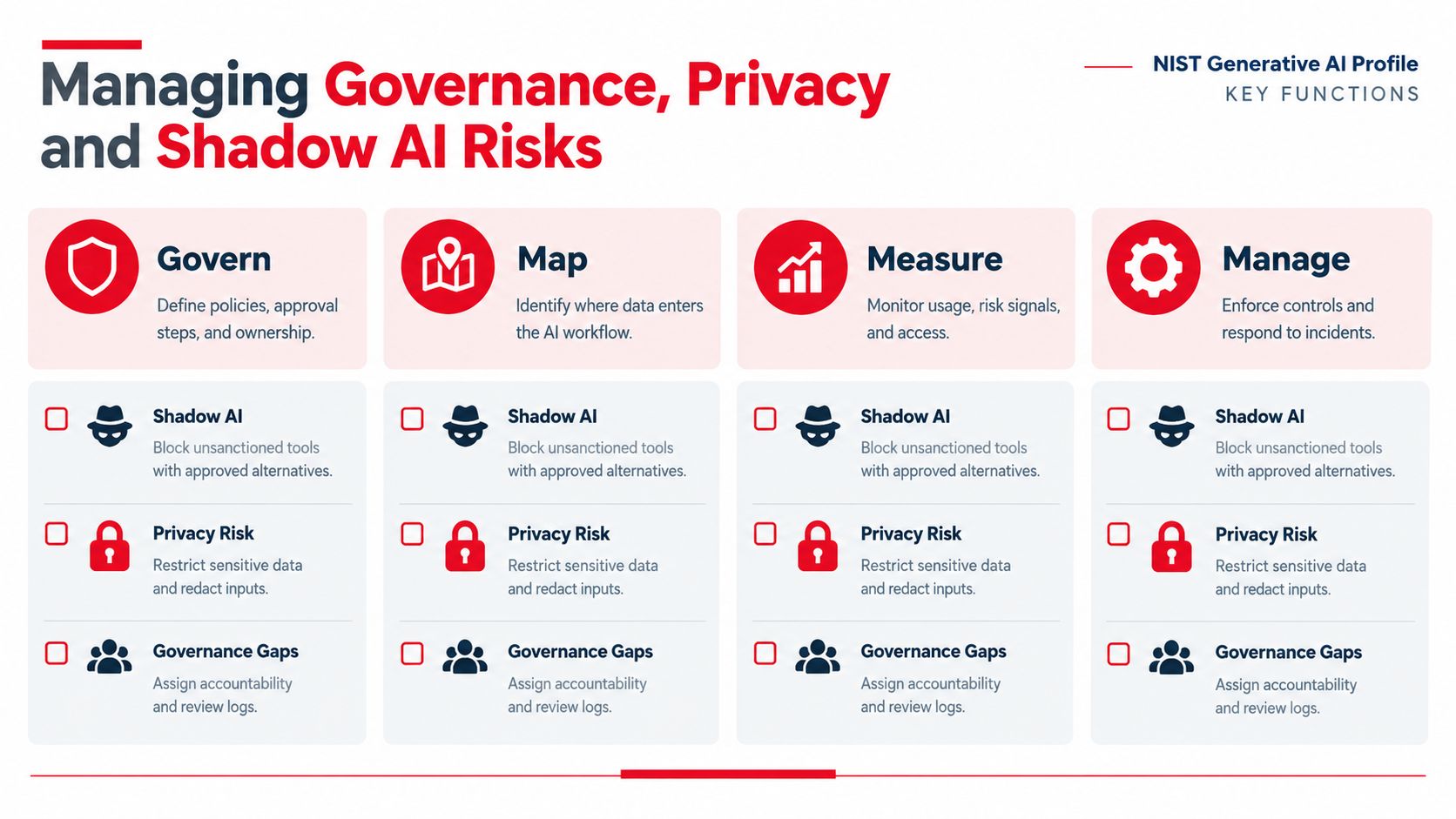
A branded workspace does not govern itself. Before selling one, decide who sets the client's AI rules, how employees follow them, and what the MSP does when something goes wrong. NIST's Generative AI Profile groups risk management into four functions: Govern, Map, Measure, and Manage. Use them as operating categories, not as a certification or a promise of compliance (NIST AI Risk Management Framework).
Govern and map the real workflow
Govern means naming decision-makers. The client should approve permitted uses and own its policy; the MSP should document the service controls it operates and how users report concerns. Give employees practical rules for deciding what information they can enter. A clause in the service agreement cannot make that decision for them.
Map means recording where AI enters work and what happens to the data. Track approved workspaces, model providers, business purposes, data categories, and accountable client owners. This inventory gives both parties a way to identify unsanctioned tools and gaps in policy.
Privacy risks include exposing sensitive information, using data without authorization, or disclosing it to the wrong party. NIST's Generative AI Profile recommends documenting data-handling practices, reviewing generated content for privacy risks, and preparing response procedures for possible exposure (NIST Generative AI Profile). Verify the provider's data-use and retention terms before making promises. Then define permitted inputs and who handles a suspected exposure.
Measure and manage the operating risks
Measure the signals available to the MSP and client, including workspace use, budget consumption, access, and reported policy exceptions. Manage those signals with specific actions: adjust access, review a workflow, update user guidance, or escalate an incident. Set a review cadence and assign an owner; an unreviewed dashboard is not governance.
| Risk | MSP-Owned Control |
|---|---|
| Shadow AI | Keep an inventory of approved workspaces and provide a sanctioned option employees can use. |
| Sensitive information in prompts | Define permitted data, train users on input rules, and document the escalation path. |
| Unbounded consumption | Set available team budgets and review usage with the client. |
| Unreviewed AI output | Assign a human reviewer when accuracy or context matters. |
| Moderation mistaken for compliance | State what moderation covers, what it cannot guarantee, and which policies remain the client's responsibility. |
Moderation is one control in a larger operating process. Review Prox.ia's AI prompt moderation capabilities to assess how they fit your service design, then document their limits alongside the client's policy and escalation procedures. Sell the controls you can demonstrate, not a blanket claim that the service is safe or compliant.
Evaluating Client Fit and Taking the Next Step
A white-label AI agreement is not proof that clients are ready to buy. A 2025 SMB survey found that 18% of businesses had no plans to use AI, with skills, relevance, and resources among the barriers (2025 SMB survey). Use a staged fit check instead of pitching every client the same workspace. The goal is to find a specific workflow the client can support and the MSP can operate profitably.
Test one workflow before expanding
Start with one client and one task employees can describe clearly. For example, test drafting an internal document from non-sensitive material, with a staff member reviewing the result before use. “Use AI more” is not a useful pilot goal.
Set the success criteria before the trial begins. Agree on what acceptable output looks like, who reviews it, which employees can access the workspace, and how users request help. Set a time limit and decide what the MSP and client will assess: workflow usefulness, staff adoption, operating effort, and whether the service warrants a recurring fee.
The point is service fit, not activity. A client who logs in regularly may still lack a workflow worth supporting. Continue only when the task delivers value and the MSP can provide the agreed support without unclear responsibilities or unpriced work.
Expand only after the first workflow earns it. Add teams or use cases when the client follows the review process, the data rules work in practice, and the service has a clear ongoing purpose.
Branding alone gives the client a labeled workspace. The MSP's offer needs a defined onboarding path, usage expectations, policy guidance, and a support model. Before signing, be ready to explain what the recurring service includes and what the client must own. If those terms are unclear, settle them before rollout.
As noted earlier, review the available workspace and budget controls, then confirm branding scope, deployment choices, and enablement terms with Veevoo for the specific service you plan to sell.
Veevoo, Inc. distributes and enables software offers for MSPs, including Prox.ia for building a branded, governed AI service around a client-facing workspace. Visit Veevoo, Inc. to discuss product fit and confirm the terms and capabilities relevant to your proposed offer.